On this page 11 sections
- How we chose these 24-port switches
- Comparison table
- Our Top Picks Reviewed
- 1. TP-Link TL-SG1024S 24 Port Gigabit Desktop/Rackmount Switch
- 2. TP-Link TL-SG1024DE 24 Port Gigabit Easy Smart Managed Switch
- 3. Tenda TEG1024D 24 Port Gigabit Rackmount Switch
- 4. TP-Link TL-SG1428PE 24 Port Gigabit PoE+ Easy Smart Switch
- 5. D-Link DGS-1024D 24-Port Gigabit Unmanaged Switch
- Buying guide: picking a 24-port switch that fits
- Final verdict
- FAQ
A 24-port gigabit switch is the backbone of most small offices, classrooms and fully wired homes. If you have a patch panel, a network closet or more than about fifteen wired devices, this is the size to look at.
It sits in a rack or on a shelf, takes one connection from your router, and gives a full-speed link to every desk, camera, access point, printer and NAS. A good one runs quietly for years without anyone thinking about it.
We went through the 24-port switches people actually buy on Amazon.com, matched every spec against the manufacturer's datasheet, and cut anything with slow ports or an unknown brand. Here is the short list.
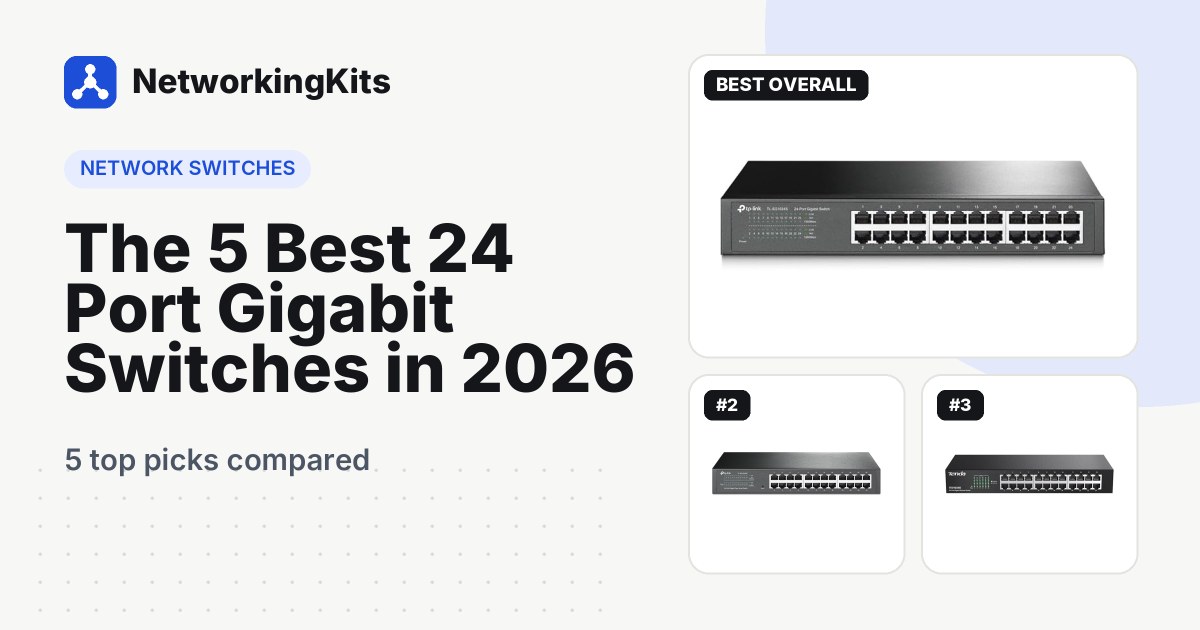
Quick answer: For most people, the TP-Link TL-SG1024S is the best 24-port gigabit switch. It is silent, plug and play and ships with rack ears. Want VLANs and port monitoring? Get the TP-Link TL-SG1024DE. Need to power cameras or access points? The TP-Link TL-SG1428PE has 24 PoE+ ports and a 250W budget.
Not sure you need this many ports? Our 16-port switch roundup covers smaller networks for less money.
How we chose these 24-port switches
Every pick has 24 Gigabit Ethernet ports for your devices. Beyond that, we weighed what matters when one box carries a whole building's traffic:
- Full speed on every port. Twenty-four gigabit ports need 48 Gbps of switching capacity to run flat out at the same time.
- Ready for a rack. At this size most switches end up in a rack or closet, so mounting options count.
- Noise. We flag which switches are fanless and which need fans.
- Real warranty terms. We checked each maker's US warranty policy, not just the listing.
- Long-term owner feedback. We read the praise and the complaints, especially about reliability.
Best 24 Port Gigabit Switches Compared (2026)
| Product | Type | PoE | Noise | Warranty | Score | |
|---|---|---|---|---|---|---|
 Best OverallTP-Link TL-SG1024S 24 Port Gigabit Desktop/Rackmount SwitchSmall offices and wired homes that need a simple backbone | Unmanaged, plug and play | None | Fanless, silent | 3 years | 9.2 | Check Price |
 Best ManagedTP-Link TL-SG1024DE 24 Port Gigabit Easy Smart Managed SwitchGrowing offices and home labs that want VLANs | Easy Smart managed | None | Fanless, silent | 3 years | 9.1 | Check Price |
 Best ProtectionTenda TEG1024D 24 Port Gigabit Rackmount SwitchRacks with outdoor runs or storm-prone areas | Unmanaged, plug and play | None | Fanless, silent | 3 years | 8.9 | Check Price |
 Best PoETP-Link TL-SG1428PE 24 Port Gigabit PoE+ Easy Smart Switch (250W)Camera systems, access points and office phones | Easy Smart managed PoE+ | 250W on 24 ports | Fans | 3 years | 8.8 | Check Price |
 Longest WarrantyD-Link DGS-1024D 24-Port Gigabit Unmanaged SwitchBuyers who want lifetime coverage and silent running | Unmanaged, plug and play | None | Fanless, silent | Limited lifetime (with registration) | 8.7 | Check Price |
Our Top Picks Reviewed
Here is a closer look at all 5 of our picks for the best 24 port gigabit switches: what each one does well, where it falls short and who it suits best, based on the specs and real buyer feedback.

TP-Link TL-SG1024S 24 Port Gigabit Desktop/Rackmount Switch
- Ports
- 24 x Gigabit RJ45
- Type
- Unmanaged, plug and play
- Extras
- 48 Gbps, 802.3x flow control, Green power saving
- Form factor
- Metal, fanless, 1U rack kit included
- PoE
- None
- Noise
- Fanless, silent
- Warranty
- 3 years
If you just need 24 fast ports and never want to think about them again, buy this one. The TP-Link TL-SG1024S has no settings, no fan and no learning curve. Plug in the power, run one cable to your router, and every device gets a full gigabit link.
Owners clearly agree, and well over 500 sell every month. Buyers keep praising how easily it slots in as a main switch, and several mention it as the cure for laggy Wi-Fi in a home office. The included rack hardware gets plenty of love too.

The build is simple and solid. A metal case spreads heat without a fan, so it stays silent on a desk or in a bedroom closet. At 11.6 by 7.1 by 1.7 inches, it fits a standard 1U rack slot, and rubber feet come in the box for shelf use. TP-Link rates it at 48 Gbps of switching capacity, enough for all 24 ports to run at full speed together. It also trims its own power draw when ports sit idle.
A small number of owners had a unit give up early. Keep the receipt, because the 3-year TP-Link warranty has you covered if that happens. And because it is unmanaged, there are no VLANs or port statistics. If you want those, the next pick is your switch.
What we like
- Silent fanless metal case
- Rack ears and rubber feet included
- True plug and play
- 48 Gbps switching, full speed on every port
Good to know
- No VLANs or port stats (the TL-SG1024DE adds them)
- Register it on day one so any claim is easy
- No PoE, so cameras need a PoE switch or injectors

TP-Link TL-SG1024DE 24 Port Gigabit Easy Smart Managed Switch
- Ports
- 24 x Gigabit RJ45
- Type
- Easy Smart managed
- Extras
- 32 VLANs, QoS, static LAG, mirroring, cable test
- Form factor
- Metal, fanless, desktop or rackmount
- PoE
- None
- Noise
- Fanless, silent
- Warranty
- 3 years
What happens when your network outgrows "just more ports"? Maybe the security cameras should not see the family laptops. Maybe a work PC needs priority on video calls. That is where the TL-SG1024DE earns its place.
It is an Easy Smart switch, which is TP-Link's way of saying managed but friendly. Out of the box it acts like a plain switch. When you are ready, a web page lets you set up to 32 VLANs, port and tag-based QoS, IGMP snooping for IPTV, static link aggregation and port mirroring. Cable diagnostics and loop prevention help when something goes wrong, and 10KB jumbo frames speed up big NAS transfers.

The recurring theme in owner feedback is value: people call it a fully programmable switch with enterprise-style features at a home-office price. They like the interface too, and one owner confirmed full-duplex gigabit speeds on every port.
A few things to know. Some buyers wanted IPv6 management features, which this model lacks. Connection complaints pop up now and then, and most trace back to a settings change. So tweak one thing at a time, and write down the switch's IP address first. Our walkthrough on creating your first VLAN makes that first login far less intimidating. Like the S model, it is fanless, metal and covered for 3 years.
What we like
- Up to 32 VLANs plus QoS and IGMP snooping
- Port mirroring and cable diagnostics
- Fanless and silent
- Works as a plain switch until you log in
Good to know
- No IPv6 management, which most homes will not miss
- Change one setting at a time to avoid lockouts
- No PoE (the TL-SG1428PE adds it)

Tenda TEG1024D 24 Port Gigabit Rackmount Switch
- Ports
- 24 x Gigabit RJ45
- Type
- Unmanaged, plug and play
- Extras
- 48 Gbps, 4 Mbit buffer, 6 kV lightning protection
- Form factor
- Steel rackmount, brackets included, fanless
- PoE
- None
- Noise
- Fanless, silent
- Warranty
- 3 years
Lightning does not have to hit your house to hurt your network. A nearby strike can push a surge down a long outdoor cable and take out the switch port at the other end. The Tenda TEG1024D is built with that risk in mind.
Every port and the power supply carry 6 kV lightning protection, which Tenda says reduces the risk from induced surges. That matters most if a cable leaves the building, say to a detached garage, a gate camera or a workshop. It does not replace a proper surge protector, but it is a welcome extra layer.

The rest of the spec sheet is strong for a plug-and-play switch. You get 48 Gbps of switching capacity, a 4 Mbit packet buffer, jumbo frame support and flow control to keep heavy transfers clean. The steel housing has no fan, so it runs silently, and rack brackets, screws and rubber feet come in the box.
Owner feedback is very good, with very few complaints. Buyers describe it as great value and rock solid at gigabit speeds.
Tenda is also a smaller name in the US, and stock can run thin, which is why it sits mid-pack. Coverage is 3 years, plus free lifetime technical support.
What we like
- 6 kV lightning protection on every port
- 48 Gbps switching, full speed on all ports
- Silent fanless steel case
- Rack brackets and feet included
Good to know
- Check stock before you plan an install around it
- Smaller US brand, so keep the receipt handy

TP-Link TL-SG1428PE 24 Port Gigabit PoE+ Easy Smart Switch (250W)
- Ports
- 24 x PoE+ RJ45, 2 x RJ45, 2 x SFP
- Type
- Easy Smart managed PoE+
- Extras
- 250W budget, 30W per port, PoE Auto Recovery
- Form factor
- Metal, 1U rack kit included, 2 fans
- PoE
- 250W on 24 ports
- Noise
- Fans
- Warranty
- 3 years
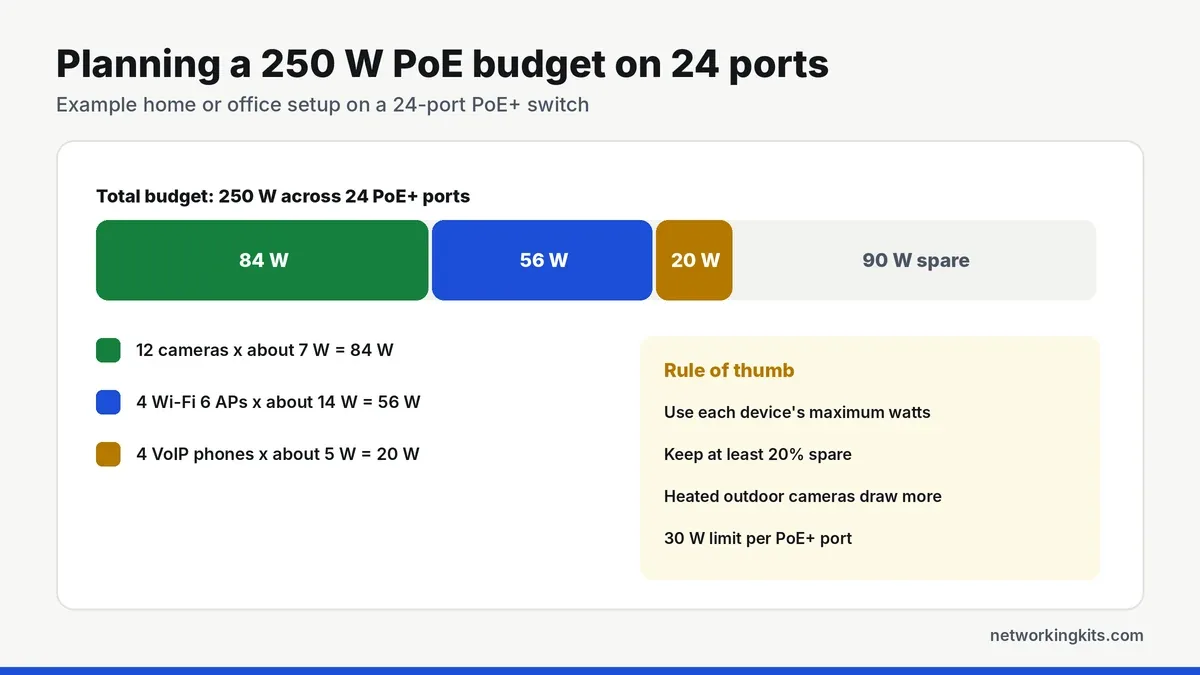
Twelve cameras under the eaves, four Wi-Fi access points on the ceilings and a handful of desk phones. None of them sit near a power outlet. One TP-Link TL-SG1428PE can run the lot over network cable alone.
All 24 main ports deliver PoE+ at up to 30 watts each, drawn from a 250W total budget. If you ever push past that limit, the switch cuts power to lower-priority ports first instead of starving everything. Two extra non-PoE gigabit ports and two SFP slots handle the uplink, so you never give up a PoE port for it.

The feature we would use most is PoE Auto Recovery. Once enabled, the switch notices when a camera or access point stops responding and power-cycles it for you. That beats climbing a ladder to unplug something. As an Easy Smart switch, it also handles up to 32 VLANs, QoS and IGMP snooping, so cameras can live on their own network.
Owners describe it as reliable and industrial in feel, easy to set up and steady at powering cameras. One owner runs it next to other TP-Link switches at home without a hitch.
Two notes before you buy. It uses two fans, and opinions on the noise range from barely there to too loud for an office, so a closet or rack room suits it best. Some buyers also felt it was more switch than they needed, so count your powered devices first. Our plain-English PoE explainer shows how. Warranty: 3 years.
What we like
- 24 PoE+ ports sharing a 250W budget
- PoE Auto Recovery reboots frozen devices
- 2 spare gigabit ports plus 2 SFP slots
- Rack kit included
Good to know
- Two fans, so a closet or rack suits it best
- Total your device watts before you buy
- More switch than you need for a few cameras

D-Link DGS-1024D 24-Port Gigabit Unmanaged Switch
- Ports
- 24 x Gigabit RJ45
- Type
- Unmanaged, plug and play
- Extras
- Storm control, port isolation, EEE, cable diagnostics
- Form factor
- Compact metal, fanless, desktop or rack
- PoE
- None
- Noise
- Fanless, silent
- Warranty
- Limited lifetime (with registration)
Most switches on this list are covered for 3 years. The D-Link DGS-1024D is covered for life. D-Link's US store lists a limited lifetime warranty once you register it. For a box that may sit in a closet for a decade, that counts for a lot.
It is cleverer than a typical unmanaged switch, too. A small DIP switch on the front toggles storm control, port isolation, flow control and Energy Efficient Ethernet, with no login needed. Storm control helps contain broadcast floods. Port isolation stops devices on different ports from talking to each other, which is handy for a guest area. It also has built-in cable diagnostics and powers down ports with no link.

The metal case is compact for a 24-port switch, at about 11 by 7.1 by 1.7 inches, and there is no fan. Owners describe it as dead quiet and cool running, easy to install and excellent overall.
So why fifth? Its reliability reports are a little more mixed than the TP-Link picks. Plenty of owners mention months of nonstop use without a restart, while a small share say theirs gave out within the first year. That is exactly where the lifetime coverage helps, so register it the day you install it.
What we like
- Limited lifetime warranty after registration
- Front DIP switch for storm control and port isolation
- Fanless, quiet and cool running
- Built-in cable diagnostics
Good to know
- Register it to activate the lifetime coverage
- A few early failures reported, so keep the receipt
- No VLANs or PoE
What we ruled out
Not everything that shows up in a search made our list. Here is what we left out and why, so you know what to avoid when you shop.
- Fast Ethernet (100 Mbps) switches. Some cheap 24-port switches still run their ports at 100 Mbps. They cost less, but they hold back every modern device you plug in.
- Multi-gig and 48-port models. They solve a different problem at a much higher price. Every pick here has 24 gigabit device ports.
- Unknown brands and unproven models. A switch at the center of the network needs a proven track record, so we stuck to established brands whose switches are consistently well reviewed by owners.
Buying guide: picking a 24-port switch that fits
At this size, the switch becomes the hub that everything else hangs off. Four questions decide which one you need: how many ports, how much control, how much power and where it will live.
Count before you buy
Walk the building and count every wall jack and wired device. Add one port for the uplink to your router, then a few spares for whatever arrives next year. A total of roughly 17 to 23 is the sweet spot for 24 ports. If you need more than 24, a second switch linked by one cable often costs less than a 48-port model.
Plain, smart or PoE?
An unmanaged switch like the TL-SG1024S, TEG1024D or DGS-1024D is pure plug and play. A smart switch like the TL-SG1024DE adds VLANs, QoS, port mirroring and link aggregation. A PoE switch like the TL-SG1428PE also sends power down the cable to cameras, access points and phones.
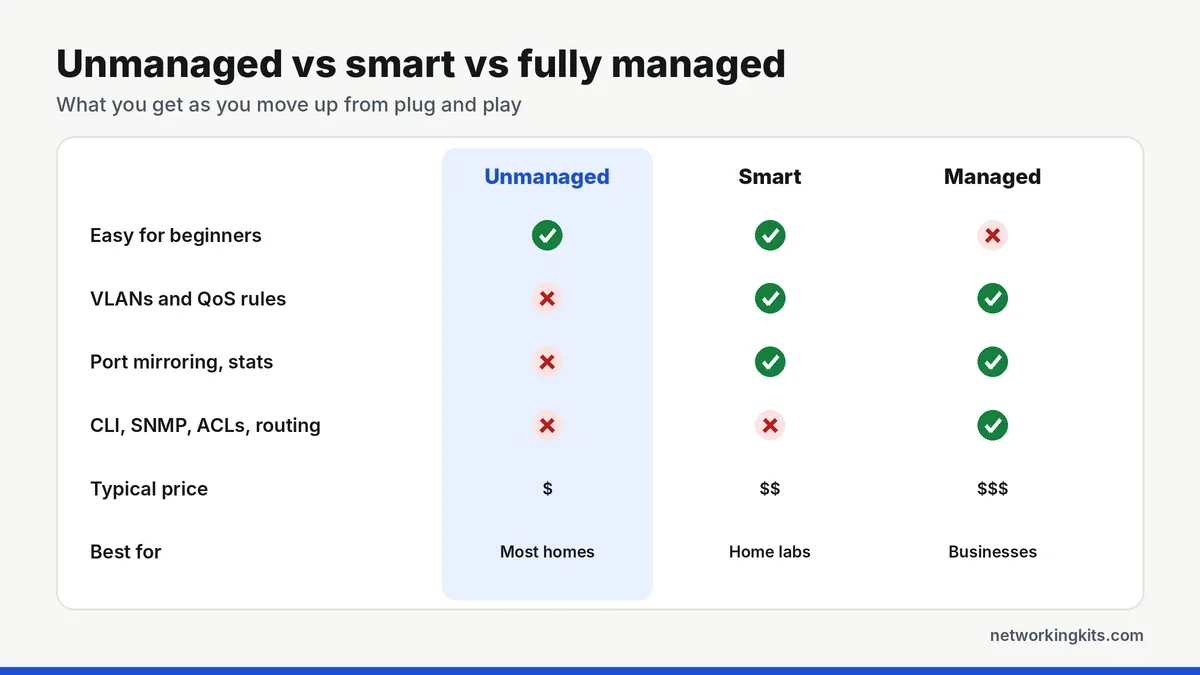
Smart features get more useful as the network grows, especially once cameras and guest devices show up. A VLAN keeps a cheap smart plug or a guest laptop away from your file server, and QoS keeps video calls smooth while someone else downloads a game. On the fence? Our guide to managed and unmanaged switches explains what each feature actually does.
Budget your PoE watts
With a PoE switch, the total power budget matters as much as the port count. List the maximum draw of every device, add them up, and keep at least 20 percent in reserve. One PoE+ port tops out at 30 watts, so a heated PTZ camera can take a big slice on its own.
Where it will live
Fanless switches are silent, so they are fine in a home office or hallway cabinet. PoE switches need fans to cool their bigger power supplies, so give them a closet, basement or rack room. Either way, leave a few inches of air around the vents and skip sealed cabinets. Heat is the quiet enemy of network gear, and a switch that runs cool tends to last longer.
Pair it with a patch panel
Twenty-four cables plugged straight into a switch gets messy fast. A patch panel above the switch solves that. Each in-wall cable terminates once at the panel, and short patch cords link the panel to the switch.
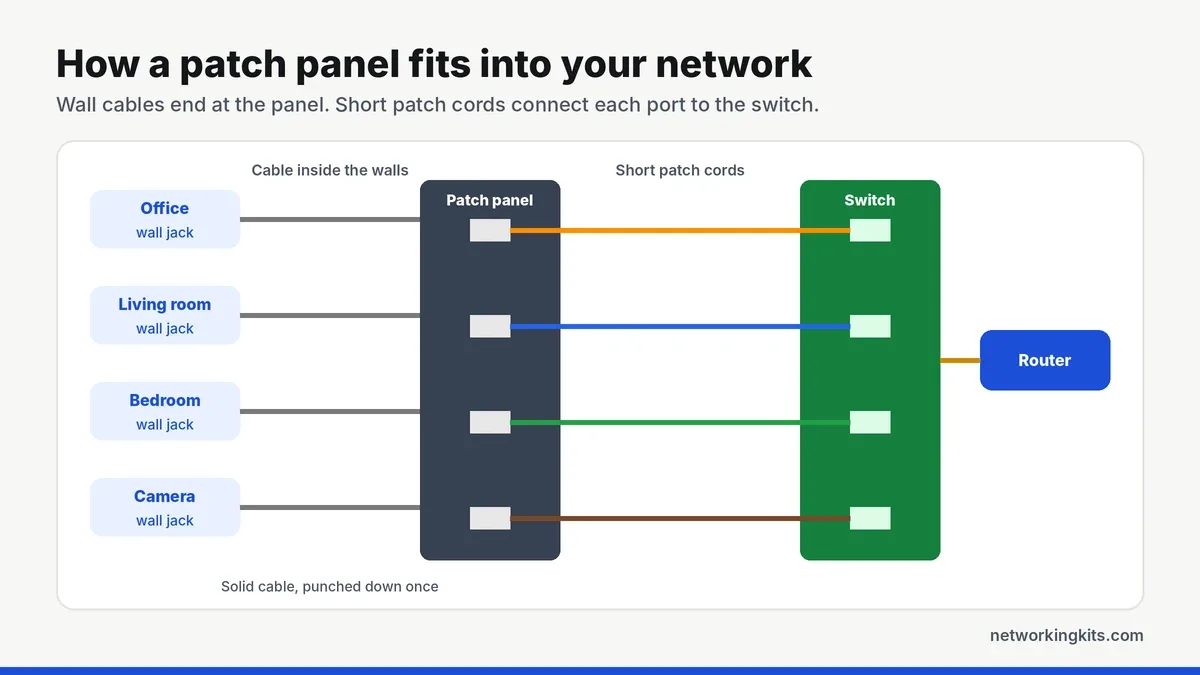
Our explainer on how patch panels work covers the basics, and our shortlist of Cat6 patch panels worth buying includes punch down and keystone options. You will also need a punch down tool, which comes in most of the complete cabling kits we compared.
Use short, color-coded patch cords between the panel and switch, such as blue for desks, yellow for cameras and red for access points. With twenty-four connections, colors make the rack easy to read at a glance.
Do you need SFP slots?
For most homes and small offices, no. A single gigabit copper uplink handles internet traffic with ease. SFP slots shine when you need fiber to another building or a switch more than 100 meters away. The TL-SG1428PE has two. If fiber is your main reason to shop, our picks for the best 26-port switches pair 24 gigabit ports with two SFP slots.
Read the warranty fine print
Warranty terms vary more than you might expect. TP-Link's US policy gives its metal-case, non-Omada switches 3 years for purchases since September 2023, which covers all three TP-Link picks here. Tenda lists 3 years plus free lifetime tech support. D-Link's US store lists a limited lifetime warranty on the DGS-1024D once you register it.
Whichever you buy, register it on install day and tape the receipt details inside the rack door. If a port ever dies, you will want that paperwork within reach, not buried in an old inbox.
Cabling and the uplink
Every device on the switch shares one uplink to the router. That is plenty for internet use. For heavy local traffic, keep the NAS and the computers that use it on the same switch, so big transfers never cross the uplink. Use solid copper cable for every in-wall run; our breakdown of Cat5e and Cat6 cable helps you choose. Then check each run with one of the Fluke testers on our list before you plug anything in.
Mistakes worth avoiding
Most switch headaches trace back to a handful of simple slips:
- Buying on price alone. Some bargain 24-port switches still run at 100 Mbps. Look for 10/100/1000 on every port.
- Undersizing PoE. Add up the watts before you choose, not after the cameras arrive.
- Creating a loop. Two cables between the same pair of switches can flood an unmanaged network. Use one, or set up link aggregation on a smart switch.
- Skipping labels. Number every cable at both ends before you terminate it.
First switch install? Our walkthrough on connecting a new network switch covers the basics step by step.
Final verdict
For most small offices and wired homes, the TP-Link TL-SG1024S is the best 24 port gigabit switch to buy. It is fanless, fits on a desk or in a standard rack, and needs no setup at all. That makes it a quiet, reliable backbone you can install in an afternoon and then forget about. Because every port runs at full gigabit speed at the same time, nobody in the office slows down when someone else starts a big backup or download.
If you think you will want VLANs or traffic monitoring later, the TP-Link TL-SG1024DE adds them for a small step up in price. Running cameras or office phones? The TP-Link TL-SG1428PE brings 250W of PoE+. Storm-prone area or outdoor cable runs? The Tenda TEG1024D adds 6 kV lightning protection on every port. And if you need a fiber link to another building, a 26-port model with SFP slots is worth a look.
Frequently Asked Questions
Is a 24-port switch good for home use?
Yes, if your home is fully wired with many wall jacks, cameras and access points. Fanless models like the TP-Link TL-SG1024S are silent. With fewer than about fifteen wired devices, a 16-port switch is usually enough.
Does a 24-port gigabit switch need a rack?
No. Most 24-port switches can sit on a shelf with rubber feet. A rack simply makes it easier to pair the switch with a patch panel and keep cables tidy.
Are 24-port switches noisy?
Most unmanaged and smart 24-port switches are fanless and silent. PoE models usually have fans to cool their power supplies, so they are better kept in a closet or rack room.
Do TP-Link switches have a lifetime warranty?
Not anymore in the US. For purchases since September 2023, TP-Link covers its metal-case switches outside the Omada line for 3 years. D-Link offers a limited lifetime warranty on the DGS-1024D once you register it.
How many cameras can a 24-port PoE switch power?
It depends on the power budget. A 250W switch like the TP-Link TL-SG1428PE can run around 24 typical cameras at about 7 watts each with room to spare. Heated or PTZ cameras draw more, so add up their maximum power first.
Tell us a little about your home or office network and we will point you in the right direction. We read every message.

We are network installers and home lab builders who have spent over a decade crimping, punching down and testing cable. Every guide is built from spec sheets, verified buyer feedback and real-world install experience.
How we research and score products →