On this page 8 sections
Ask ten people whether you need Cat5e or Cat6 and you will get ten confident answers. Some say Cat5e is outdated. Others say Cat6 is a waste of money. Both camps are partly right, which is why the question keeps coming up.
The truth is simpler than the arguments. For gigabit internet, both cables work. The real difference is headroom: how well the cable copes with noise today and with faster speeds later. Here is how they compare, and when the upgrade is worth it.
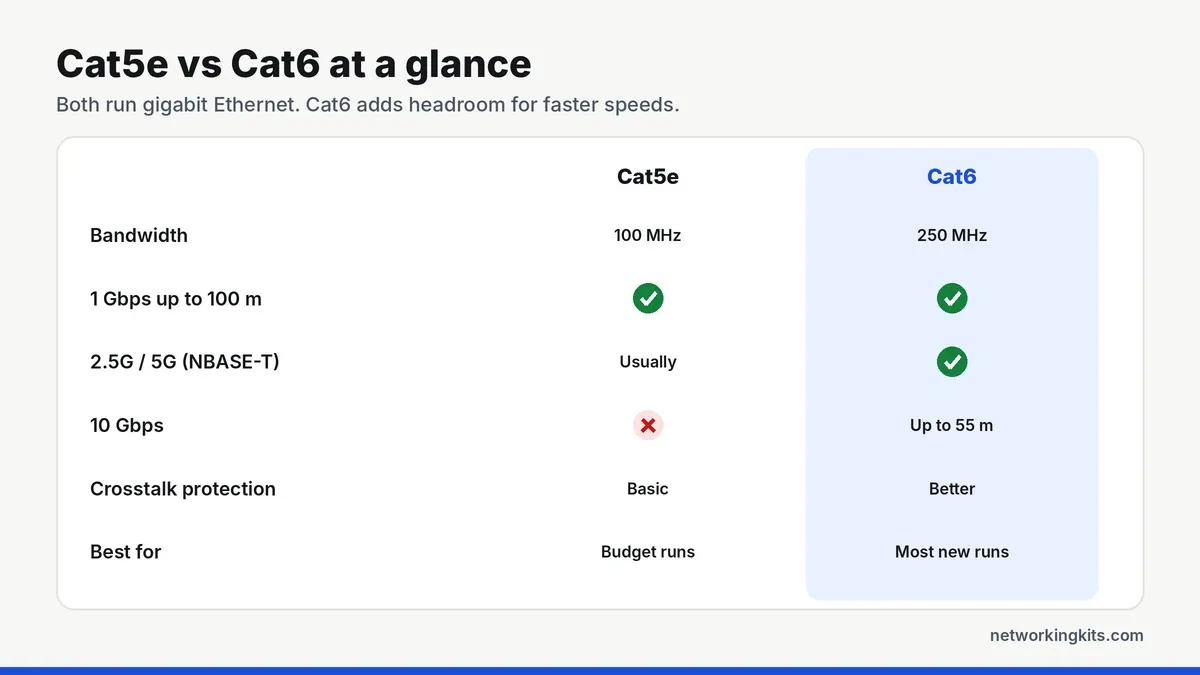
Cat5e vs Cat6 at a glance
Cat5e ("enhanced" Category 5) is rated for 100 MHz and was designed for Gigabit Ethernet. Cat6 is rated for 250 MHz, more than twice the bandwidth, and has stricter limits on crosstalk and signal loss. Both use four twisted pairs, the same RJ45 plug and the same 100 meter maximum length.
Speed: what each cable can really do
1 Gbps: Both cables run Gigabit Ethernet over the full 100 meters. If your internet plan and devices top out at 1 Gbps, which covers most homes, you will not see a speed difference.
2.5 and 5 Gbps: The newer NBASE-T standard (IEEE 802.3bz) was designed to run 2.5 Gbps and 5 Gbps over existing cable. Good Cat5e usually handles 2.5 Gbps over typical home distances, while Cat6 gives you more margin, especially for 5 Gbps or in bundles with other cables.
10 Gbps: Cat5e is not rated for 10 Gbps. Cat6 supports 10GBASE-T up to about 55 meters, and Cat6a takes it to 100 meters. Our guide to Cat6A cable and 10 Gbps covers that upgrade in detail.
What is different inside the cable?
The extra bandwidth comes from construction. Cat6 pairs are twisted more tightly, the copper is often slightly thicker, and many Cat6 cables include a plastic spline that keeps the four pairs physically apart. Less contact between pairs means less crosstalk, so the signal stays clean at higher frequencies.
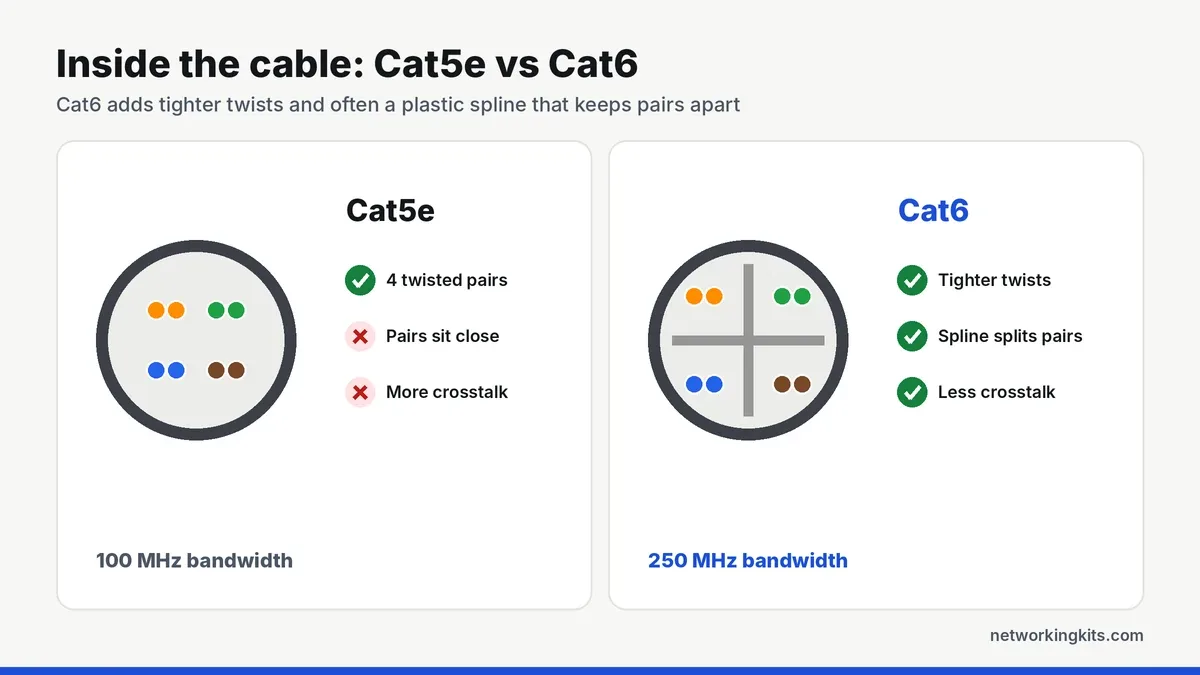
That spline is also why Cat6 is a little thicker and stiffer than Cat5e. It is not a big deal for patch cables, but it matters if you are fishing many runs through tight walls, or crimping your own plugs, since Cat6 conductors can be a tighter fit in a standard RJ45 connector.
Does Cat6 help gaming or streaming?
Not directly. A gaming console or a 4K streamer uses a tiny fraction of a gigabit, and both cables deliver the same latency. What really lowers lag is using any wired connection instead of Wi-Fi. If ping is your problem, our guide to lowering ping for gaming covers the fixes that actually make a difference.
Where Cat6 does help is reliability in noisy spots, such as a cable running next to power cords behind an entertainment center. Its better crosstalk performance gives you a bit more margin before errors creep in.
Solid vs stranded: the other choice that matters
Both Cat5e and Cat6 come in two styles. Solid cable uses one thick copper wire per conductor. It carries signal a little better over long distances and is the right choice for runs inside walls that end in keystone jacks or a patch panel. Stranded cable uses many thin wires twisted together, so it is more flexible and survives being bent and moved, which makes it ideal for patch cables between a wall plate and your devices.
Buy solid cable for permanent runs and stranded cable for anything you plug and unplug. And whichever category you choose, make sure it is pure copper rather than copper-clad aluminum, which is the most common way cheap cables cut corners.
Price and when to upgrade
Today the price gap between Cat5e and Cat6 patch cables is small, often just a dollar or two, so for new cables Cat6 is the easy choice. For bulk cable inside walls the gap is bigger, but labor is usually the real cost of an installation, so most installers now default to Cat6 or Cat6a for new runs.
Keep your Cat5e if it is already in the walls, tests clean and your speeds are 1 Gbps. Replacing it will not make your internet faster. Buy Cat6 for any new patch cable or new run, especially if you might upgrade to multi-gig internet or a faster network card later. Our guide to cables for PlayStation gaming includes great Cat6 options, and they work for any device.
Not sure what is in your walls? The category is printed on the cable jacket every few feet, such as "CAT5E" or "CAT6". You can also check a run with a cable tester, and a qualification tester can tell you whether it will handle 2.5G or 10G.
Bottom line
For any new patch cable, buy Cat6. It costs about the same and gives you headroom for faster speeds later. If Cat5e is already in your walls and it tests clean, keep it, because at gigabit speeds you will not notice a difference.
Frequently Asked Questions
Is Cat6 faster than Cat5e?
For 1 Gbps connections, no. Both run gigabit at the same speed. Cat6 has more bandwidth, so it supports 10 Gbps on runs up to about 55 meters and handles 2.5G and 5G with more margin.
Can I mix Cat5e and Cat6 cables?
Yes. They use the same connectors and work together. The connection will simply perform at the level of the lowest-rated part of the link.
Is Cat5e still good enough in 2026?
For gigabit internet and most home use, yes. Cat5e is only a limit if you want 10 Gbps or a long multi-gig run, in which case Cat6 or Cat6a is the better buy.
Should I replace Cat5e in my walls with Cat6?
Usually not. If your existing Cat5e tests clean and runs at 1 Gbps, replacing it will not speed up your internet. Upgrade only if you need 10 Gbps or the cable is damaged.

We are network installers and home lab builders who have spent over a decade crimping, punching down and testing cable. Every guide is built from spec sheets, verified buyer feedback and real-world install experience.
How we research and score products →