On this page 9 sections
A security camera on the outside wall. A Wi-Fi access point on the ceiling. A doorbell by the front door. None of them sit next to an outlet, and running a power cable to each one is expensive and ugly.
Power over Ethernet solves that by sending power and data down the same network cable. It is how most business cameras, access points and desk phones are installed, and it is just as useful at home. Here is how PoE works, what the different standards mean and how to plan your power budget.
What is PoE?
Power over Ethernet (PoE) is a set of IEEE standards that let a network cable carry DC power alongside data. A PoE switch or injector, called the power sourcing equipment (PSE), sends power to a powered device (PD), such as a camera or access point. One cable runs from the switch to the device, and that is the only cable the device needs.
Standard PoE is "active", which means the switch first checks that the device on the other end actually supports PoE before sending any power. That handshake is what makes it safe to plug a laptop or a regular PC into a PoE port: it simply gets data, no power.
The PoE standards explained
There are four main types, each delivering more power than the last. The power at the switch is always higher than what reaches the device, because some is lost as heat in the cable.
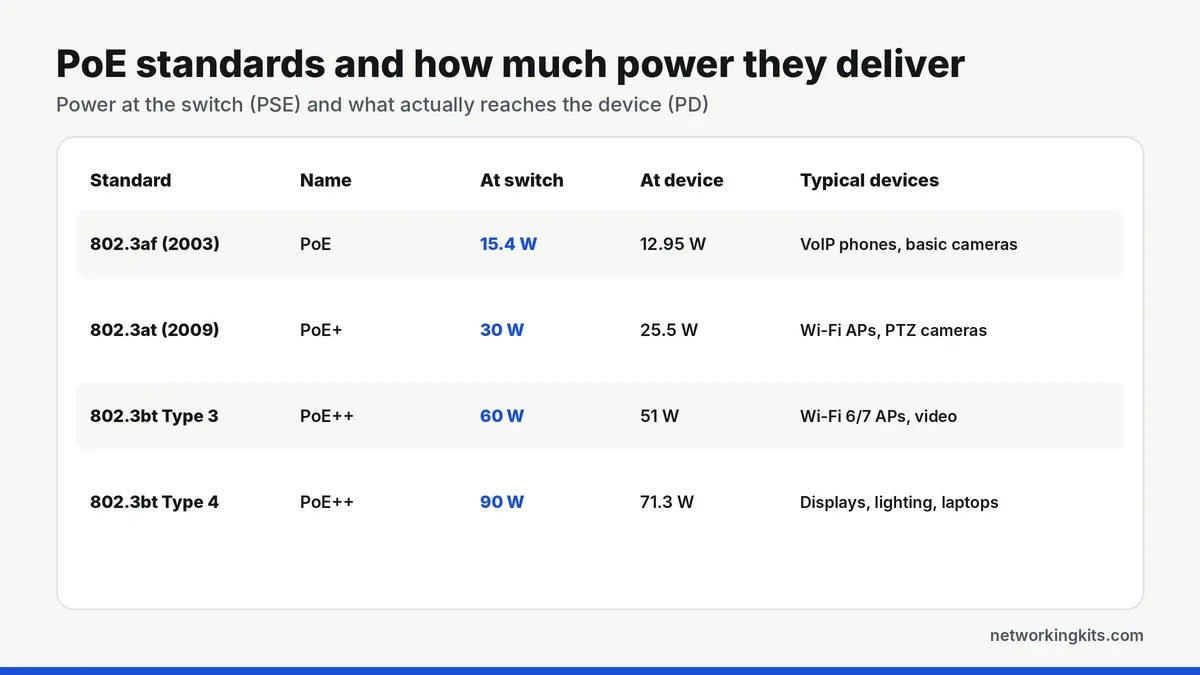
- 802.3af (PoE, Type 1): up to 15.4 W per port, with 12.95 W guaranteed at the device. Enough for VoIP phones and basic cameras.
- 802.3at (PoE+, Type 2): up to 30 W per port and 25.5 W at the device. The most common standard on home and small office switches.
- 802.3bt Type 3: up to 60 W per port, about 51 W at the device, using all four pairs. Used by Wi-Fi 6E and Wi-Fi 7 access points and PTZ cameras.
- 802.3bt Type 4: up to 90 W per port, about 71 W at the device, for displays, lighting and some laptops.
The standards are backward compatible. A PoE+ switch happily powers an 802.3af camera, and a device that needs PoE+ will usually run at reduced performance, or not at all, on an older 802.3af port.
Active vs passive PoE
Some cheaper gear, especially older outdoor radios, uses "passive" PoE, typically at 24 V or 48 V. Passive PoE skips the handshake and sends power all the time. It works with matching devices, but it can damage equipment that does not expect it. If a device says "24V passive", use the injector it came with, and do not plug it into a standard PoE switch port expecting it to work.
How to plan a PoE power budget
Every PoE switch has two limits: the maximum per port, and the total budget shared across all ports. A 4-port PoE+ switch might offer 30 W per port but only 65 W in total, so four 30 W devices running at full load would exceed it.
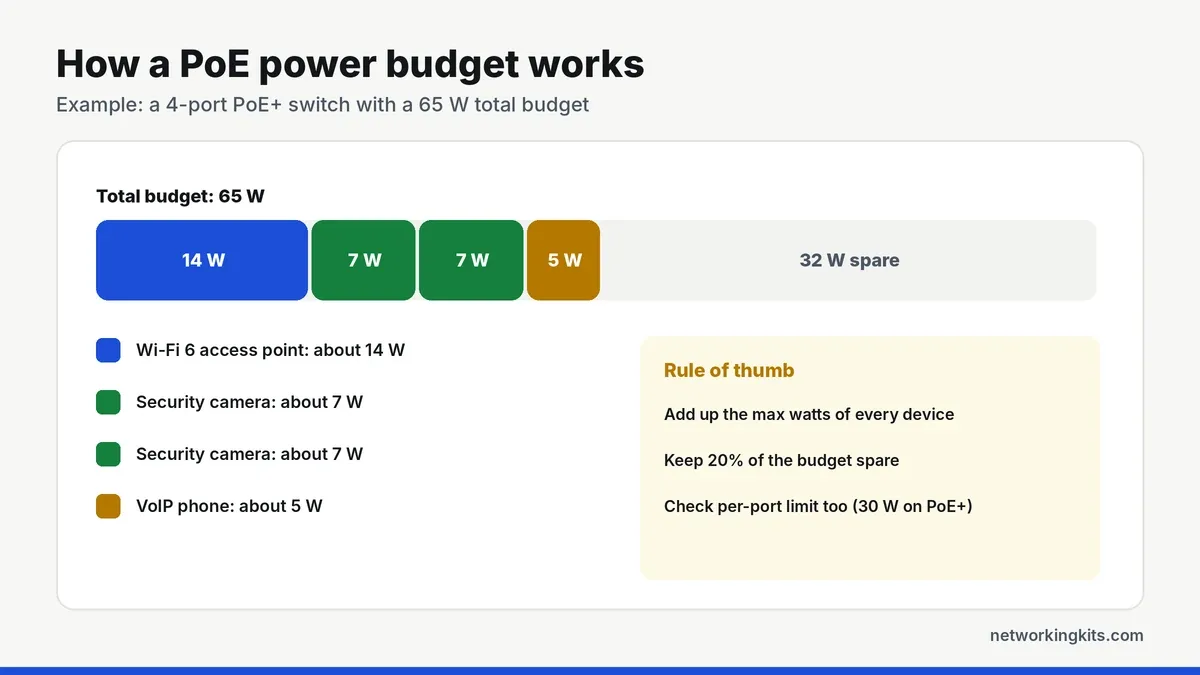
To size it, look up the maximum power each device draws, add them together and leave about 20 percent headroom. Cameras with night vision infrared and heaters draw more at night or in cold weather, so use their maximum figure, not the typical one.
Do you need special cable for PoE?
No. PoE works over standard Cat5e, Cat6 and Cat6a, up to the normal 100 meter limit. Thicker, pure copper cable handles heat better, which matters most for high-power devices built on the IEEE 802.3bt PoE standard and for big bundles. Avoid copper-clad aluminum cable, which runs hotter and can fail under PoE loads. Our guide to which Ethernet cable category to buy covers the differences.
Common PoE devices at home
The most popular uses are security cameras, video doorbells, Wi-Fi access points and mesh nodes with PoE input, VoIP desk phones and small devices like a Raspberry Pi with a PoE HAT. A single cable to each device also makes it easy to reboot a stuck camera remotely, since a managed PoE switch can turn the port off and on again.
PoE switch or PoE injector?
If you only need to power one device, a single-port PoE injector between your normal switch and the device is the cheapest option. For two or more devices, a PoE switch is tidier and easier to manage. The TP-Link TL-SG1005P in our guide to compact Ethernet switches offers four PoE+ ports with a 65 W budget, which is ideal for a few cameras or access points.
When you install PoE cable runs, test them before mounting the devices. Many cable testers, including some in our picks for a network cable tester, can also detect PoE and show which pairs carry power.
Bottom line
PoE sends power and data over one Ethernet cable, which makes cameras, access points and doorbells much easier to install. Check which PoE standard your device needs, add up the watts against the switch budget, and you can skip a power outlet at every device.
Frequently Asked Questions
Is PoE safe for devices that do not support it?
Standard PoE (802.3af, at and bt) is safe. The switch checks for a PoE device before sending power, so a laptop or PC on a PoE port only receives data. Passive PoE does not do this check and can damage devices.
How far can PoE run?
Up to 100 meters (328 feet), the same as normal Ethernet. For longer distances, you can use a PoE extender or a switch closer to the device.
Does PoE slow down network speed?
No. Power and data travel together without affecting each other, so a gigabit PoE port runs at full gigabit speed.
What is the difference between PoE and PoE+?
PoE (802.3af) delivers up to 15.4 W per port, and PoE+ (802.3at) delivers up to 30 W. PoE+ is backward compatible and is the better choice for access points and cameras with heaters or motors.

We are network installers and home lab builders who have spent over a decade crimping, punching down and testing cable. Every guide is built from spec sheets, verified buyer feedback and real-world install experience.
How we research and score products →