On this page 11 sections
- What we looked for
- Comparison table
- Our Top Picks Reviewed
- 1. TRENDnet 24-Port Cat6 Unshielded Patch Panel, TC-P24C6
- 2. Cable Matters 1U 24 Port Keystone Patch Panel with Cable Management
- 3. Cable Matters 10Gbps 1U 24-Port Cat6A Ethernet Patch Panel
- 4. Monoprice 24-Port Cat6 Patch Panel, 110 Type
- 5. TRENDnet 8-Port Cat6A Shielded Patch Panel, TC-P08C6AS
- Buying guide: choosing the right patch panel
- Final verdict
- FAQ
Future you will thank present you for buying a patch panel. Two years from now, the printer moves, a camera needs a new port, or one connection starts acting up. With a panel, the fix takes a short patch cord and half a minute. Without one, you are wrestling a nest of stiff in-wall cable.
A patch panel is the permanent end point for every cable in your walls. Each run is punched down or snapped in once, gets its own numbered port, and then stays put. Everything that changes happens on the front, with flexible patch cords that cost a few dollars.
We researched the best-selling Ethernet patch panels on Amazon.com, checked category ratings and warranty terms with each manufacturer, and set aside anything from brands without a networking background. Then we read what home installers and IT pros report after real installs. These are the five worth your rack space.
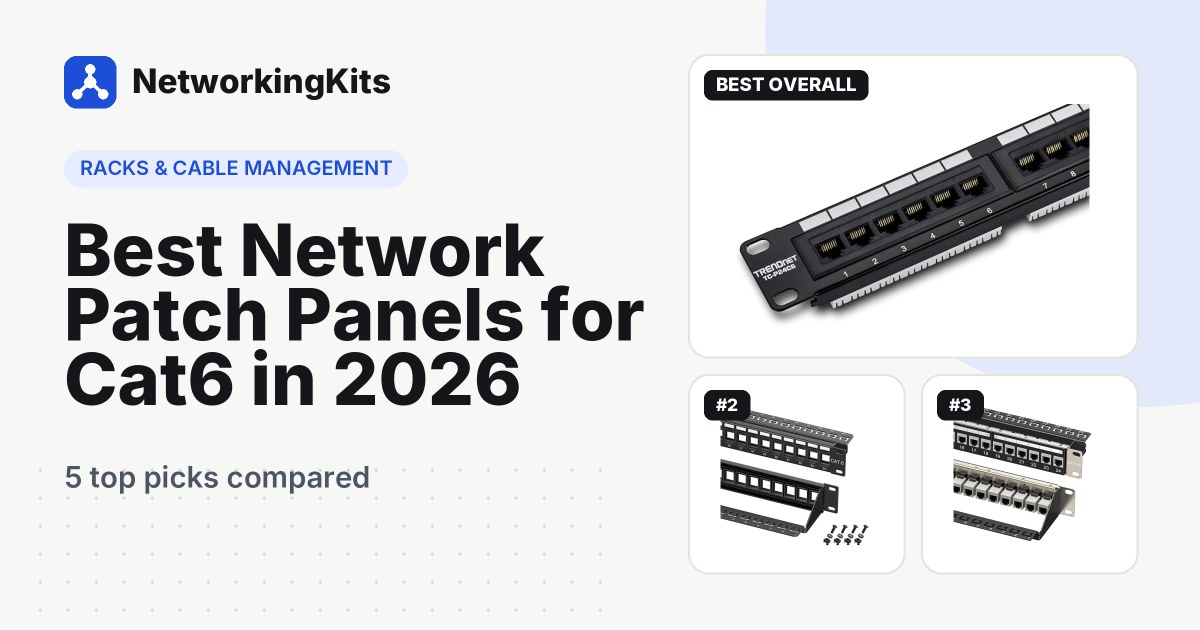
Quick answer: For most people, the TRENDnet TC-P24C6 is the best network patch panel. It is a 24-port Cat6 punch down panel that owners consistently praise, with clear wiring labels and a 3-year warranty. Prefer snap-in jacks? The Cable Matters 24-port keystone panel is the most flexible choice. Want 10 Gbps with no punching at all? Go for the Cable Matters Cat6A panel.
Still deciding whether you need one? Our beginner's guide to patch panels for home networks explains when it pays off.
What we looked for
We stuck to 19-inch rackmount and wall-mount Ethernet panels, and judged them on what decides whether an install goes smoothly:
- Termination style. Punch down panels cost the least per port. Keystone panels let you swap or mix jacks. Coupler panels need no punching at all.
- Category rating. The panel has to match your cable: Cat6 for gigabit, Cat6A for 10 Gbps at full distance.
- Strain relief and labels. A rear support bar and clear numbering keep terminations secure and ports easy to trace.
- Owner feedback. We read the complaints as well as the praise, especially about loose ports and fit.
Best Network Patch Panels for Cat6 Compared (2026)
| Product | Ports | Category | Mounting | Warranty | Score | |
|---|---|---|---|---|---|---|
 | 24, punch down (110 IDC) | Cat6 unshielded, 250 MHz | 19-inch rack, 1U | 3 years | 9.3 | Check Price |
 Best Keystone PanelCable Matters 1U 24 Port Keystone Patch Panel with Cable ManagementMixing Cat6, Cat6A, coax and HDMI keystones | 24, blank keystone | Depends on jacks used | 19-inch rack or wall, 1U | Lifetime | 9.1 | Check Price |
 Best for 10GCable Matters 10Gbps 1U 24-Port Cat6A Ethernet Patch Panel10 Gbps networks and installs with no punching | 24, Cat6A shielded couplers | Cat6A STP, 10 Gbps | 19-inch rack or wall, 1U | Lifetime | 8.9 | Check Price |
 Best ValueMonoprice 24-Port Cat6 Patch Panel, 110 TypeA simple Cat6 punch down panel from a familiar brand | 24, punch down (110) | Cat6 | 19-inch rack, 1U | 1 year | 8.6 | Check Price |
 Best Small PanelTRENDnet 8-Port Cat6A Shielded Patch Panel, TC-P08C6ASWall-mount boxes, closets and small home offices | 8, shielded punch down (110 IDC) | Cat6A shielded, 10G ready | Wall mount, 0.5U | 3 years | 8.5 | Check Price |
Our Top Picks Reviewed
Here is a closer look at all 5 of our picks for the best network patch panels for Cat6: what each one does well, where it falls short and who it suits best, based on the specs and real buyer feedback.

TRENDnet 24-Port Cat6 Unshielded Patch Panel, TC-P24C6
- Ports
- 24, punch down (110 IDC)
- Category
- Cat6 unshielded, 250 MHz
- Mounting
- 19-inch rack, 1U
- Wiring
- T568A and T568B labels
- Warranty
- 3 years
This is the panel we would hand to a friend wiring their first rack. The TRENDnet TC-P24C6 is a 24-port Cat6 unshielded punch down panel in a standard 1U, 19-inch frame, and it does the basic job with almost no drama.
Each port uses 110-style IDC blocks on the back, so any 110 or Krone tool works. TRENDnet certifies it for Cat6 at 250 MHz, which covers gigabit networks with room to spare. Every block carries a color-coded T568A and T568B diagram, and all 24 ports come pre-numbered. No cheat sheet taped to the wall required.

TRENDnet designed it alongside its own TC-PDT, our top pick among the punch down tools we compared, though any decent 110 tool will do.
Owner feedback is about as good as it gets for a patch panel. People mention easy terminations, a secure fit in the rack and solid build quality. One buyer singled out that wiring diagram as the reason the job went smoothly.
The one recurring complaint is a cable that does not stay put behind the panel. A support bar or a few hook-and-loop ties fixes that, and it is good practice on any panel. TRENDnet covers the current version with a 3-year limited warranty, and it is NDAA compliant for government installs.
What we like
- Color-coded T568A/B diagram on every port
- Pre-numbered ports in a standard 1U size
- Works with 110 or Krone tools
- 3-year limited warranty
Good to know
- Fixed ports, so test each run as you go
- Add a support bar or ties behind it
- Needs a 110 punch down tool

Cable Matters 1U 24 Port Keystone Patch Panel with Cable Management
- Ports
- 24, blank keystone
- Category
- Depends on jacks used
- Mounting
- 19-inch rack or wall, 1U
- Wiring
- Any keystone jack
- Warranty
- Lifetime
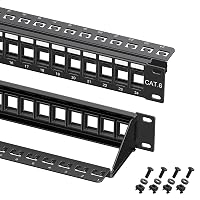
What if you want Cat6 for the desks, Cat6A for the NAS and a coax jack for the TV, all in one panel? A blank keystone panel makes that easy, and the Cable Matters 24-port is the one buyers pick most often.
It is an empty frame rather than a panel with built-in ports. You terminate each cable into a keystone jack, then snap the jack into place. That extra step pays off later. A damaged port takes seconds to replace, and you can mix Cat6, Cat6A, HDMI, fiber and voice keystones freely. Our guide to the different keystone jack styles helps you decide what goes in.

That removable bar on the back is the standout feature. It has sequential port labels and 24 C-shaped keyholes for zip ties, so every cable is supported right behind its jack. The frame is powder-coated steel in a 1U, 19-inch size, with stamped port numbers and writable label strips. It can also go on a wall with a bracket.
With over 1,000 sold each month, it is the most popular panel on this list. Buyers say it fits standard rack spacing perfectly, accepts a wide range of keystone brands and instantly tidies a messy closet. Cable Matters lists a lifetime warranty.
Just remember that the jacks are not in the box. Budget for them, plus a punch down tool if you choose punch down keystones.
What we like
- Swap or mix individual jacks
- Removable rear support bar with tie points
- Powder-coated steel frame with stamped port numbers
- Lifetime warranty
Good to know
- Keystone jacks are sold separately
- One extra step per port, but easier repairs later
- Category depends on the jacks you choose

Cable Matters 10Gbps 1U 24-Port Cat6A Ethernet Patch Panel
- Ports
- 24, Cat6A shielded couplers
- Category
- Cat6A STP, 10 Gbps
- Mounting
- 19-inch rack or wall, 1U
- Wiring
- Plug-in, no termination
- Warranty
- Lifetime
Not everyone wants to learn punch down technique. Maybe your cables already have RJ45 plugs, or you would simply rather crimp than punch. The Cable Matters 10Gbps Cat6A panel is built for exactly that.
It ships loaded with 24 shielded Cat6A couplers. Each port has a socket on the back for the in-wall cable and one on the front for the patch cord, so installing a run takes two clicks. Cable Matters rates it for 10 Gbps and says it fully supports PoE, PoE+ and PoE++. Each port is individually shielded against interference.

Because the couplers sit in standard keystone openings, you can swap any of them for a punch down jack later. The rear management bar has C-shaped keyholes and sequential labels. Rack screws, cable ties and reusable hook-and-loop straps come in the box.
Owners are very positive. They call it well built, easy to install and good value, and several mention how clean it looks in a rack. Cable Matters lists a lifetime warranty.
One owner found the tolerances tight when inserting RJ45 plugs, so push firmly and straight. Also keep in mind that every in-wall cable needs a plug on the end, which means a crimper instead of a punch tool. For 10 Gbps runs close to 100 meters, pair it with Cat6A cable. Our Cat6 vs Cat6A comparison explains why.
What we like
- Ready for 10 Gbps
- No punching, just plug in
- Individually shielded ports
- Lifetime warranty
Good to know
- In-wall cables need RJ45 plugs, so bring a crimper
- Plugs fit snugly, so insert them straight
- Full 10 Gbps distance needs Cat6A cable

Monoprice 24-Port Cat6 Patch Panel, 110 Type
- Ports
- 24, punch down (110)
- Category
- Cat6
- Mounting
- 19-inch rack, 1U
- Wiring
- T568A and T568B
- Warranty
- 1 year
Sometimes you just want a plain, honest punch down panel from a brand you already buy cables from. That is the Monoprice 24-port Cat6, and it does not pretend to be anything fancier.
It is a 1U, 19-inch panel with 110-type terminations on the back and 24 numbered ports on the front. It works with both T568A and T568B wiring and is UL listed. The black steel face has white blanks for labeling each port, and a color-coded diagram on the back shows where each conductor lands. Terminate it with any 110 punch down tool.

Buyers describe it as easy to install, well built and good value, and one confirms every port runs at full gigabit speed.
Connection reports are a little mixed. Most owners get reliable ports, while a few ended up with a weak one. That is usually a termination issue rather than a faulty panel, so test each run as you go and re-punch anything that fails.
Monoprice covers non-cable products like this panel for one year from delivery. That is shorter than TRENDnet's 3 years, which is the main reason our top pick edges it out.
What we like
- UL listed steel panel
- Color-coded wiring diagram
- White blanks for labeling
- Well-known networking brand
Good to know
- Test each port as you terminate it
- 1-year warranty, shorter than TRENDnet's
- Fixed ports cannot be swapped

TRENDnet 8-Port Cat6A Shielded Patch Panel, TC-P08C6AS
- Ports
- 8, shielded punch down (110 IDC)
- Category
- Cat6A shielded, 10G ready
- Mounting
- Wall mount, 0.5U
- Wiring
- T568A and T568B labels
- Warranty
- 3 years
The smallest panel on this list is also the most capable on paper. The TRENDnet TC-P08C6AS packs 8 shielded Cat6A ports into a compact metal housing that mounts straight onto a wall. No rack required.
That makes it a natural fit for a closet, a home office or a media box next to the router. It is 10G ready, accepts Cat5e, Cat6 and Cat6A cable, and takes 22 to 26 AWG solid or stranded wire. Terminations use 110 IDC blocks, so you will still need a punch down tool. Color-coded T568A and T568B labels sit by every block, and an integrated cover plate keeps cables separated.

The shielding is the headline. A metal housing and 50-micron gold-plated contacts help cut interference and crosstalk, which is useful where data cable shares a wall with power lines. To get that benefit, though, you need shielded cable and a proper ground. With ordinary UTP cable, an unshielded panel does the same job.
Owners like the solid metal frame, the easy install and how firmly cables anchor to it. The handful of complaints mostly involve a single port, so test each run before you close the box.
It comes with a 3-year TRENDnet warranty. Eight ports fill up faster than you think, so count your runs first and leave a spare or two.
What we like
- Wall mounts with no rack needed
- 10G ready shielded Cat6A ports
- Takes 22 to 26 AWG solid or stranded wire
- 3-year warranty
Good to know
- 8 ports, so count your runs first
- Shielding needs shielded cable and a ground
- Test each port before closing the box
What we ruled out
Not everything that shows up in a search made our list. Here is what we left out and why, so you know what to avoid when you shop.
- Unknown brands and panels without a solid track record. Patch panels look alike in photos, but frame and contact quality vary. We stuck to established networking brands with a solid owner record.
- Cat5e-only panels. They work for gigabit, but most people now install Cat6 cable, and the panel should match it.
- Fiber, coax and phone-only panels. They do different jobs. Every pick here is an Ethernet panel for twisted pair network cable.
Buying guide: choosing the right patch panel
A patch panel has no chips, no power and no settings. Even so, the wrong one can mean redoing the slowest part of the job. These are the decisions to make before you order.
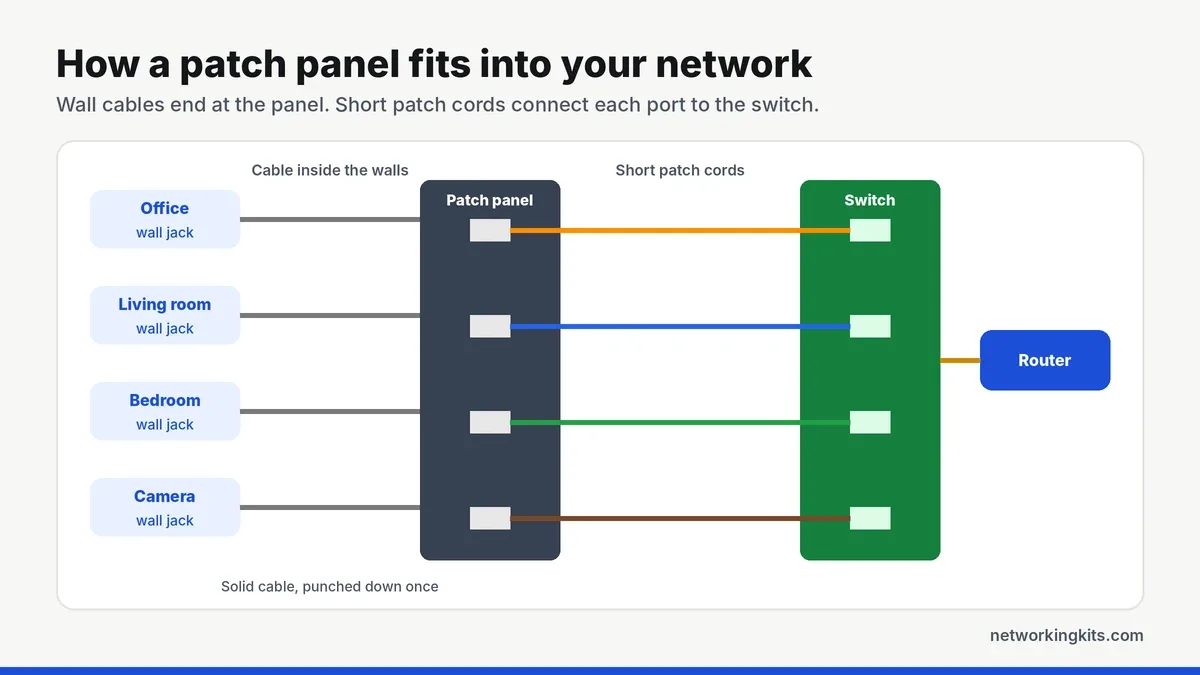
How a patch panel fits in
Each in-wall cable runs from a wall jack to the back of the panel, where it is terminated for good. Short patch cords then connect the front ports to your switch. The panel does not move data on its own. It simply organizes the wiring and protects the solid in-wall cable from constant handling.
Punch down, keystone or coupler?
This is the big one. A punch down panel, like the TRENDnet TC-P24C6 or the Monoprice, has fixed ports with 110-style blocks on the back. It is the cheapest per port and makes very secure connections. The trade-off is that one damaged port cannot be swapped on its own.
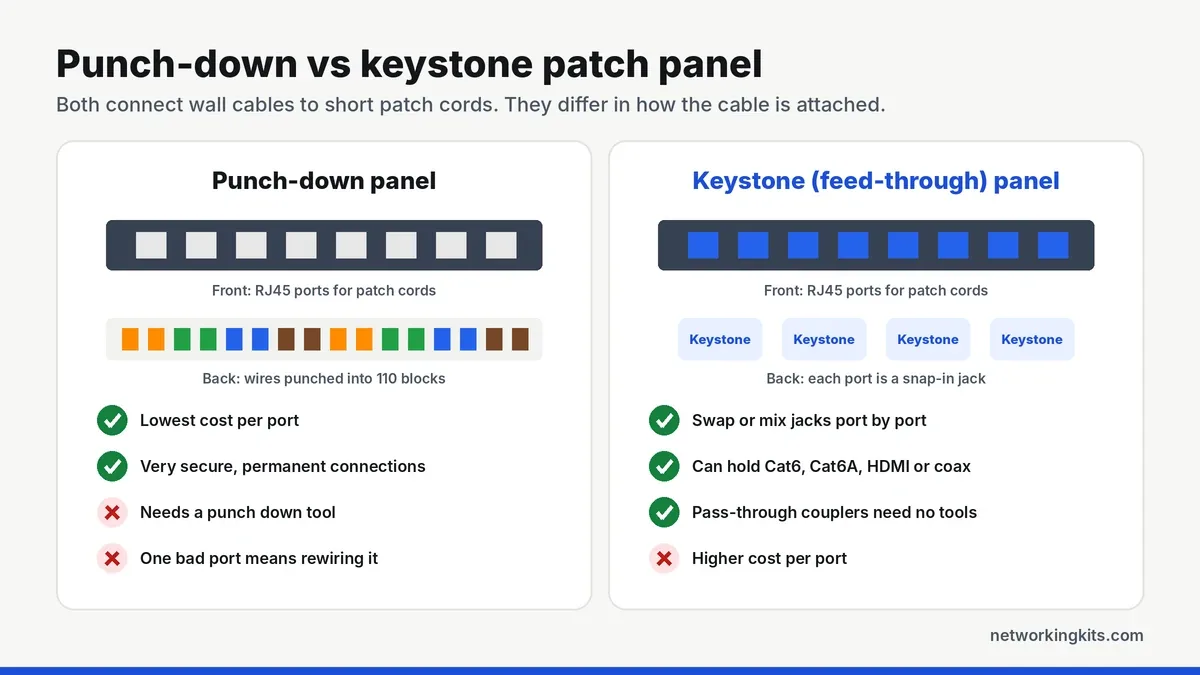
A keystone panel, like the Cable Matters 24-port, is an empty frame for snap-in jacks. You can replace a single port, mix Cat6 and Cat6A, or add coax and HDMI. A coupler panel, like the Cable Matters Cat6A, comes loaded with pass-through couplers. You plug in cables that already have RJ45 plugs instead of punching wires.
Our take: punch down if you want to set it and forget it, keystone if you like options, and coupler if you would rather crimp than punch.
How many ports?
Count every planned cable run, including cameras, access points and the TV. Then add about 25 percent for future drops. Matching the panel to the switch, 24 ports to 24 ports, keeps patch cords short and the rack easy to read.
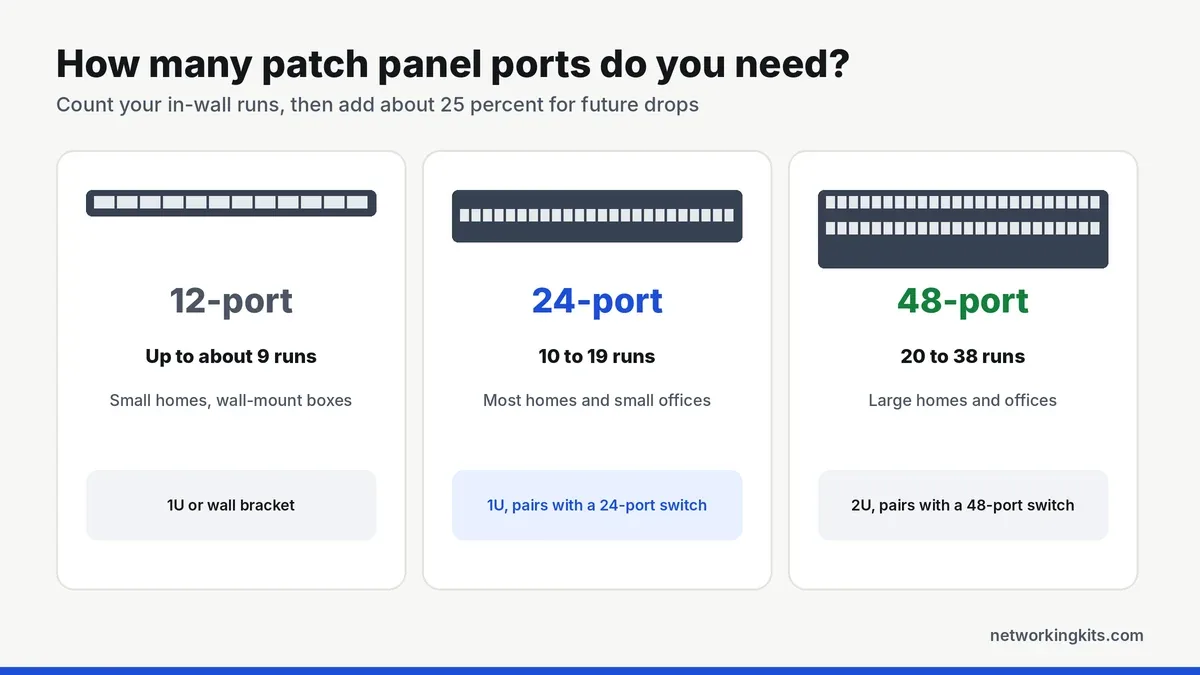
A 24-port panel takes 1U, or 1.75 inches, of rack height. Our guide to rack units helps you plan the rest of the rack.
Match the category to your cable
A panel rated below your cable limits the whole run. Cat6 panels suit gigabit networks and short 10 Gbps links. For 10 Gbps over longer runs, use Cat6A cable with a Cat6A panel. If you have not bought cable yet, our explainer on Cat6 vs Cat5e is a good place to start.
Shielded or unshielded?
Most homes and offices run unshielded (UTP) cable, and an unshielded panel is the right partner. Shielded panels like the TRENDnet 8-port only help when you also use shielded cable and ground the panel. Pairing a shielded panel with unshielded cable adds cost and no benefit.
Rack or wall?
Standard panels are 19 inches wide and bolt into a rack or cabinet, and most can also go on a wall with a simple bracket. Small panels like the TRENDnet 8-port mount straight onto a wall, which suits closets and media boxes. If your switch will sit in the same rack, our 24-port switch shortlist includes several models with rack ears.
Tools for the job
Punch down and keystone panels need a 110 punch down tool, a cable stripper and a cable tester. Coupler panels skip the punch tool but need a crimper and an RJ45 plug on every run. Our step-by-step keystone punch down guide shows the technique, and our favorite RJ45 crimpers cover the coupler route.
Label both ends of every cable before you terminate it, and write the room name on the panel label right away. Six months later, you will not remember which port goes to the office.
Patch panel or just a switch?
With only two or three in-wall runs, wall jacks at both ends are often enough. Once six or more runs meet in one spot, a panel is worth it. Our comparison of patch panels and switches shows how the two work together.
Mistakes that cost you a re-termination
Almost every failed port comes down to one of these:
- Untwisting too much. Keep about half an inch (13 mm) or less of untwisted wire at each termination. Otherwise a Cat6 run can fail a test even with every color in the right slot.
- Mixing wiring standards. Use T568A or T568B everywhere, never a mix. Our T568A vs T568B wiring guide explains both.
- No strain relief. Support every cable behind the panel with a bar or hook-and-loop ties.
- Stranded cable in the wall. In-wall runs should be solid copper. Stranded cable belongs in patch cords.
- Skipping the test. Test each run from panel to wall jack before you connect the switch.
Final verdict
The TRENDnet TC-P24C6 is the best network patch panel for Cat6 in most home and small office racks. Every port has clear T568A and T568B color labels, and TRENDnet covers it for 3 years. It is a panel that makes it easy to get things right the first time. Its 1U size fits any standard 19-inch rack or wall-mount bracket, so it suits a home closet just as well as a small office server rack.
Prefer to skip punching down altogether? The Cable Matters keystone panel lets you snap jacks in and swap them later, and the Cable Matters Cat6A coupler panel is ready for 10 Gbps with pre-made cables. Whichever you pick, label both ends of every cable as you go. For a small wall box or home office, the compact TRENDnet 8-port shielded panel is a tidy alternative. Future you will be grateful the first time something needs tracing.
Frequently Asked Questions
What is the best patch panel for a home network?
For most homes, a 24-port Cat6 punch down panel like the TRENDnet TC-P24C6 is the best choice. It fits a standard rack, handles gigabit speeds with room to grow and has clear wiring labels on every port.
Should I buy a punch down or keystone patch panel?
Choose punch down if you want the lowest cost per port and plan to set it up once. Choose keystone if you want to swap single ports later or mix Cat6, Cat6A, coax and HDMI jacks.
Does a patch panel slow down my network?
No. A well-terminated panel rated for your cable category has no noticeable effect on speed. Problems come from poor terminations, so test every run after you punch it down.
Do I need a Cat6A patch panel?
Only if you plan to run 10 Gbps over long distances with Cat6A cable. For gigabit networks and short 10 Gbps runs, a Cat6 panel is enough.
Can I use a patch panel without a rack?
Yes. Small panels like the TRENDnet 8-port mount directly on a wall, and most 19-inch panels can go on a wall with an inexpensive bracket.
Tell us a little about your home or office network and we will point you in the right direction. We read every message.

We are network installers and home lab builders who have spent over a decade crimping, punching down and testing cable. Every guide is built from spec sheets, verified buyer feedback and real-world install experience.
How we research and score products →