On this page 11 sections
- How we picked these 26-port switches
- Comparison table
- Our Top Picks Reviewed
- 1. NETGEAR 26-Port Gigabit Ethernet Smart Managed Pro Switch
- 2. NETGEAR 26-Port PoE Gigabit Ethernet Smart Switch (GS324TP), 190W
- 3. NETGEAR 26-Port Gigabit Ethernet Smart Switch
- 4. MokerLink 26 Port Gigabit Managed Switch, 24 Port GE, 2 x 1G SFP
- 5. TRENDnet 26-Port Gigabit PoE+ Switch, TPE-TG262
- Buying guide: how to choose a 26-port gigabit switch
- Final verdict
- FAQ
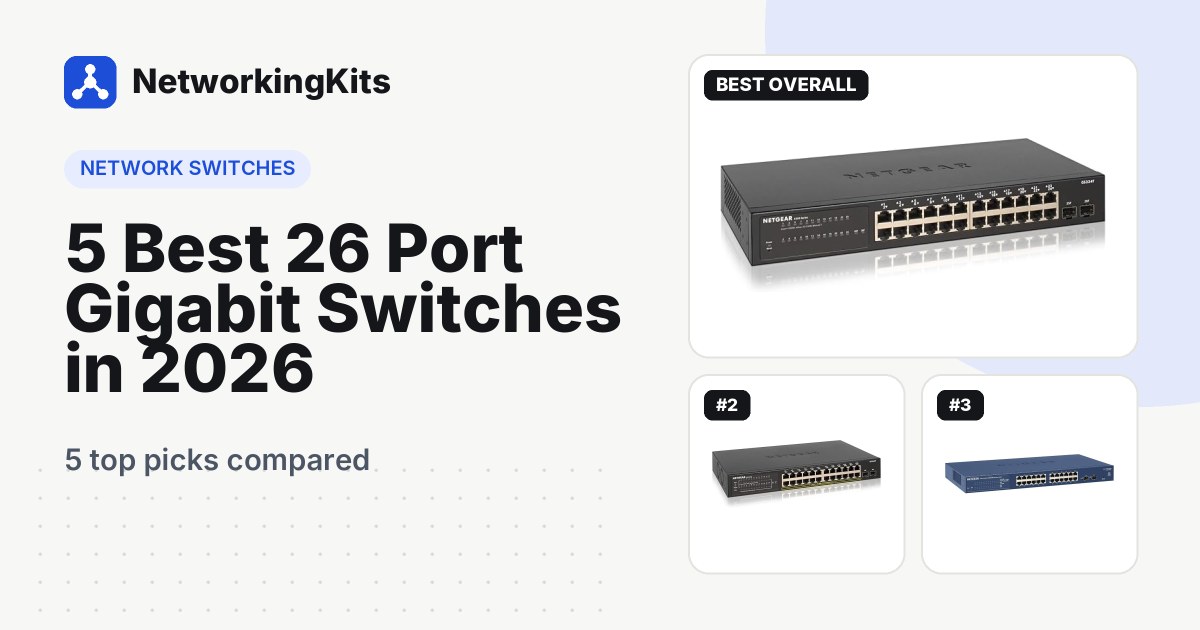
A 26-port gigabit switch gives you 24 regular Ethernet ports plus 2 extra SFP slots. Those two slots are for connecting the switch to something far away or important, like another switch upstairs, a second building, or your main router over fiber.
That makes it a popular choice for small businesses, schools, workshops and larger homes that have outgrown a single 24-port switch. Most 26-port models are also smart managed, so you can set up VLANs to keep cameras, guests and staff devices apart.
We compared the 26-port gigabit switches sold on Amazon.com, checked every spec against the maker's datasheet, and left out models with slow 100 Mbps ports or unknown brands. All five picks have 24 gigabit ports plus 2 SFP slots.
Quick answer: Get the NETGEAR GS324T. It is silent, easy to manage, draws almost no complaints from owners, and is covered for 5 years. Need to power cameras or Wi-Fi access points? Step up to the NETGEAR GS324TP with 190W of PoE+.
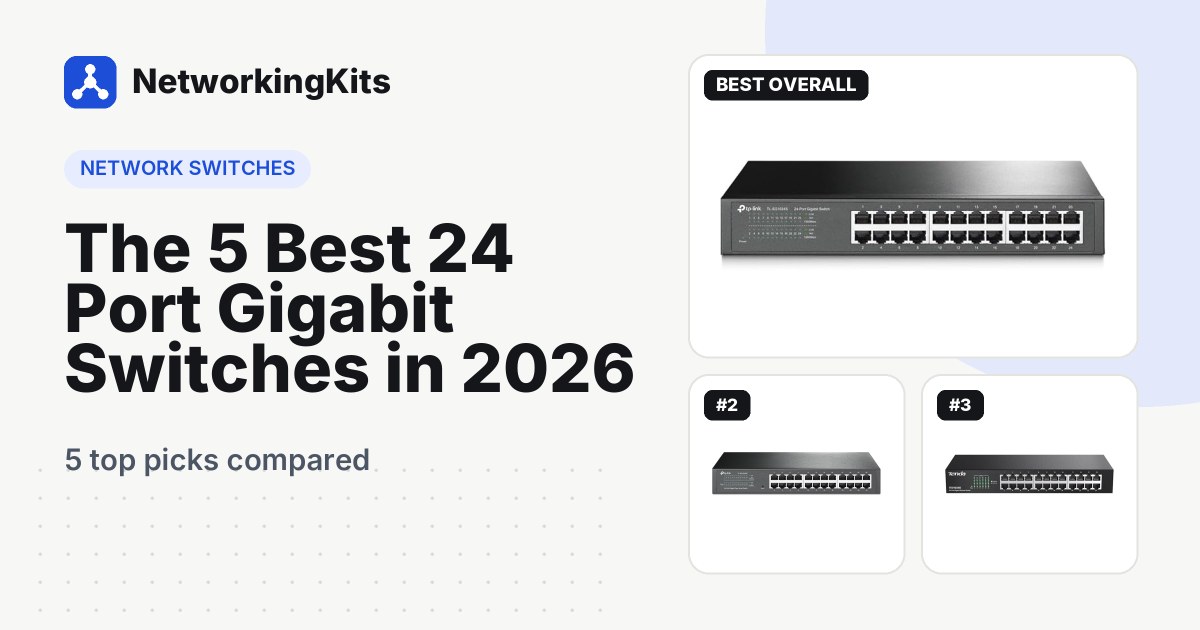
No plans for fiber or a second switch? Then you can save money with one of our best 24-port gigabit switches instead.
How we picked these 26-port switches
A switch this size usually ends up at the heart of the network, so when it misbehaves, everyone notices. Here is what we looked for:
- A real 26-port layout. 24 gigabit RJ45 ports plus 2 SFP slots, all at full gigabit speed. Plenty of cheap "26-port" PoE switches run their device ports at 100 Mbps, and none of those made the cut.
- Management that makes sense. VLANs, QoS and link aggregation are great, but only if the settings page does not feel like a puzzle.
- Enough PoE power. For PoE models, can the budget actually run a row of cameras and access points at once?
- Noise. Fanless switches are silent. PoE switches need fans, so we paid attention to what owners say about the hum.
- Warranty and real-world feedback. We checked the warranty length and dug into the complaints, not just the praise.
Best 26 Port Gigabit Switches Compared (2026)
| Product | Type | PoE | Cooling | Warranty | Score | |
|---|---|---|---|---|---|---|
 Best OverallNETGEAR 26-Port Gigabit Ethernet Smart Managed Pro Switch (GS324T)Home labs and offices that want silent, easy management | Smart managed (S350) | None | Fanless, silent | 5 years | 9.3 | Check Price |
 Best PoENETGEAR 26-Port PoE Gigabit Ethernet Smart Switch (GS324TP), 190WSecurity cameras and Wi-Fi access points | Smart managed (S350) | 190W total, 30W per port | Fans | 5 years | 9.1 | Check Price |
 Longest WarrantyNETGEAR 26-Port Gigabit Ethernet Smart Switch (GS724Tv4)Advanced home labs and small businesses | Smart managed (ProSAFE) | None | Fanless, silent | Limited lifetime | 8.8 | Check Price |
 Best Budget ManagedMokerLink 26 Port Gigabit Managed Switch, 24 Port GE, 2 x 1G SFPBudget home labs that want every L2 feature | L2 web managed | None | Fanless | 1 year | 8.4 | Check Price |
 Best Unmanaged PoE+TRENDnet 26-Port Gigabit PoE+ Switch, TPE-TG262Big camera and PoE installs with no setup | Unmanaged, plug and play | 380W total, 30W per port | Fans | Lifetime, fans and PSU 1 year | 8.1 | Check Price |
Our Top Picks Reviewed
Here is a closer look at all 5 of our picks for the best 26 port gigabit switches: what each one does well, where it falls short and who it suits best, based on the specs and real buyer feedback.

NETGEAR 26-Port Gigabit Ethernet Smart Managed Pro Switch (GS324T)
- Ports
- 24 x Gigabit RJ45, 2 x 1G SFP
- Type
- Smart managed (S350)
- PoE
- None
- Cooling
- Fanless, silent
- Warranty
- 5 years
If you only read one review on this page, make it this one. The NETGEAR GS324T is the switch we would put in almost any home lab, network closet or small office, and it is hard to find anyone who regrets buying it.
The layout is simple: 24 gigabit ports on the left, 2 SFP slots on the right, all in a metal case that sits on a desk or bolts into a rack. There is no fan, so it makes no sound at all. You could keep it in a bedroom and never know it was there.

The real draw is how easy it is to manage. It belongs to NETGEAR's S350 Smart Managed Pro series, so you get VLANs, QoS, IGMP snooping, LACP link aggregation, port mirroring and SNMP monitoring through a clean web page. And if none of that means anything to you yet, that is fine. It works as a plain plug-and-play switch on day one, and the settings are there when you are ready.
Owners love it, and complaints are hard to find. One buyer runs four of these S350 switches across nine VLANs and calls them robust and easy to set up. Another upgraded from an unmanaged switch just for link aggregation and says it took minutes. Someone who swapped out an older NETGEAR GS724TP said the new interface alone made the upgrade worth it.
So what is the catch? The SFP slots run at 1 Gbps, not 10G, and you buy the modules separately. There is no PoE either. NETGEAR backs it with a 5-year warranty, and it supports Energy Efficient Ethernet (802.3az), which you can switch on to save a little power on idle links. New to managed switches? Our guide to managed vs unmanaged switches explains what all those features actually do.
What we like
- Plug and play on day one
- Silent fanless metal case
- Easy VLANs, QoS and LACP
- 5-year warranty
Good to know
- SFP modules are sold separately
- No PoE (the GS324TP adds it)
- SFP slots run at 1G, not 10G

NETGEAR 26-Port PoE Gigabit Ethernet Smart Switch (GS324TP), 190W
- Ports
- 24 x Gigabit PoE+ RJ45, 2 x 1G SFP
- Type
- Smart managed (S350)
- PoE
- 190W total, 30W per port
- Cooling
- Fans
- Warranty
- 5 years
Picture a ladder, a ceiling camera and a power outlet nowhere nearby. That is the problem the NETGEAR GS324TP solves. It is the GS324T with Power over Ethernet on all 24 ports, so one network cable carries both data and power to each camera, access point, VoIP phone or video doorbell.
Each port can deliver up to 30 watts, and the switch shares a 190W budget between them. It figures out how much power each device needs on its own, and the web page shows you exactly what every port is drawing. You can schedule PoE so access points go dark overnight, and when a camera freezes, you can turn its port off and on again from your desk instead of hauling out that ladder.

It is also surprisingly compact. At 13 by 8.1 inches and 1.7 inches tall, it fits on a shelf just as easily as in a rack.
The feedback is remarkably consistent. Owners call it reliable, easy to manage and good value, and one says it runs flawlessly alongside an Orbi mesh system. A buyer who replaced a dead Cisco switch found each camera drawing less than 3.5 watts. Another had been through several PoE brands for a home security setup over five years and says this was the first one that simply stayed stable.
The trade-off is noise. PoE switches need fans, and owners are split: some find it quiet, others would not want it in an office. One reviewer also had trouble with older 100 Mbps devices. And while 190W covers a typical home camera system plus a few access points, it will not run 24 power-hungry PTZ cameras at once. Our guide to Power over Ethernet shows how to add up your budget. Like the GS324T, it comes with a 5-year warranty.
What we like
- PoE+ on all 24 ports
- Compact enough for a shelf or 1U rack
- Per-port power monitoring and scheduling
- 5-year warranty
Good to know
- Has fans, so a closet or rack suits it best
- 190W covers most home setups, not 24 PTZ cameras
- Check any very old 100 Mbps gadgets

NETGEAR 26-Port Gigabit Ethernet Smart Switch (GS724Tv4)
- Ports
- 24 x Gigabit RJ45, 2 x 1G SFP
- Type
- Smart managed (ProSAFE)
- PoE
- None
- Cooling
- Fanless, silent
- Warranty
- Limited lifetime
Some gear just refuses to go out of style. The NETGEAR GS724Tv4 has been a quiet favorite in home labs and small offices for years, and it is still one of the smartest buys if you want features the newer S350 models skip.
On the outside, it looks familiar: 24 gigabit ports, 2 SFP slots, a fanless metal case and no noise at all. Inside, it goes further. It supports up to 32 static routes, so it can move traffic between a few VLANs without a separate router. It handles 256 VLANs instead of 64, and it adds layer 2, 3 and 4 access control lists for anyone who wants fine-grained rules about what can talk to what.

A lot of buyers worry about hidden subscriptions with business gear. One reviewer clears that up: you do not need to pay for anything. Every feature works from the local web interface.
Owners keep coming back to the same praise: easy to install, a friendly management page, great VLAN support and good value. One home lab owner runs multiple VLANs and two internet providers through it behind a pfSense firewall. An IT consultant dropped it into a client's office to replace a dying switch and says it has run perfectly since. Another calls it the best managed switch they have ever used.
Then there is the warranty, which beats everything else here: limited lifetime coverage with next business day replacement, as long as you register the switch with NETGEAR within 90 days. The downsides? It is an older design, the interface looks dated next to the S350 series, and a small group of owners did run into problems. Pick it if you want the routing and ACL features, or simply the peace of mind of a lifetime warranty.
What we like
- Lifetime warranty with next business day replacement
- 32 static routes and L2/L3/L4 ACLs
- Fanless and silent
- No subscription needed
Good to know
- Interface looks older than the S350 series
- Register within 90 days for lifetime cover
- No PoE on this model

MokerLink 26 Port Gigabit Managed Switch, 24 Port GE, 2 x 1G SFP
- Ports
- 24 x Gigabit RJ45, 2 x 1G SFP
- Type
- L2 web managed
- PoE
- None
- Cooling
- Fanless
- Warranty
- 1 year
Want every advanced feature without paying NETGEAR prices? The MokerLink 26-port managed switch is the bargain of the group, and on paper, it has the longest feature list of the five.
You get 24 gigabit ports, 2 SFP uplinks, a fanless metal rack case and enough switching capacity to run all 26 ports at full speed at once. Then comes the alphabet soup: VLANs, QoS, link aggregation, spanning tree, IGMP snooping, ACLs, IP-MAC-port binding, DHCP snooping, storm control and 802.1X login, managed through a web page, SNMP or a command line.

One nice touch is SFP monitoring. If you run fiber, the dashboard can show the temperature and signal strength of each module, which makes tracking down a flaky link a lot easier.
Most owners are happy with it. Buyers say it feels solid, sets up quickly and offers great value. One owner noticed that speeds through the switch matched a direct connection with no switch at all, which is exactly what you want to hear. Another uses it as the main hub for a whole house wired from a fiber router and says it does exactly what it promises.
It is not quite as polished as the NETGEAR picks. A small number of owners reported problems such as slow connections, and a few say it runs warm, so give it some airflow in the rack. If you mix it with other brands' gear, test your VLAN setup before you rely on it. The 1-year warranty is the shortest here, which is the trade-off for the lower price. For a home lab, it is a great deal. For a business network, we would spend a little more on a NETGEAR.
What we like
- Long L2 feature list with CLI
- SFP DDM monitoring
- Fanless metal rack case
- Lowest cost managed pick
Good to know
- 1-year warranty, the shortest here
- Give it airflow in a tight cabinet
- Test VLANs when mixing brands

TRENDnet 26-Port Gigabit PoE+ Switch, TPE-TG262
- Ports
- 24 x Gigabit PoE+ RJ45, 2 x Gigabit SFP
- Type
- Unmanaged, plug and play
- PoE
- 380W total, 30W per port
- Cooling
- Fans
- Warranty
- Lifetime, fans and PSU 1 year
Not everyone wants to log in to a switch. If you are wiring up a camera system or an office full of IP phones and just want everything to power on and work, the TRENDnet TPE-TG262 is built for you.
All 24 ports are gigabit PoE+ at up to 30 watts each, backed by a big 380W power budget, twice what the GS324TP offers. That is enough to run all 24 ports at around 15 watts each, which covers most cameras and access points. The power supply is built in, so there is no bulky brick, and the metal case fits a standard 19-inch rack. Two SFP slots handle fiber if you need it.

There are no settings at all. Plug in your devices, connect one port or SFP slot to your router, and you are done. It is also NDAA and TAA compliant, which matters for government installs.
The real-world stories are good when it works. One office runs all of its IP phones and an access point from it, and linked a second building with a fiber module. Another owner has powered five security cameras from one since 2018 without a single problem. Owners also tend to describe it as well made.
Not every review is glowing. A handful of owners had a unit stop working, which is exactly where TRENDnet's Lifetime Protection on the switch earns its keep, though the fans and internal power supply get 1 year. The fans are also audible, so it belongs in a closet or rack rather than on your desk. If you want PoE you can schedule and monitor, the GS324TP is the better fit. If you want the most power with no setup at all, this is the one.
What we like
- Largest PoE budget, 380W
- Built-in power supply
- NDAA and TAA compliant
- Lifetime Protection
Good to know
- Fans are audible, so rack or closet it
- No settings to customize
- Fans and power supply covered for 1 year
What we ruled out
Not everything that shows up in a search made our list. Here is what we left out and why, so you know what to avoid when you shop.
- Budget "26-port" PoE switches with slow device ports. Several listings only promise gigabit speed on the 2 uplinks, which means the 24 ports you actually use run at 100 Mbps. Fine for a few cameras, but not a gigabit switch.
- Unknown brands with little feedback. We skipped a smart managed 26-port model with thin, weak owner feedback, and a full gigabit PoE switch from a seller with no track record in networking.
- NETGEAR GS724TP and GS724TPP. Both are solid PoE switches, but the GS324TP covers the same need with an easier interface and a more proven track record with owners.
- 28-port switches. Models with 24 ports plus 4 uplinks are a different size class, so we kept this list to true 24 + 2 layouts.
Buying guide: how to choose a 26-port gigabit switch
Every switch on this list has the same 24 + 2 port layout, so picking one comes down to three questions: do you need management, do you need power, and how much noise can you live with? Here is how to answer them.
What the extra two ports are for
The two extra ports on a 26-port switch are SFP slots, not normal Ethernet jacks. They take a small plug-in module, either fiber or copper, and are designed for uplinks: the link back to your router, to another switch, or to a building too far away for copper cable. Ports 1 to 24 are for your devices.
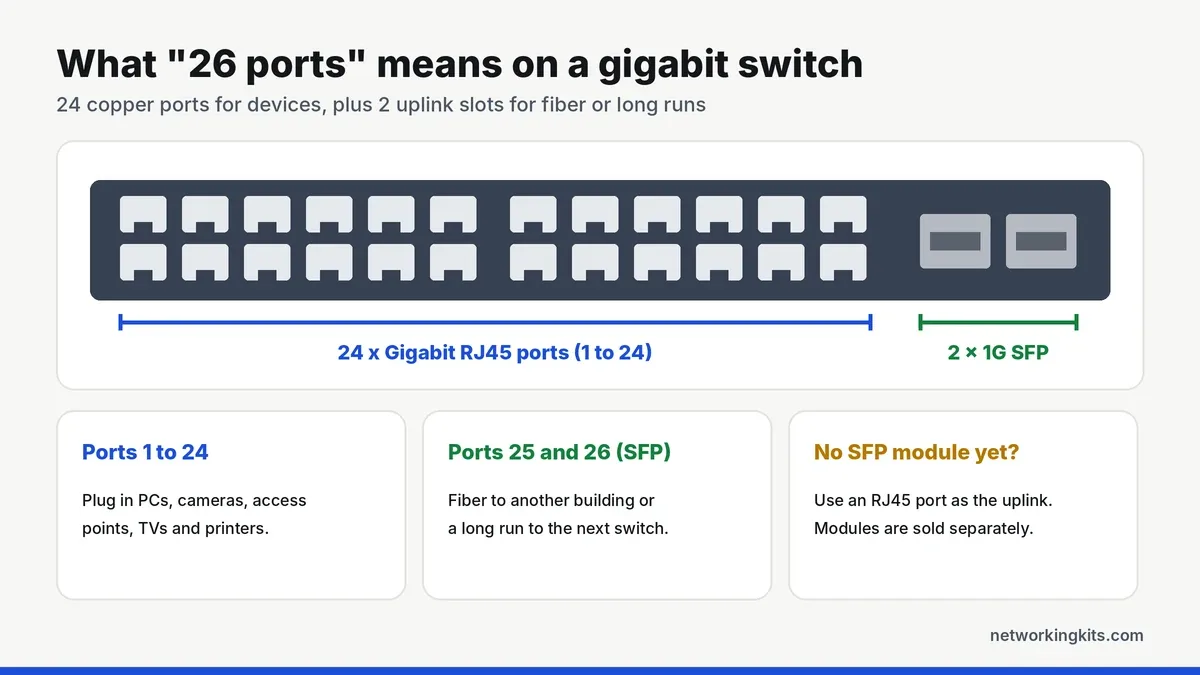
You do not have to use the SFP slots. If everything is within 100 meters, connect the switch to your router with any RJ45 port. Our explainer on SFP ports and modules covers which module to buy when you do need one.
Smart managed, PoE or unmanaged?
This is the biggest decision. A smart managed switch like the GS324T, GS724Tv4 or MokerLink gives you VLANs, QoS and link aggregation, and still works as a plain switch until you change anything. A PoE+ model like the GS324TP or TRENDnet also powers cameras and access points over the network cable.
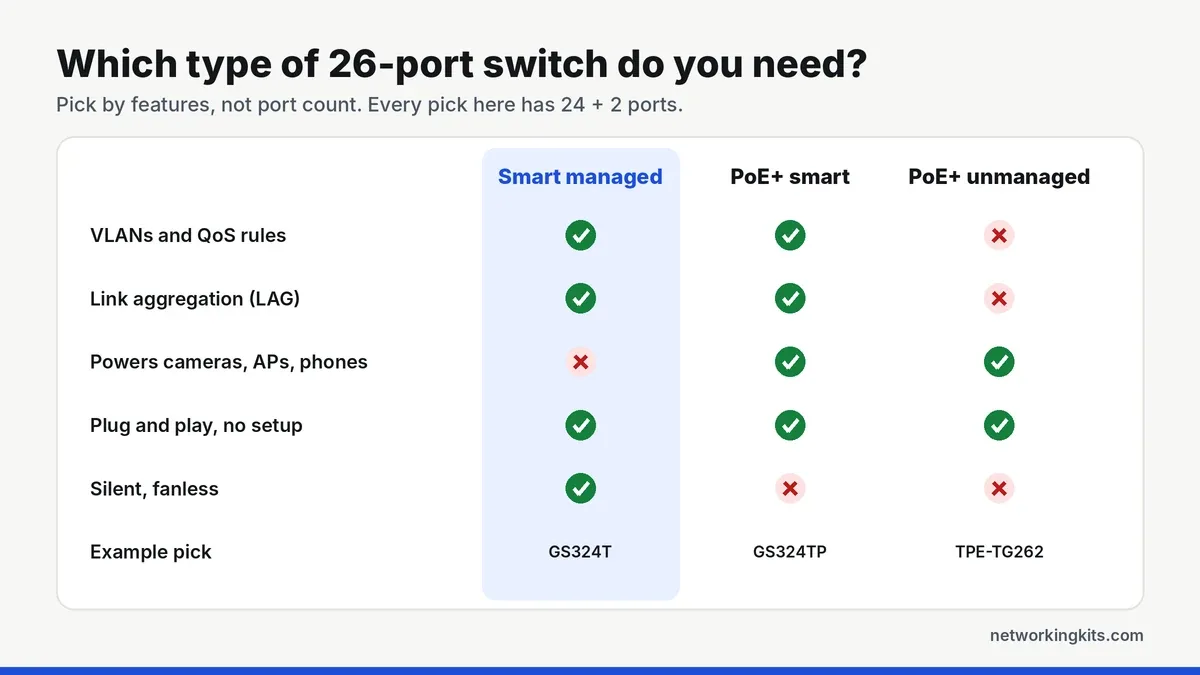
If you want VLANs to separate cameras, smart home gadgets or guests from your main devices, choose a managed model. Our step-by-step guide on setting up a VLAN walks through the process on a smart switch.
How much PoE power do you need?
Add up the wattage of every device you plan to power, then add about 20 percent headroom. Typical figures are 4 to 8 watts for a dome camera, 8 to 15 watts for a Wi-Fi 6 access point and 25 watts or more for a PTZ camera. The GS324TP's 190W budget suits a typical home camera system with a few access points. If you plan to power 15 or more devices, or several PTZ cameras, the TRENDnet's 380W budget gives you more room.
Uplinks and link aggregation
The uplink is the link that carries everyone's traffic back to the router, so it can become a bottleneck when many devices are busy at once. Managed switches can bond two or more ports into one faster link with LACP, which is popular for NAS boxes and links between switches. Our explainer on link aggregation shows when it helps and when it does not.
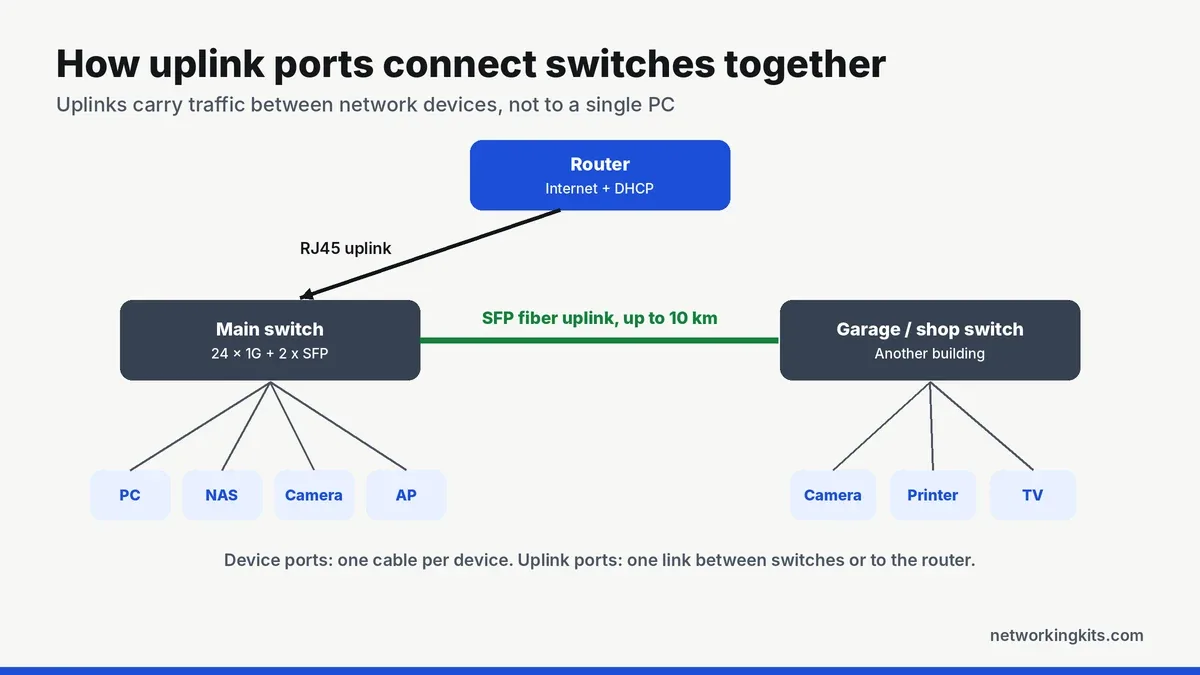
For more on how the two kinds of ports differ, read what an uplink port does.
Noise, heat and placement
Fanless switches like the GS324T and GS724Tv4 are completely silent and fine on a desk or in a living space. PoE switches need fans to handle the heat of powering devices, so put them in a closet, basement or rack. Leave a little space around the vents either way. A 26-port switch takes 1U, or 1.75 inches, of rack space; see our guide to rack units to plan the rest of the rack.
Warranty and support
A switch at the center of your network should be covered for years. On this list, NETGEAR's GS724Tv4 has a limited lifetime hardware warranty with next business day replacement, the GS324T and GS324TP have 5 years, TRENDnet offers Lifetime Protection in the U.S. and Canada (1 year on the fans and power supply), and MokerLink lists 1 year.
Pair your switch with a 24-port patch panel directly above it in the rack. Short 1-foot patch cords from panel port 1 to switch port 1 keep everything traceable. Our picks for the best Cat6 patch panels pair well with any switch here.
Common mistakes to avoid
- Buying a 100 Mbps PoE switch by mistake. Many cheap "26-port PoE" switches only run their device ports at 100 Mbps. Check that the listing says 24 gigabit or 10/100/1000 ports.
- Forgetting the SFP module. SFP slots ship empty. Order the right fiber or copper module, and matching fiber cable, with the switch.
- Undersizing the PoE budget. Total the watts of your devices first, especially access points and PTZ cameras.
- Putting a PoE switch on a desk. The fans that keep it cool can be loud in a quiet room.
- Creating a network loop. Never connect two cables between the same two switches unless you have set up link aggregation or spanning tree.
Setting up for the first time? Our guide to installing a network switch covers the basics.
Final verdict
If you want the best 26 port gigabit switch for a home lab or small office, get the NETGEAR GS324T. It is completely silent, easy to manage from a clean web page, and covered for 5 years. You can use it as a simple plug-and-play switch on day one and turn on VLANs or link aggregation whenever you are ready. The two SFP slots leave room for a fiber run or a link to a second switch, which is exactly why most people choose a 26-port model in the first place.
Need to power cameras or access points as well? The NETGEAR GS324TP gives you the same easy management plus 190W of PoE+. If you want static routing and a lifetime warranty, the NETGEAR GS724Tv4 is still a smart buy. Not planning to use fiber or a second switch? Each of these is built for years of daily use, so the right choice really comes down to whether you need power, routing or just fast ports. A good 24-port model will do the job for less.
Frequently Asked Questions
What is a 26-port switch?
It is a network switch with 24 regular Ethernet ports for devices plus 2 SFP slots for uplinks. The SFP slots take fiber or copper modules and are used to connect to a router, another switch or a distant building.
Is a 26-port switch better than a 24-port switch?
It is better if you need fiber or want to keep all 24 copper ports free for devices. If every device is within 100 meters and you have no plans for fiber, a 24-port switch does the same job for less.
Do I need SFP modules to use a 26-port switch?
No. All 24 RJ45 ports work without any module, and you can use one of them as the uplink. You only need an SFP module if you want to use the two SFP slots.
Can I use a smart managed switch without setting anything up?
Yes. Switches like the NETGEAR GS324T work as plain plug-and-play switches out of the box. You only log in when you want VLANs, QoS or link aggregation.
How many cameras can a 26-port PoE switch power?
It depends on the power budget. The NETGEAR GS324TP has 190W, enough for about 20 dome cameras at 6 to 8 watts each, or fewer if you add access points. The TRENDnet TPE-TG262 has 380W, enough to run all 24 ports at about 15 watts each.
Tell us a little about your home or office network and we will point you in the right direction. We read every message.

We are network installers and home lab builders who have spent over a decade crimping, punching down and testing cable. Every guide is built from spec sheets, verified buyer feedback and real-world install experience.
How we research and score products →