On this page 9 sections
You find the perfect network cabinet online, then notice it is listed as "9U". The switch you want is "1U", the patch panel is "1U", and the battery backup is "2U". Suddenly you are doing math with a unit you have never used before.
Rack units are simple once you know the rule. This guide explains what 1U means, how rack sizes and depths work, what fits in a typical home or small office rack, and how to choose the right size without buying too small.
What does 1U mean?
A rack unit, written as U or RU, is a standard measure of height for equipment in a server or network rack. One rack unit is exactly 1.75 inches, or 44.45 millimeters. A 1U device is 1.75 inches tall, a 2U device is 3.5 inches tall, and so on.
The standard behind it, EIA-310, also sets the width. A standard rack is 19 inches wide across the mounting rails, which is why you see "19-inch rack" on switches and patch panels. Most rackmount network gear, including the switches in our roundup of rackmount 24-port switches and the 16-port switches we compared, is 1U high and comes with ears that bolt to the rails.
Rack sizes and what they hold
A rack's size is its usable height in rack units. A 12U rack has twelve 1.75-inch slots, or 21 inches of space for equipment. Here is a typical layout for a home or small office:
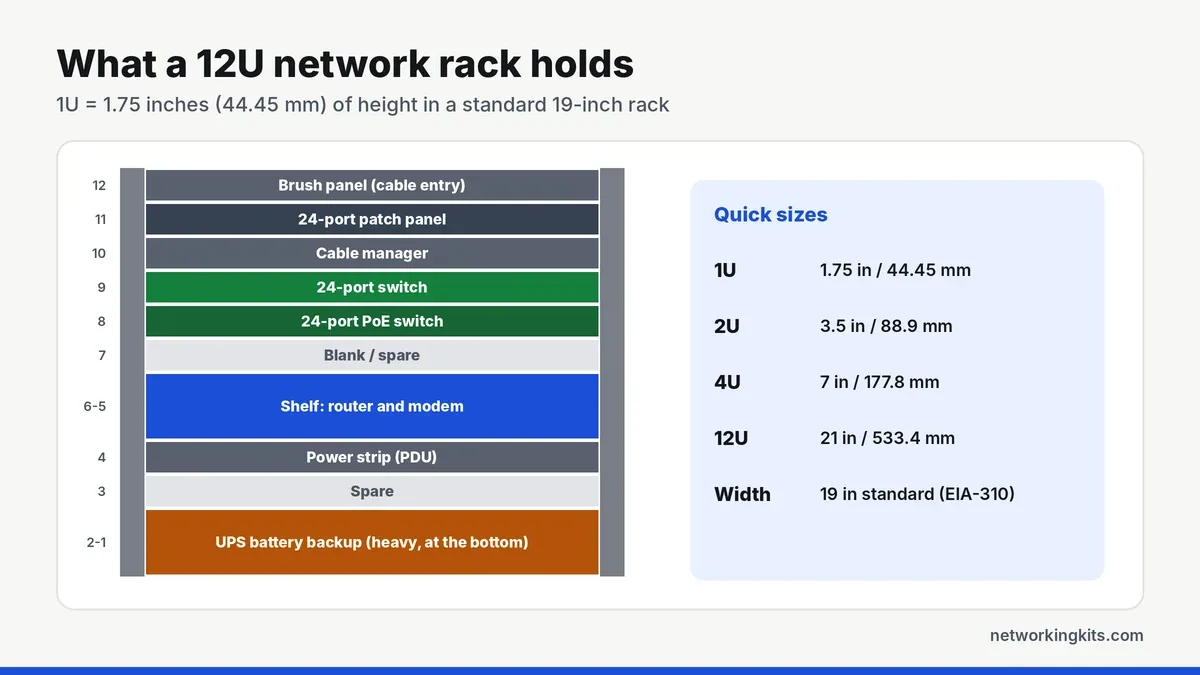
- 6U to 9U: a patch panel, one switch, a cable manager and a shelf for your router or modem.
- 12U to 15U: room for two switches, a PoE switch, a shelf and a small UPS, plus some spare space.
- 18U to 27U: a small business with a NAS or small server, multiple patch panels and a larger UPS.
- 42U: a full-height rack for server rooms and data centers.
Don't forget depth
Height is only half the story. Racks and cabinets also have a depth, and equipment must fit front to back with room for cables and airflow. Network switches and patch panels are usually shallow, often under 12 inches deep, so they fit almost any wall-mount cabinet. Servers, NAS units and UPS batteries are much deeper, so check their depth before choosing a rack.
As a rule of thumb, add a few inches of depth behind every device for power cords and cable bends. A cabinet that fits the gear exactly will be frustrating to work in.
Types of racks
Wall-mount cabinets are the most common choice for homes and small offices. They usually range from 6U to 15U, have a lockable glass or mesh door, and mount on a wall to save floor space. They suit shallow gear like switches and patch panels.
Open-frame racks have two or four posts and no sides, so they are cheap, easy to work on and great for airflow. Two-post racks are best for light network gear, while four-post racks support heavier, deeper equipment.
Enclosed floor cabinets have sides, doors and often fans or locks. They are quieter and more secure, but cost more and need proper ventilation.
How to plan your rack layout
Put heavy items, such as a UPS battery backup, at the bottom so the rack stays stable. Keep a patch panel directly above each switch, so the patch cords between them stay short, and add a cable manager or brush panel to guide cables neatly. Leave at least one or two spare units for future gear, because racks always fill up faster than you expect.
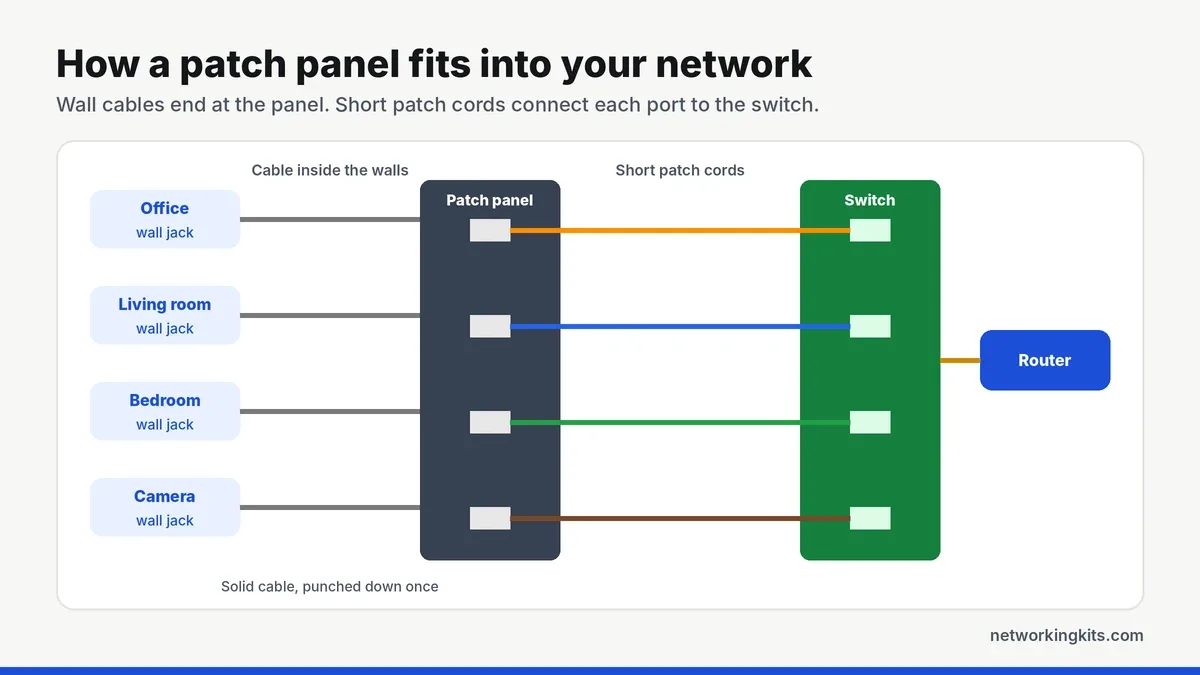
Our patch panel basics guide explains how to wire one into your rack.
Buy a rack at least 30 to 50 percent bigger than you need today. The cost difference between a 9U and a 12U cabinet is small, but moving to a bigger rack later means taking everything apart.
Labeling and cable management
A tidy rack is a fast rack to troubleshoot. Label every patch panel port with the room or device it serves, and use short patch cords in a few colors, such as one color for desks, another for cameras and another for access points. Velcro ties are kinder to cables than plastic zip ties, which can crush the pairs if pulled too tight. Run power cords down one side of the rack and data cables down the other to reduce interference and clutter.
Cooling and power
Most switches and patch panels are fanless, but PoE switches, routers and UPS units produce heat. In an enclosed cabinet, choose one with vents or a fan, and do not block the sides of switches that pull air through them. A rackmount power strip, often called a PDU, keeps power cords tidy, and a UPS keeps your network running through short power cuts.
Bottom line
One rack unit is 1.75 inches of height. Add up the U of everything you plan to mount, leave a few spare units for growth and airflow, and check the depth before you buy. For most home networks, a small 6U to 12U wall rack is plenty.
Frequently Asked Questions
How tall is 1U in a rack?
One rack unit (1U) is 1.75 inches, or 44.45 millimeters, tall. A 2U device is 3.5 inches tall, and a 4U device is 7 inches tall.
What size rack do I need for a home network?
Most homes do well with a 9U to 12U wall-mount cabinet. That fits a patch panel, one or two switches, a router shelf and a small UPS, with spare space for future gear.
Are all racks 19 inches wide?
Most network and server racks use the 19-inch standard set by EIA-310. Some telecom equipment uses 23-inch racks, but nearly all home and small office gear is designed for 19-inch racks.
Can I put a desktop switch in a rack?
Yes, with a rack shelf. Many desktop switches also include rackmount ears. Check the switch width and whether ears are included before you buy.

We are network installers and home lab builders who have spent over a decade crimping, punching down and testing cable. Every guide is built from spec sheets, verified buyer feedback and real-world install experience.
How we research and score products →