On this page 7 sections
Cat6 and Cat6a look almost identical on the shelf. Same RJ45 plug, same blue jacket in most listings, and only a letter between them on the label. Yet one costs noticeably more per foot, and installers argue about it constantly.
The short answer is that both cables run gigabit Ethernet perfectly over a full 100 meters. The difference only shows up when you want 10 Gbps, or when you are running cable inside walls that you do not want to open again in ten years. Here is what actually changes, and which one you should buy.
The quick difference
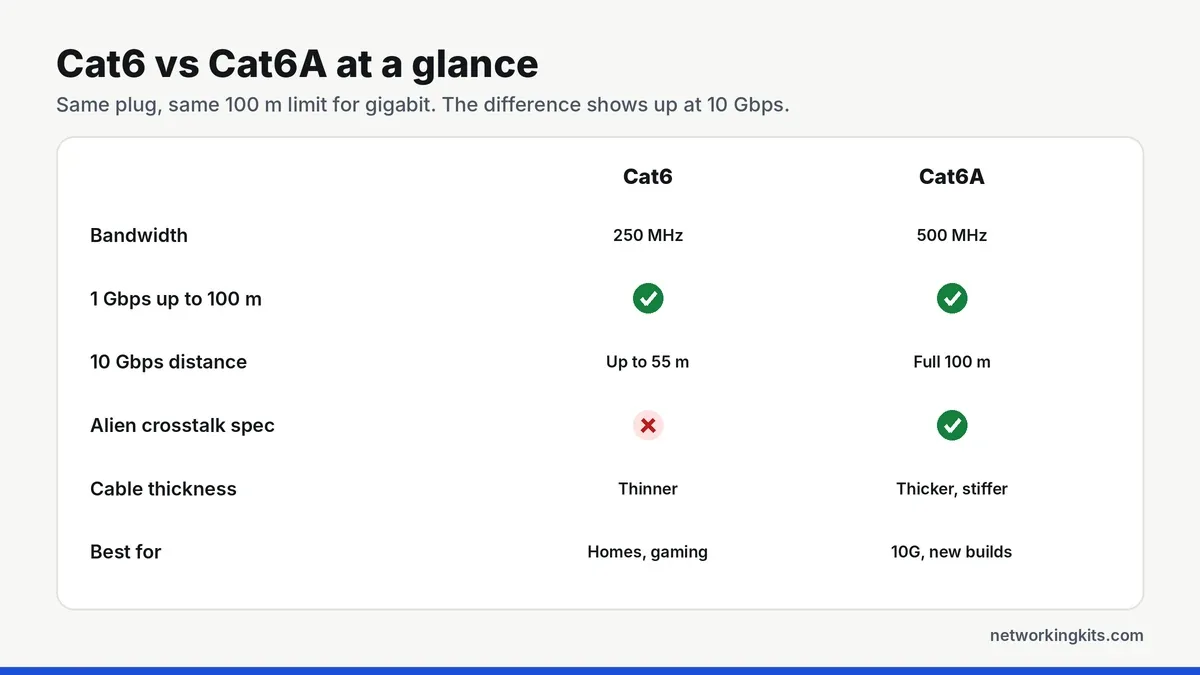
Cat6 is rated for frequencies up to 250 MHz. Cat6a, the "augmented" version, doubles that to 500 MHz. Higher frequency headroom is what lets a cable carry faster signals without errors, and it is the reason Cat6a can run 10 Gigabit Ethernet (10GBASE-T) over the full 100 meter channel, while Cat6 can only manage it over shorter runs.
Speed and distance: where Cat6 runs out
For 1 Gbps, the speed almost every home device uses today, there is no difference at all. Both cables are good for 100 meters (328 feet), which is the standard Ethernet channel limit made up of a 90 meter permanent link plus patch cords at each end.
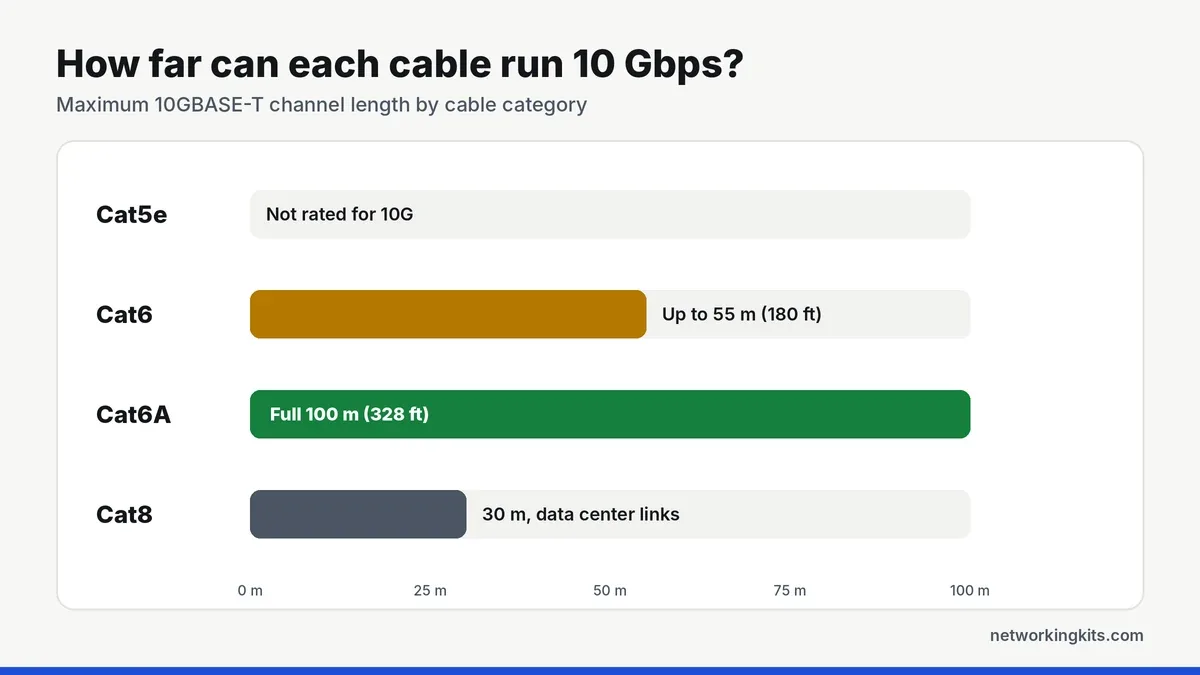
At 10 Gbps the story changes. The IEEE allows 10GBASE-T on Cat6 for up to 55 meters (about 180 feet), and only when the cable is installed in a low-noise environment. Cat6a is built for 10 Gbps over the full 100 meters, so it is the safer choice for long runs in an office, a home lab or a basement rack.
Alien crosstalk: the real reason Cat6a is thicker
Inside every Ethernet cable, four twisted pairs carry the signal. Crosstalk happens when the signal on one pair leaks into another. Cat6 already handles crosstalk inside the cable well. What it does not specify is alien crosstalk, the noise that jumps between neighboring cables bundled tightly together, which becomes a problem at the higher frequencies 10 Gbps uses.
Cat6a fixes this with more insulation, tighter twists and often foil shielding, and it has an alien crosstalk specification that Cat6 lacks. That extra material is why Cat6a is noticeably thicker and stiffer. It takes up more room in conduit, needs a wider bend radius and can be harder to push through tight wall plates.
Price, size and installation
Cat6a usually costs more per foot, and its connectors and keystone jacks cost more too. If you buy shielded Cat6a, you also need shielded connectors and proper grounding for the shielding to do its job. For a few short patch cables the price gap is small, but on a 1,000 foot box it adds up.
The thicker jacket also matters when you crimp your own ends. Cat6a can be a tight fit in standard plugs, so many installers use pass-through connectors rated for Cat6a. If you plan to make your own cables, read our guide to making your own Ethernet cables first, and pick a kit from our guide to choosing a cable tool kit.
Check that any cable you buy is pure copper, not copper-clad aluminum (CCA). CCA cables are cheaper, but they break more easily and can fail certification tests and PoE loads. A real Cat6 or Cat6a cable will say "100% copper" or "bare copper" on the jacket or listing.
Do your other parts need to match?
A link is only as good as its weakest part. To get true Cat6a performance, every piece of the channel needs to be rated Cat6a: the cable, the plugs or keystone jacks, the patch panel and the patch cords. Mixing a Cat6a run with Cat6 jacks still works fine at gigabit speeds, but it may not pass a 10 Gbps certification test.
The devices at each end matter too. Your switch, router or network card needs a 10 Gbps port before any of this extra headroom is used. Most home routers and consoles still have 1 Gbps ports, which is why Cat6 remains the practical choice for most people today.
Which one should you buy?
Quick verdict: Cat6 is the right cable for most homes and every patch cable, while Cat6a is worth it for new in-wall runs you want ready for 10 Gbps.
Choose Cat6 if you are connecting a PC, console, TV or router at gigabit speeds, buying patch cables, or running cable under 55 meters where you might try 10 Gbps someday. It is cheaper, thinner and easier to work with. For gaming, a good Cat6 patch cable is all you need, and our PS4 Ethernet cable picks show the ones buyers trust most.
Choose Cat6a if you are wiring a new house or office inside the walls, running long links to a rack, connecting a NAS or switch at 10 Gbps, or pulling many cables in one bundle. Cable inside walls usually stays for 15 years or more, so the extra cost is cheap insurance.
Whichever you choose, test the cable after you terminate it. A simple verifier catches miswires and opens, and our look at Fluke LinkIQ and MicroScanner testers covers tools that can qualify a link for 10 Gbps too.
Frequently Asked Questions
Is Cat6a faster than Cat6?
Only at 10 Gbps over longer distances. Both cables run 1 Gbps over 100 meters with identical speed. Cat6a can run 10 Gbps over the full 100 meters, while Cat6 is limited to about 55 meters at 10 Gbps.
Can I use Cat6a cables with Cat6 or Cat5e devices?
Yes. Cat6a uses the same RJ45 connector and is fully backward compatible. Your devices will simply run at the fastest speed they support.
Is Cat6a worth it for gaming?
Not for speed. Consoles and most gaming PCs use 1 Gbps ports, and Cat6 handles that perfectly. Cat6a only makes sense if you also want 10 Gbps for a NAS or are wiring your walls for the future.
Do I need shielded Cat6a?
Not always. Unshielded (UTP) Cat6a is fine in most homes and offices. Shielded cable helps near heavy electrical noise, such as motors, lighting ballasts or power cables, but it needs shielded connectors and grounding to work properly.

We are network installers and home lab builders who have spent over a decade crimping, punching down and testing cable. Every guide is built from spec sheets, verified buyer feedback and real-world install experience.
How we research and score products →