On this page 9 sections
You have stripped the cable, fanned out the eight little wires and now you are staring at two diagrams online: T568A and T568B. They look almost the same. Pick the wrong one and does the cable still work?
The good news is that neither standard is faster or better. The only rule that really matters is consistency. This guide shows both color orders, explains exactly what is different, and tells you which one to use for patch cables, wall jacks and crossover cables.
What T568A and T568B are
T568A and T568B are the two wiring schemes defined in the TIA-568 cabling standard for eight-pin RJ45 connectors. They tell you which colored wire goes into which pin. Both use the same four pairs, orange, green, blue and brown, and both work at every Ethernet speed from 10 Mbps up to 10 Gbps.
The only difference: orange and green swap
The two standards are identical except that the orange and green pairs trade places. Pins 4 and 5 (the blue pair) and pins 7 and 8 (the brown pair) are the same in both.
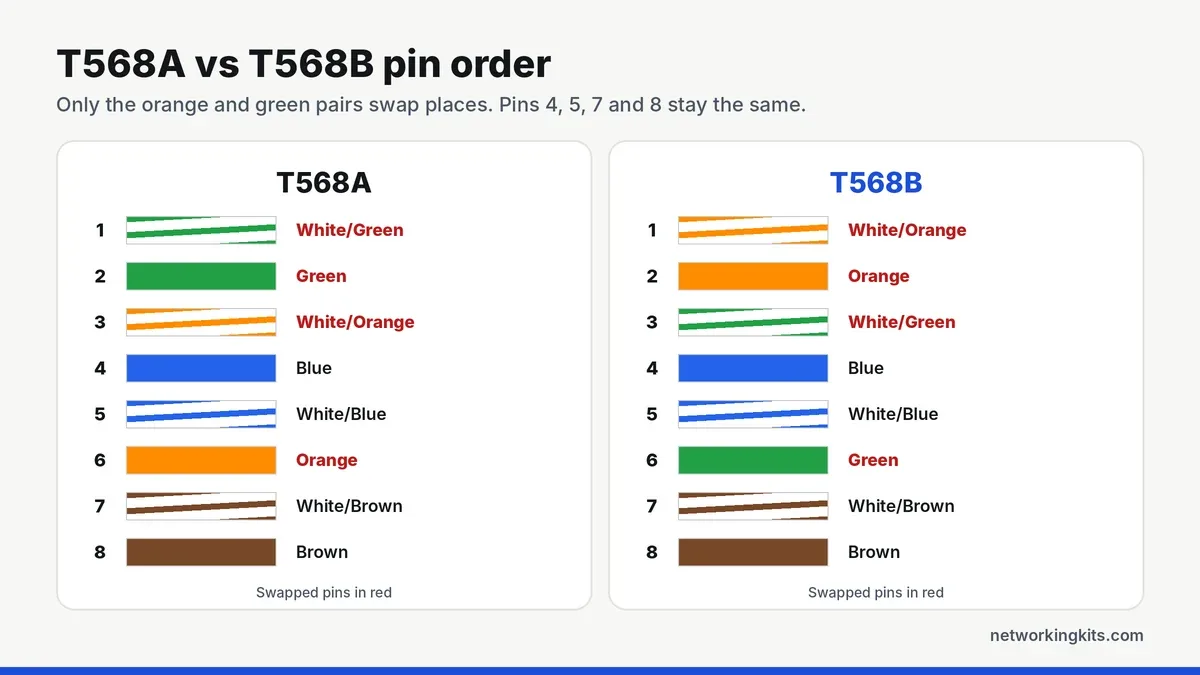
T568B, pins 1 to 8: white/orange, orange, white/green, blue, white/blue, green, white/brown, brown.
T568A, pins 1 to 8: white/green, green, white/orange, blue, white/blue, orange, white/brown, brown.
Notice that the green pair in T568B, and the orange pair in T568A, is split across pins 3 and 6, with the blue pair in between. That split is part of the original design and the reason you must follow the diagram exactly rather than just keeping pairs together.
Why the pairs are twisted and split
Each pair of wires is twisted together so that electrical noise affects both wires equally and cancels out. That only works if the two wires of a pair carry the same signal. In both standards, pins 1 and 2 form one pair, pins 3 and 6 form another, pins 4 and 5 another and pins 7 and 8 the last.
A very common beginner mistake is to wire the colors in a simple order, such as all four pairs side by side, so pins 3 and 4 share a pair. The cable may still light up on a basic tester, but the signals no longer travel on twisted pairs, so it picks up crosstalk and often drops to 100 Mbps or fails under load. This is called a split pair, and it is why the color order matters so much.
Does one perform better?
No. Because the same pairs carry the same signals, just on swapped pins, performance is identical. Cable installers who have run certification tests on both report no measurable difference. What causes problems is mixing them on one cable by accident, or getting the order wrong in a way that splits a pair.
Which one should you use?
T568B is by far the most common choice for patch cables and commercial installs in North America, and it is what most pre-made Ethernet cables use. If you are making patch cables, or adding to an existing network, use T568B unless you know the building uses A.
T568A is the one the TIA standard recommends for new residential wiring, mainly for backward compatibility with older telephone wiring, and older revisions of the standard noted it for US government installs. If a contract or spec sheet says T568A, use it.
The golden rule: pick one and use it everywhere in the same building. Wall jacks and patch panels are usually printed with both color codes, so check the label that matches your choice.
Straight-through vs crossover cables
When both ends of a cable use the same standard, it is a straight-through cable, and this is what you need for almost everything: connecting a PC, console, TV or access point to a switch or router.
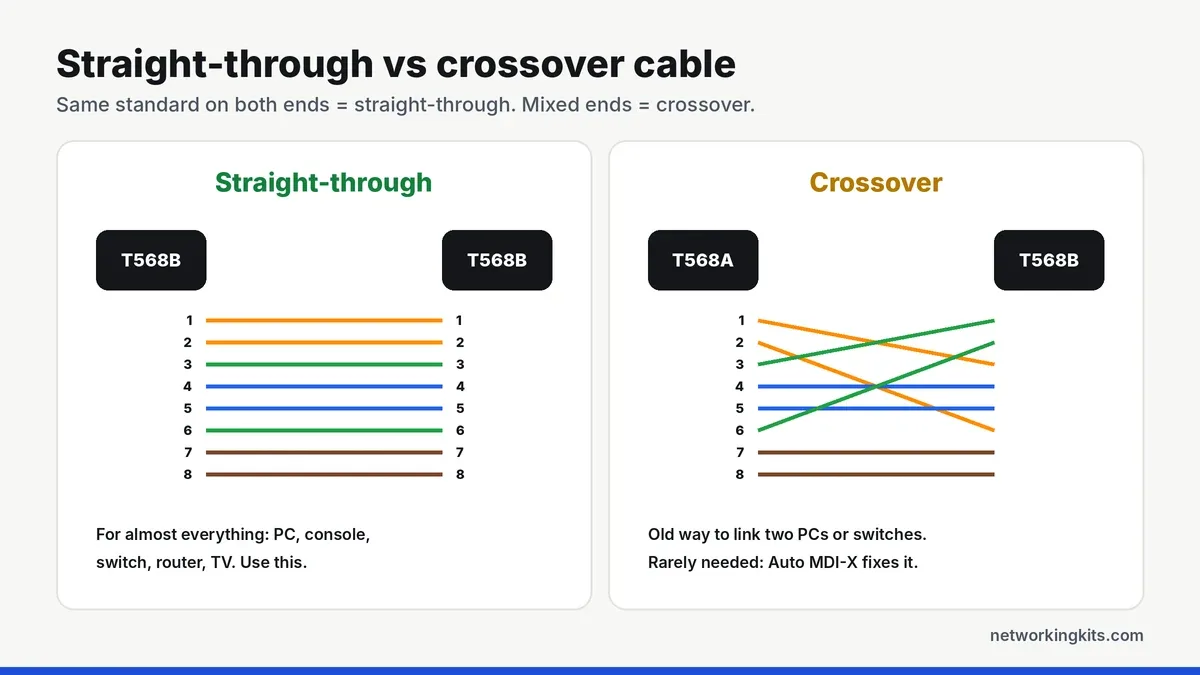
If you wire one end T568A and the other end T568B, you get a crossover cable, which swaps the transmit and receive pairs. Years ago you needed one to connect two computers or two switches directly. Today almost every device supports Auto MDI-X, which detects the cable type and adjusts automatically, so crossover cables are rarely needed. Nearly every gigabit port supports it.
Hold the RJ45 plug with the clip facing away from you and the gold contacts on top, cable coming toward you. Pin 1 is on the left. Getting this orientation right is the most common fix for a "backwards" cable.
How to check your wiring
A cable tester takes the guesswork out. Even a basic one lights up pins 1 to 8 in sequence, so you can spot crossed, open or split pairs in seconds. For long runs or 10 Gbps links, a qualification tester can confirm the cable will handle the speed. Our Fluke tester comparison covers both types, and the network tool kits we recommend include a tester with the crimper.
Ready to wire your own? Follow our guide on how to make an Ethernet cable.
Bottom line
T568A and T568B perform exactly the same. The only thing that matters is using one standard on both ends of every cable. In the US, T568B is the common choice for new home and office wiring, so pick it unless your building already uses T568A.
Frequently Asked Questions
Is T568A or T568B better?
Neither. They perform the same at every Ethernet speed. T568B is more common for patch cables and commercial installs, while T568A is recommended for new residential wiring. Consistency matters more than the choice.
What happens if I use T568A on one end and T568B on the other?
You create a crossover cable. Modern devices with Auto MDI-X will still work with it, but it is not standard for patch cables, so use the same scheme on both ends.
Can I mix T568A and T568B in the same house?
Each individual cable must use the same standard at both ends, but different runs can technically use different standards. It is still best to use one standard throughout to avoid confusion later.
Which standard do pre-made Ethernet cables use?
Most pre-made patch cables sold in the US use T568B on both ends. They will work with wall jacks wired to either standard, because each cable is a complete straight-through link.

We are network installers and home lab builders who have spent over a decade crimping, punching down and testing cable. Every guide is built from spec sheets, verified buyer feedback and real-world install experience.
How we research and score products →