On this page 7 sections
Keystone jacks are the little snap-in modules behind every neat Ethernet wall plate and keystone patch panel. They all share the same standard shape, which means you can mix and match them freely, but they are not all the same inside.
Pick the wrong type and you will either need a tool you do not have or end up with a jack that limits your cable's speed. This guide explains the main types of keystone jacks, which category to choose and which one fits your project.
What is a keystone jack?
A keystone jack is a standardized connector module that snaps into a keystone wall plate, surface box or patch panel. The front is a socket, most often RJ45 for Ethernet, and the back is where you connect the cable. Because the outer shape is standard, one wall plate can hold an Ethernet jack, a coax jack and an HDMI jack side by side.
The main types of keystone jacks
Punch down (110) jacks
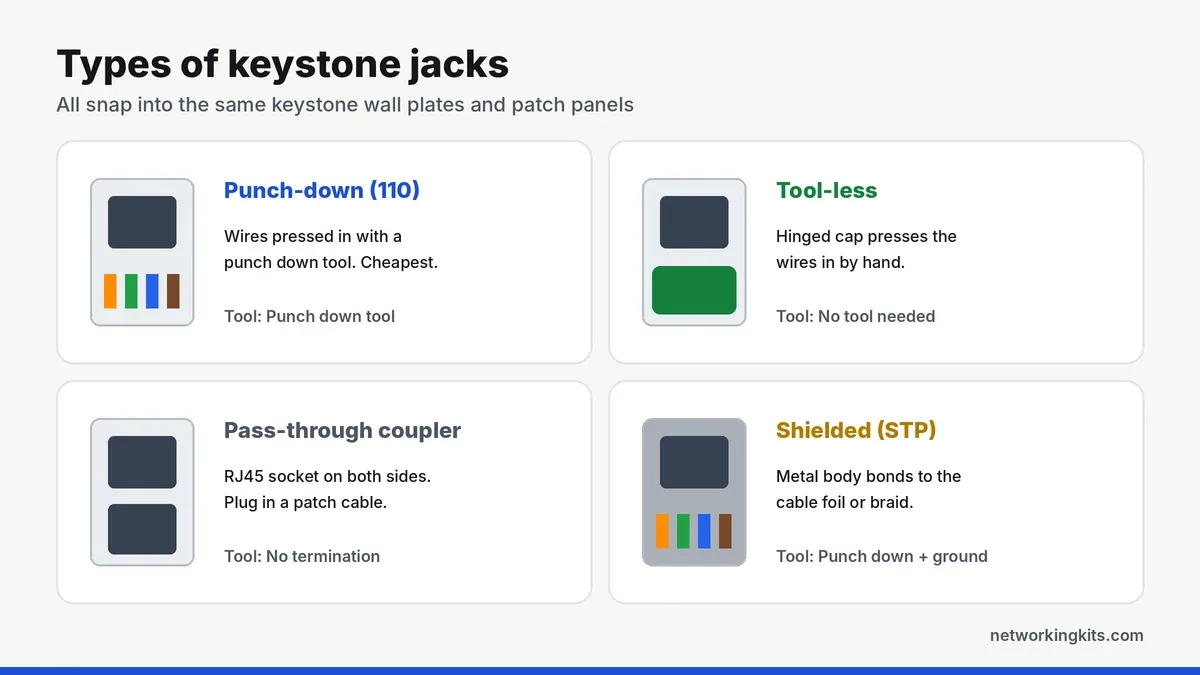
The most common type. You lay each wire into a color-coded slot and press it in with a 110 punch down tool, which also trims the excess. They are the cheapest, make very secure connections and are what most installers use. Our step-by-step guide to terminating a keystone jack covers the technique, and our punch down tool picks cover the tool.
Tool-less jacks
Tool-less jacks have a hinged cap with the contacts built in. You lay the wires in, trim them and close the cap by hand, which presses every wire into place at once. They cost more per jack but are great if you only need a few and do not want to buy a punch down tool. The trade-off is that some designs are harder to re-terminate.
Pass-through couplers
A coupler has an RJ45 socket on both sides, so a plugged cable connects straight through. There is nothing to terminate, which makes them popular in coupler patch panels and for quick setups. The downside is that every in-wall cable then needs a crimped plug, and each coupler adds one more connection to the channel.
Shielded jacks
Shielded (STP) jacks have a metal body that bonds to the foil or braid of shielded cable. They only make sense with shielded cable and a grounded panel or plate. With ordinary unshielded cable, a regular unshielded jack is the right choice.
Angled and slim jacks
Some jacks angle the cable entry at 45 or 90 degrees, which helps in shallow wall boxes or tight cabinets, and slim jacks fit high-density panels. They work the same way as standard punch down jacks.
Choose the right category
The jack must match or exceed your cable's category, or it will limit the whole run. A Cat5e jack is fine for Cat5e cable, but Cat6 cable needs a Cat6 jack, and 10 Gbps at full distance needs Cat6A jacks with Cat6A cable.
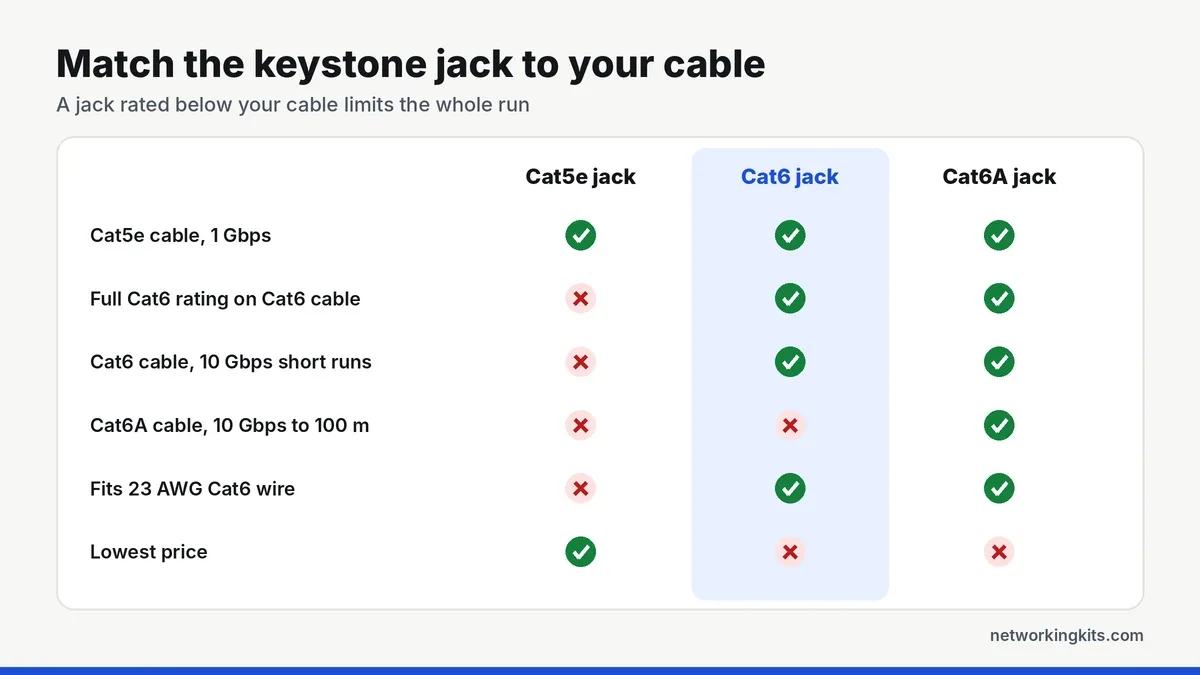
Cat6 conductors are also slightly thicker, usually 23 AWG, and Cat6 jacks are built to hold them properly. Not sure which cable you have? Our breakdown of Cat5e and Cat6 cable and Cat6 vs Cat6a explain the differences.
Which keystone jack should you buy?
- Wiring a whole house or office: Cat6 punch down jacks and a good 110 punch down tool. They are the cheapest and most reliable per port.
- Just one or two wall jacks: tool-less jacks save you buying a tool.
- Cables that already have plugs: pass-through couplers, but use them sparingly in a run.
- Shielded cable or electrically noisy areas: shielded jacks, grounded properly.
Whatever you choose, buy jacks in the same color as your wall plates, or use colors to mark different uses, such as blue for data and white for TV.
Buy a few more jacks than you need. A jack or two is often lost to practice or a mistake, and having a spare saves a second trip.
Keystone jacks in a patch panel
Keystone jacks also snap into blank keystone patch panels, which lets you swap individual ports and mix Ethernet with coax or HDMI in one panel. Our Cat6 patch panel reviews include a popular 24-port keystone panel, and our look at what a patch panel does compares keystone and punch down panels.
Final thoughts
For most home installs, a punch-down keystone jack that matches your cable category is the best value. Tool-less jacks are easier if you only do a few, and pass-through couplers are handy when you just want to extend a patch cable. Whatever you pick, match the jack rating to the cable.
Frequently Asked Questions
Are all keystone jacks the same size?
Yes. Keystone jacks share a standard outer shape, so they fit any keystone wall plate, surface box or keystone patch panel, regardless of brand or connector type.
Are tool-less keystone jacks as good as punch down jacks?
Good tool-less jacks perform just as well when installed correctly. They cost more per jack, so punch down jacks are usually better value for larger installs.
Can I use a Cat6 keystone jack with Cat5e cable?
Yes. A Cat6 jack works with Cat5e cable, and the run performs at Cat5e level. Using a Cat5e jack with Cat6 cable is the combination to avoid.
Do I need shielded keystone jacks?
Only if you use shielded cable and ground the panel or plates. With ordinary unshielded cable, unshielded jacks are the right choice.

We are network installers and home lab builders who have spent over a decade crimping, punching down and testing cable. Every guide is built from spec sheets, verified buyer feedback and real-world install experience.
How we research and score products →