On this page 11 sections
- What we judged them on
- Comparison table
- Our Top Picks Reviewed
- 1. TRENDnet TC-PDT Punch Down Tool with 110 and Krone Blade
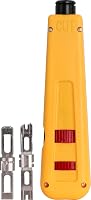
- 2. Fluke Networks D814 Impact Punch Down Tool with EverSharp 110 and 66 Blades
- 3. Jonard Tools EPD-91461 Impact Punchdown Tool with 66 and 110 Blades
- 4. DataShark 70034 110 Non-Impact Punchdown Tool
- 5. Cable Matters Punch Down Tool with 110 and 66 Blade
- Buying guide: how to choose a punch down tool
- Final verdict
- FAQ
A good punch down makes a small, satisfying snap. The wire drops into the contact, the tail gets sliced off, and you move to the next slot. A bad one feels mushy, leaves the conductor half seated and costs you a re-termination later, usually after the drywall is patched.
The tool makes the difference. A decent punch down tool seats every wire at the same depth and trims the excess in one stroke, over and over, without wearing out your hand. For a few wall jacks, almost anything works. A full 24-port patch panel means 192 wires, and that is where the right tool saves real time.
We started with the punch down tools that sell the most on Amazon.com, confirmed blade types and impact settings with each maker, and stuck to brands that installers actually trust. Then we read what installers and DIYers report after real jobs. Every pick is a punch down tool, not a crimper or a kit.
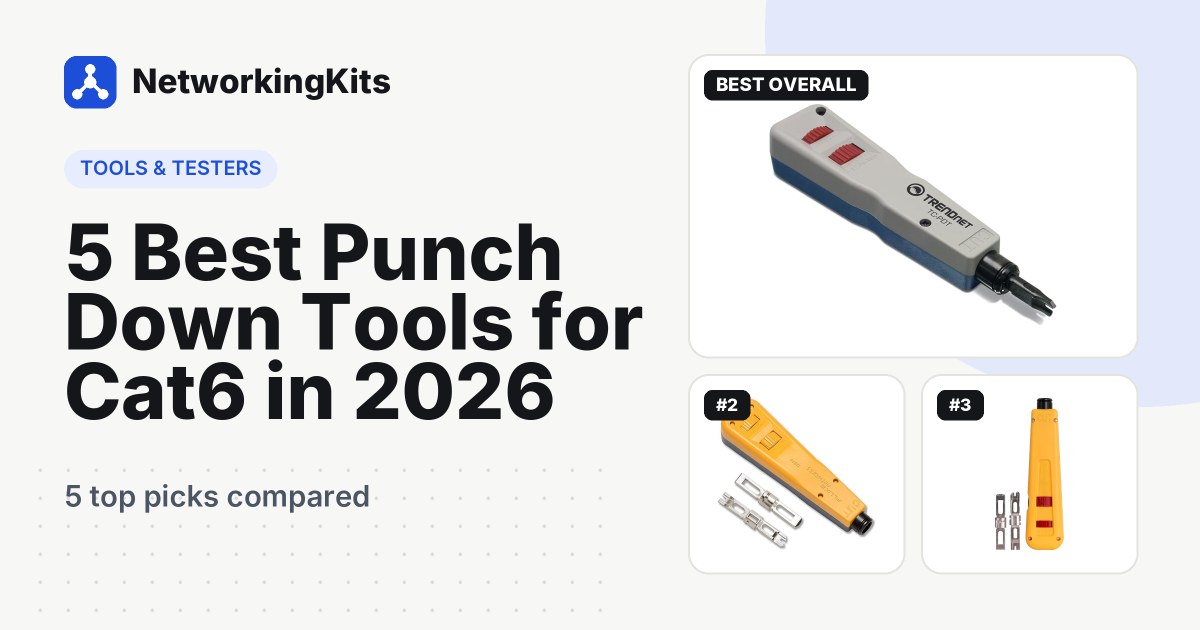
Quick answer: For most people, the TRENDnet TC-PDT is the best punch down tool. It is the easiest tool here to recommend, and it comes with swappable 110 and Krone blades plus a high and low impact setting. If you terminate panels for a living, the Fluke Networks D814 is the pro's choice. The Jonard EPD-91461 gets you a lifetime-warranted impact tool for much less.
A quick note on terms. A punch down tool terminates the solid cable inside your walls into jacks and panels, while a crimper puts plugs on patch cords. Need both? Our networking tool kit roundup covers complete sets.
What we judged them on
We focused on handheld tools for 110-style keystone jacks, patch panels and blocks. Four things decided the ranking:
- The blade. A 110 blade is essential for Ethernet. A 66 or Krone blade is a bonus for phone blocks and European modules.
- Impact action. A spring-loaded tool seats every wire with the same force. Hi and Lo settings match that force to the wire gauge.
- A clean cut. The tail should snip off on the first punch so it cannot touch the next contact.
- Owner feedback and warranty. We read the complaints too, especially about durability and blades that stop cutting.
Best Punch Down Tools for Cat6 Compared (2026)
| Product | Blades | Impact setting | Warranty | Score | |
|---|---|---|---|---|---|
 Best OverallTRENDnet TC-PDT Punch Down Tool with 110 and Krone BladeMost people wiring keystone jacks and small patch panels | 110 and Krone, reversible | Adjustable high / low | 1 year limited | 9.2 | Check Price |
 Best for ProsFluke Networks D814 Impact Punch Down Tool with EverSharp 110 and 66 BladesInstallers terminating patch panels every week | EverSharp 110 and 66 | Hi (22 AWG) / Lo (24-26 AWG) | Lifetime | 9.0 | Check Price |
 Best Value ImpactJonard Tools EPD-91461 Impact Punchdown Tool with 66 and 110 BladesDIYers and techs who want pro impact for less | 66 and 110 | Adjustable Hi / Lo | Lifetime (blades: defects only) | 8.8 | Check Price |
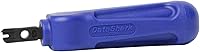 Best for Keystone JacksDataShark 70034 110 Non-Impact Punchdown ToolHome projects with a handful of keystone jacks | Fixed 110 | Non-impact | 1 year | 8.6 | Check Price |
 | 110 and 66 | Adjustable Lo / Hi | 1 year limited | 8.3 | Check Price |
Our Top Picks Reviewed
Here is a closer look at all 5 of our picks for the best punch down tools for Cat6: what each one does well, where it falls short and who it suits best, based on the specs and real buyer feedback.

TRENDnet TC-PDT Punch Down Tool with 110 and Krone Blade
- Blades
- 110 and Krone, reversible
- Impact setting
- Adjustable high / low
- Cuts excess wire
- Yes
- Extras
- Twist-and-lock holder, spare blade storage
- Warranty
- 1 year limited
The TRENDnet TC-PDT is one of the best-selling punch down tools on Amazon, and it has kept a loyal following for years. For a hand tool, that is a remarkable track record. It is also why this is our pick for almost anyone wiring a home or small office.
The idea is simple. Lay a wire in the slot of a keystone jack or patch panel, press down, and the tool seats the conductor and cuts the tail in one stroke. It is a spring-loaded impact tool, and TRENDnet gives it an adjustable high and low actuation setting. You can match the force to the wire, or just to your preference.
Two blades come in the box, a 110 and a Krone. They are interchangeable and reversible, and a twist-and-lock holder makes swaps quick while stopping the blade from pulling out mid-job. A spare blade lives in the handle so it does not wander off.

Owners mostly agree on the good stuff: it is easy to use, good value and the blades cut cleanly. It keeps selling steadily too, with more than 200 going out every month. Some installers wish it hit a little harder. Some find sockets a breeze, while others need a second or third push to seat stiff Cat6 wire. Try the high setting before you push harder.
TRENDnet covers it with a 1-year limited warranty, and it is NDAA and TAA compliant in the US and Canada. For full patch panels every week, the Fluke below holds up better. For keystone jacks and the occasional panel, this is the easiest recommendation on the page.
What we like
- Twist-and-lock blade holder
- 110 and Krone blades included
- Adjustable high and low impact
- Spare blade stored in the handle
Good to know
- Stiff Cat6 may need the high setting or a second push
- 1-year warranty, so keep the receipt
- Daily panel work suits the Fluke better

Fluke Networks D814 Impact Punch Down Tool with EverSharp 110 and 66 Blades
- Blades
- EverSharp 110 and 66
- Impact setting
- Hi (22 AWG) / Lo (24-26 AWG)
- Cuts excess wire
- Yes
- Extras
- Locking blade, spare blade storage in handle
- Warranty
- Lifetime
Watch a commercial installer finish a 48-port panel, and there is a good chance a Fluke Networks D814 is in their hand. It is the tool pros buy when consistency matters more than price.
The D814 is a true impact tool with an adjustable spring. The low setting suits 24 and 26 AWG wire, and the high setting drives heavier 22 AWG conductors. Because the spring releases at the same point every time, port 1 and port 48 get the same termination.

This version comes with Fluke's EverSharp 110 and 66 blades, so it handles Ethernet panels, keystone jacks and older phone blocks. The blades lock in place when you insert them, and a compartment in the end of the handle holds a spare.
Fluke Networks covers the D814 with a lifetime warranty, the strongest promise on this list. There is less owner feedback on Amazon than for the other picks, because most pros buy their tools from electrical distributors. What feedback there is stays positive, and EverSharp blades have a strong reputation among installers.
The catch is price. It is the most expensive tool here, and its strengths really show when you terminate panels every week. For a handful of wall jacks, it is more than you need. If punching down is part of your job, though, it pays for itself in fewer re-terminations.
What we like
- Consistent spring impact on every wire
- EverSharp 110 and 66 blades
- Spare blade storage in the handle
- Lifetime warranty
Good to know
- Priciest pick, best for frequent panel work
- Less Amazon feedback, as pros often buy elsewhere
- More tool than a few wall jacks need
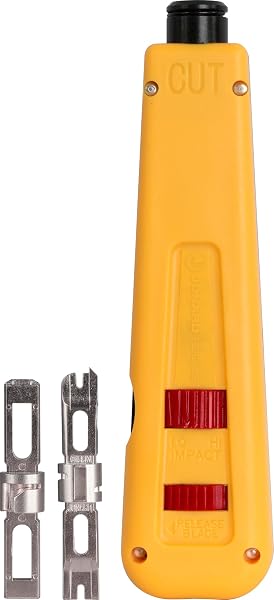
Jonard Tools EPD-91461 Impact Punchdown Tool with 66 and 110 Blades
- Blades
- 66 and 110
- Impact setting
- Adjustable Hi / Lo
- Cuts excess wire
- Yes
- Extras
- Hook/spudger, yellow cut side, blade storage
- Warranty
- Lifetime (blades: defects only)
Ever punched a wire with the blade facing the wrong way? You cut the conductor you just seated, and you start over. The Jonard Tools EPD-91461 makes that mistake hard to make.
The body is split into two colors, with the cut side marked yellow, so you can tell at a glance which way the blade faces. That sounds minor until you are on your knees behind a desk in poor light. A combination hook and spudger stores in the chassis for pulling wires back out, and an enlarged compartment holds spare blades.

Underneath those friendly details is a proper impact tool. It has high and low settings and ships with both a 66 and a 110 blade. Position the wire, push, and listen for the pop that tells you it is seated.
It is sold in several blade bundles of the same tool, and owners across them tell a similar story. Buyers praise the build quality, the well-made blades and the value for money. The most common criticism comes from people who expected it to feel as polished as tools costing several times more.
Here is what makes it a smart buy. Jonard's Made For Life warranty covers the tool itself for life, while blades count as wear parts covered against defects. Want a true impact tool for patch panels without paying for the Fluke name? This is the smart buy.
What we like
- High and low impact settings
- Yellow cut side shows blade direction
- Built-in hook and spudger
- Lifetime warranty on the tool
Good to know
- Feels less refined than the Fluke
- Blades are wear parts, so keep a spare
- Sold in several blade bundles, so check which one you pick

DataShark 70034 110 Non-Impact Punchdown Tool
- Blades
- Fixed 110
- Impact setting
- Non-impact
- Cuts excess wire
- Yes
- Extras
- Comfortable handle
- Warranty
- 1 year
No springs. No settings. Nothing to adjust. The DataShark 70034 is the simplest tool on this list, and for a first-time DIYer that can be a real advantage.
It is a non-impact tool with a fixed 110 blade. You press the wire into the slot of a keystone jack or patch panel, and the blade seats it and trims the tail. It is designed for Cat5, Cat5e and Cat6 cable, both UTP and STP.

Without an impact mechanism, you feel exactly when each wire seats. Many beginners like that, because they can see and sense what the tool is doing on their first few jacks. The comfortable handle stays easy to hold through a dozen terminations.
Owners are a happy bunch here. People praise the quality and the clean cuts, and they say it suits home projects especially well. One owner said it made installing several punch down keystone jacks a breeze.
The limits come from the design. The blade is fixed, so there is no 66 or Krone option. A few owners need a firm push or a second pass to cut cleanly, and it will feel slow on a full panel. DataShark covers it for 1 year. For a weekend of keystone jacks around the house, though, it is a great little tool.
What we like
- Simple and easy to control
- Clean cuts for most owners
- Great for a few keystone jacks
- Comfortable handle
Good to know
- Fixed 110 blade only
- A firm push helps on stiff wire
- An impact tool is faster for full panels

Cable Matters Punch Down Tool with 110 and 66 Blade
- Blades
- 110 and 66
- Impact setting
- Adjustable Lo / Hi
- Cuts excess wire
- Yes
- Extras
- Twist-and-lock blade, blade storage
- Warranty
- 1 year limited
On a tight budget but still want impact action? The Cable Matters punch down tool brings a spring mechanism and two blades to the lowest price on this list.
It has adjustable Lo and Hi force settings, and this version includes both a 110 and a 66 blade. It terminates Ethernet and voice cable into 110 patch panels, keystone jacks and blocks. Cable Matters lists it as compatible with keystone jacks for Cat5 through Cat8 cable.

The blade swaps with a twist-and-lock socket, and the spare rides inside the tool body. The spring action makes each punch quick and low effort, which helps when you are working down a row of jacks.
It is a popular pick, with more than 500 selling every month. Buyers call it excellent quality for the price, and its smooth action comes up again and again.
Long-term durability is the soft spot. One buyer felt it was not tough enough for rack work, and another had the head pop off during use. Cable Matters covers its products with either a one-year limited or a lifetime warranty depending on the item, so count on at least a year. For a home network, it is a fine value. If you terminate panels often, step up to the Jonard or Fluke.
What we like
- Impact action at the lowest price here
- 110 and 66 blades included
- Smooth spring action
- Over 500 sold every month
Good to know
- Built for home jobs rather than daily rack work
- Some owners report wear over time, so keep the receipt
- Warranty length is not spelled out, so plan on 1 year
What we ruled out
Not everything that shows up in a search made our list. Here is what we left out and why, so you know what to avoid when you shop.
- Crimpers and all-in-one kits. Crimpers do a different job, and kits bundle tools you may not need. Every pick here is a dedicated punch down tool.
- Tools without a 110 blade. US Ethernet jacks and patch panels use 110 contacts, so a Krone-only or 66-only tool would leave you stuck.
- Unknown brands and tools with a weak track record. Blade quality is hard to judge from a listing photo. We stuck to established networking brands with a proven owner record.
Buying guide: how to choose a punch down tool
Punch down tools all look roughly alike. The real differences hide in the blade, the spring and the warranty. Here is what to check before you buy.
Start with the blade: 110, 66 or Krone
Nearly every Ethernet keystone jack and patch panel sold in the US uses 110-style contacts. So the 110 blade is the one you will use on every job. 66 blades are for older telephone blocks, and Krone blades fit LSA-style modules common in Europe and some phone systems.
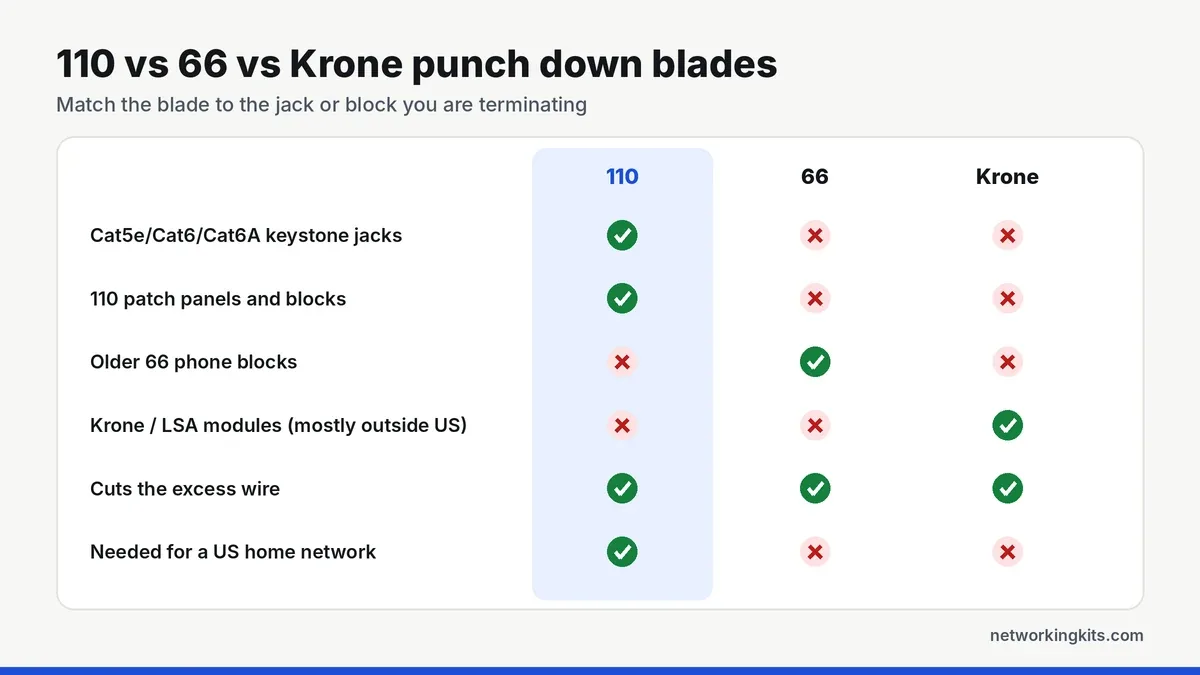
Every tool on this list except the DataShark ships with a second blade, which helps if you ever touch phone wiring. If you only do Ethernet, a 110 blade alone is fine.
Impact or non-impact?
An impact tool has a spring that releases at a set point, driving the blade with the same force every time. That consistency is why installers reach for one on full patch panels. The Hi and Lo settings match the force to the wire. Lo usually suits 24 and 26 AWG, and Hi suits the heavier 22 and 23 AWG conductors in many Cat6 cables.
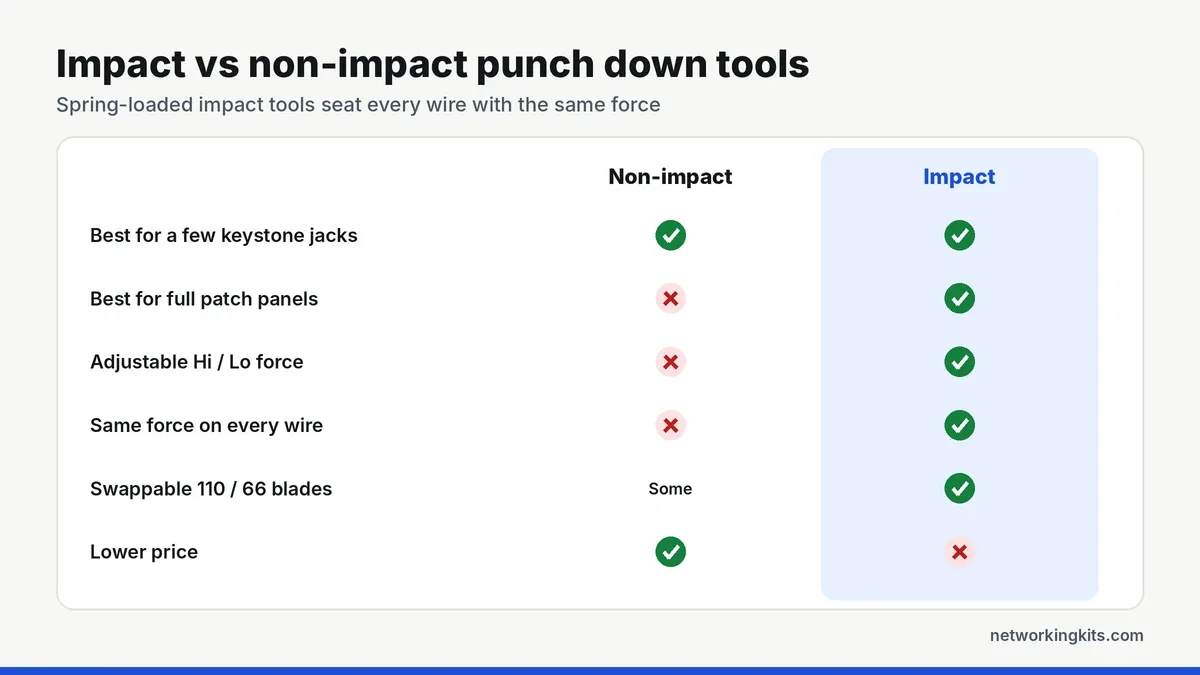
A non-impact tool relies on your hand alone. It is simpler and gives you more feel, which is great for a handful of keystone jacks. On a 24-port panel, though, the results start to depend on how tired your hand is by port 20.
Get the cut side right
Every tool here trims the excess as it punches, but only if the blade faces the right way. The cutting edge must face the outside of the jack, away from the contact. Point it inward and you slice the wire you just terminated. The Jonard marks its cut side in yellow, which makes this hard to get wrong.
Blades also dull with use, especially on thick Cat6 copper. If tails stop cutting cleanly, swap the blade before you blame the jack.
Small extras that add up
A built-in hook and spudger, like the Jonard's, lets you pull a wire back out or dress a bundle without grabbing another tool. Blade storage in the handle keeps the spare from vanishing into a toolbag. And a comfortable grip matters more than you would think by wire 150.
Jacks or a whole panel?
Most people buy a punch down tool for one of two jobs: wall jacks around the house, or a patch panel in a closet. Both use the same 110 contacts. A panel just means doing it eight times per port, all in a row, which is where an impact tool earns its keep. Our beginner's explainer on patch panels covers when you need one, and our patch panel shortlist includes punch down and keystone models.
Technique matters as much as the tool
Strip back only as much jacket as you need. Keep each pair twisted right up to the jack, lay every wire in its color-coded slot, and punch with the cut side facing out.
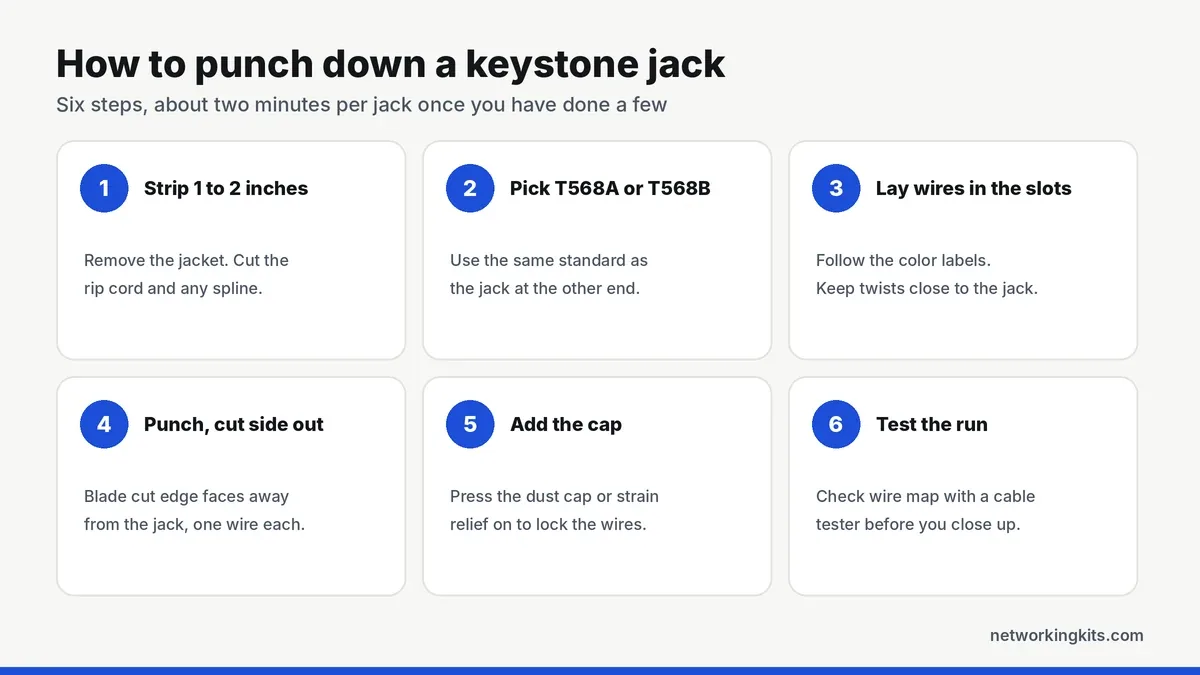
Use the same wiring standard as the jack at the far end of the cable. Our guide to T568A and T568B wiring explains the difference, and our step-by-step keystone tutorial walks through the whole job.
Test every run before you close up the wall or the rack. A wire can look seated and still have a weak contact. Our picks for a network cable tester range from simple wire map verifiers to qualification testers.
What the warranties really cover
Coverage on this list ranges widely. Fluke Networks and Jonard both cover their impact tools for life, though Jonard treats blades as wear parts that are only covered against defects. TRENDnet and DataShark offer one year. Cable Matters gives its products either a one-year limited or a lifetime warranty depending on the item, so plan on the shorter term for its tool.
Punch down tool or crimper?
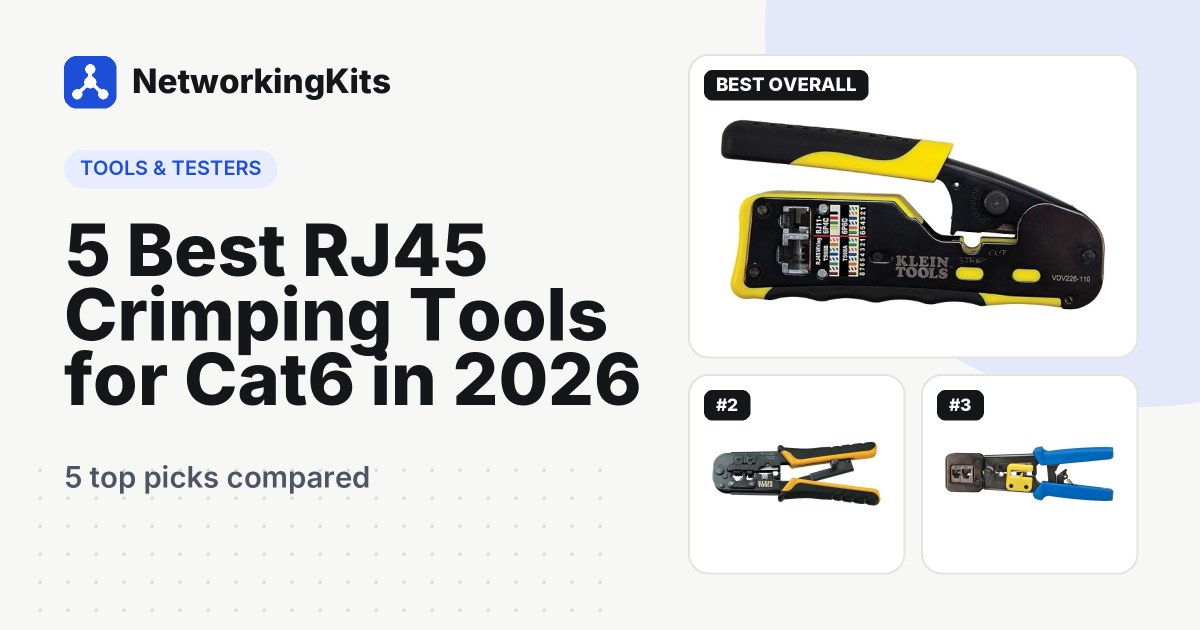
They are not interchangeable. A punch down tool terminates solid in-wall cable into jacks and panels. A crimper attaches RJ45 plugs to patch cords. Wiring a house usually calls for both, plus a tester. Our guide to the best RJ45 crimping tools handles the crimper side.
Final verdict
For most people, the TRENDnet TC-PDT is the best punch down tool for Cat6. It is easy to use, has an adjustable impact setting, and comes with both 110 and Krone blades. Whether you are wiring a few keystone jacks at home or a small office patch panel, it seats and trims each wire cleanly. It is the tool we would hand to a first-timer, and it is solid enough that experienced installers rarely outgrow it for small jobs.
If you terminate patch panels every week, the Fluke Networks D814 is worth the extra money for its consistent impact and lifetime warranty. For a handful of jacks, the gentle DataShark 70034 is all you need. The Jonard EPD-91461 is a great middle ground, with pro impact action and a lifetime warranty for less than the Fluke. Whichever you choose, keep the blade's cut side facing the loose wire end, and most bad terminations never happen.
Frequently Asked Questions
What is the best punch down tool for home use?
For most homes, the TRENDnet TC-PDT is the best choice. It is easy to use, consistently well reviewed by owners, and includes a 110 blade for keystone jacks and patch panels plus a Krone blade.
Do I need a 110 or 66 punch down blade?
For Ethernet, you need a 110 blade. Cat5e, Cat6 and Cat6A keystone jacks and patch panels use 110 contacts. A 66 blade is only for older telephone punch down blocks.
Is an impact punch down tool worth it?
Yes, if you are terminating a patch panel or more than a few jacks. An impact tool seats every wire with the same force, and its Hi and Lo settings give more consistent results with less hand fatigue.
Can I punch down a keystone jack without a punch down tool?
Many keystone jacks include a small plastic punch tool, and tool-less jacks have a cap that presses the wires in by hand. A real punch down tool is faster and more reliable, and it trims the excess wire cleanly.
Which way should the punch down blade face?
The cutting edge must face the outside of the jack, away from the contact. If it faces inward, the blade can cut the wire you are terminating. Most tools mark the cut side, and the Jonard colors it yellow.
Tell us a little about your home or office network and we will point you in the right direction. We read every message.

We are network installers and home lab builders who have spent over a decade crimping, punching down and testing cable. Every guide is built from spec sheets, verified buyer feedback and real-world install experience.
How we research and score products →