On this page 6 sections
A keystone jack is the part that turns a bare cable poking out of a wall into a clean Ethernet port. Terminating one looks intimidating the first time, with eight tiny wires and a row of color-coded slots, but it is one of the easiest networking skills to learn.
Once you have done two or three, each jack takes about two minutes. This guide walks through the tools you need, the exact steps and the small mistakes that cause most failed jacks.
What you need
- Keystone jacks rated for your cable, such as Cat6 jacks for Cat6 cable.
- A 110 punch down tool. Many jacks include a small plastic tool, but a real punch down tool seats the wires more reliably and trims them in the same motion. Our impact punch down tool reviews cover simple and impact models.
- A cable stripper or a sharp utility knife used carefully.
- Flush cutters to trim the spline and any leftover tails.
- A cable tester to confirm the jack works before you close up the wall.
Solid copper in-wall cable is the right choice for keystone jacks. Stranded patch cable does not hold well in punch down contacts.
Step by step
1. Strip the jacket
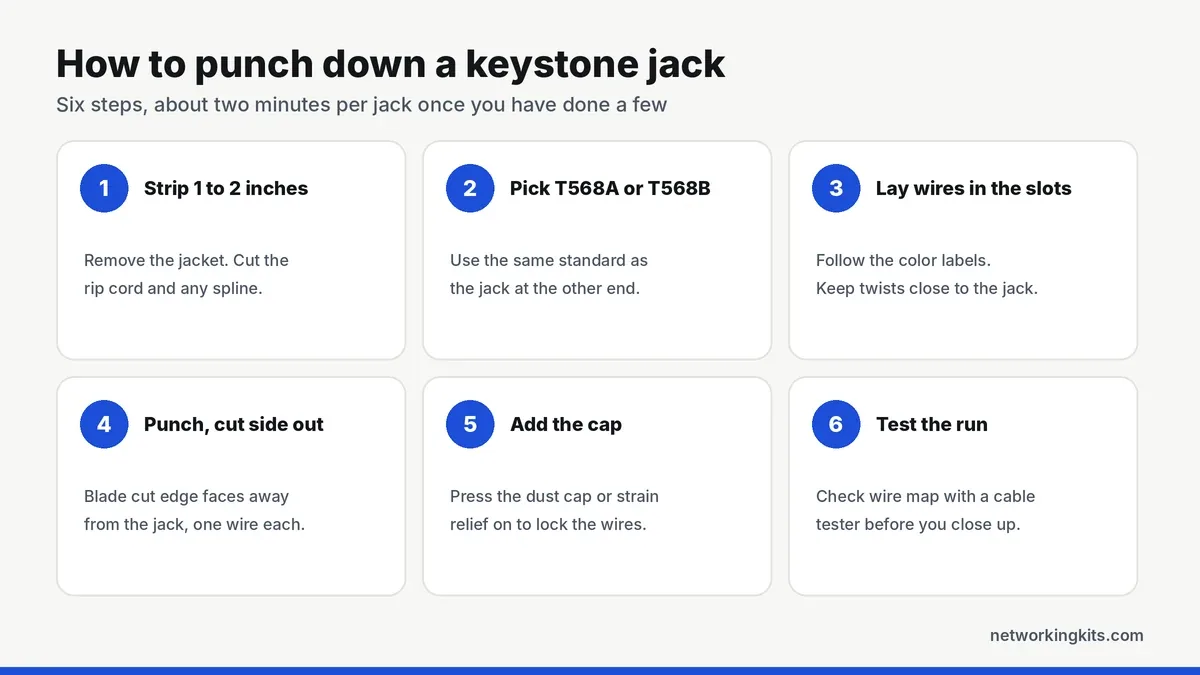
Remove about 1 to 2 inches (25 to 50 mm) of the outer jacket. Score it lightly so you do not nick the insulation on the wires inside. If the cable has a rip cord, use it to split the jacket back, and cut off the plastic spline in Cat6 cable flush with the jacket.
2. Choose your wiring standard
Keystone jacks are labeled for both T568A and T568B. Use the same standard as the jack or patch panel at the other end of the cable. T568B is the most common choice in the US. Our T568A vs T568B wiring guide explains the difference.
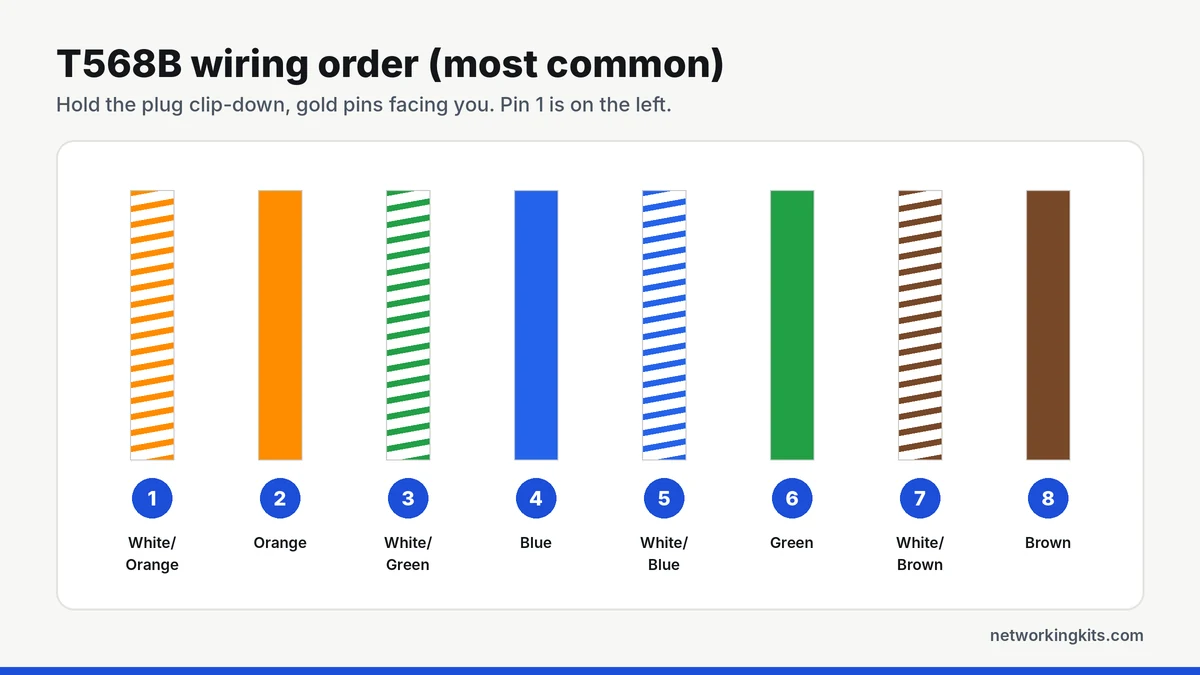
3. Lay the wires in the slots
Separate the four pairs and lay each wire into its color-coded slot on the jack. Keep the pairs twisted as close to the contacts as possible, ideally with no more than half an inch (13 mm) of untwisted wire. Untwisting too far is the most common reason a Cat6 jack fails a test even when every color is correct.
4. Punch down each wire
Put the punch down tool on the first wire with the cut side of the blade facing outward, away from the jack. Press firmly until the tool clicks or the wire seats fully. The blade pushes the wire into the contact and trims the excess at the same time. Repeat for all eight wires.
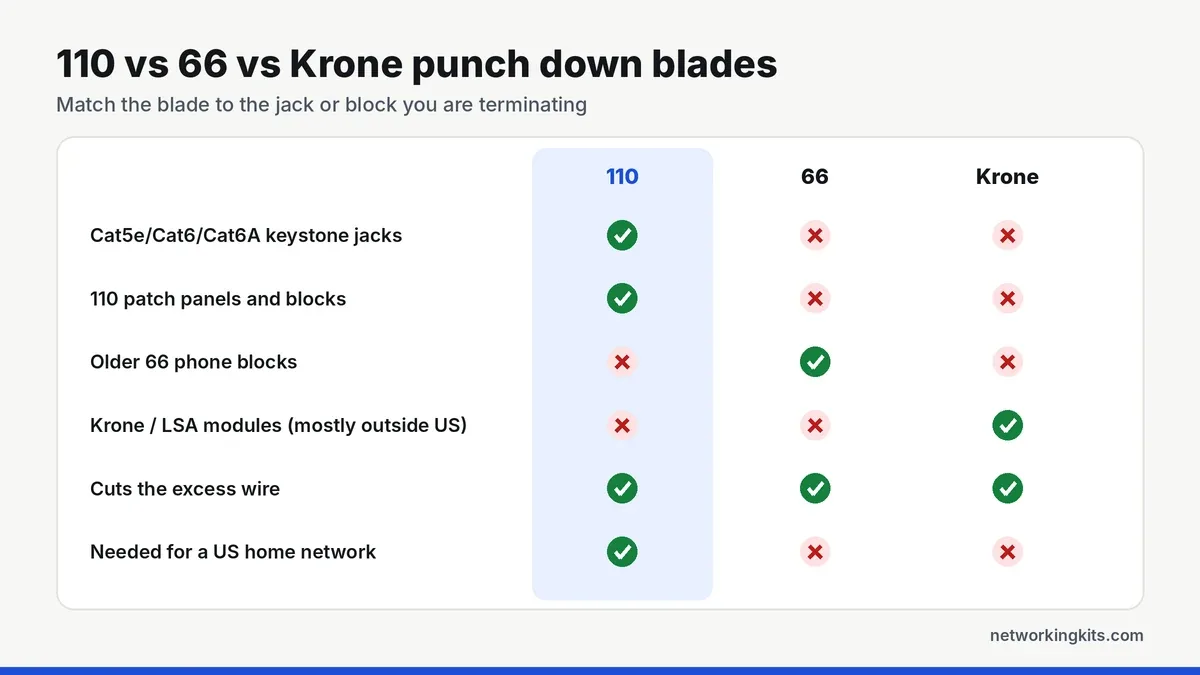
If a tail does not cut cleanly, punch it again or trim it with flush cutters. A loose tail can touch the neighboring contact and cause problems later.
5. Add the cap
Most jacks include a dust cap or strain relief that snaps over the terminated wires. It holds them in place and keeps the cable from pulling on the contacts. Then snap the jack into the wall plate or patch panel.
6. Test the run
Plug a cable tester into both ends and check the wire map. All eight wires should show as connected in order, with no opens, shorts or swapped pairs. If one wire fails, re-punch that wire before redoing the whole jack.
Leave a little extra cable, about a foot, coiled behind the wall plate or panel. If a jack ever needs to be redone, you can cut it off and start again without pulling a new run.
Common mistakes and how to fix them
- Blade facing the wrong way: it cuts the wire on the jack side. Turn the tool so the cut side faces out.
- Mixed standards: T568A at one end and T568B at the other creates a crossover. Re-terminate one end to match.
- Too much untwisted wire: the run may work at 100 Mbps but fail at gigabit. Re-strip and keep the twists closer.
- Jacket outside the jack: without the jacket inside the strain relief, the wires take all the pulling force. Strip less next time.
- Wrong category jack: a Cat5e jack on Cat6 cable may not fit the thicker wires well. Match the jack to the cable.
Punch down jack or a crimped plug?
Use keystone jacks and patch panels for cables that live inside walls, and crimped RJ45 plugs for patch cables you plug and unplug. If you need to make patch cables too, our walkthrough on crimping an RJ45 cable covers crimping, and our guide to the types of keystone jacks explains tool-less and pass-through options.
Terminating a whole closet? Our Cat6 patch panel reviews use the same 110 punch down technique, just 24 times in a row.
Bottom line
Punching down a keystone jack comes down to three habits: keep the twists close to the jack, follow one wiring standard on both ends, and face the cutting side of the blade outward. Test every run before you close the wall plate, and you will rarely need to redo a jack.
Frequently Asked Questions
Can I punch down a keystone jack without a tool?
Many keystone jacks include a small plastic punch tool, and tool-less jacks have a hinged cap you press by hand. A proper 110 punch down tool is faster and more reliable, and it trims the excess wire cleanly.
Should I use T568A or T568B for keystone jacks?
Either works, as long as both ends of the cable use the same standard. T568B is the most common in the US, and most jacks are labeled for both.
How much wire should be untwisted at a keystone jack?
Keep no more than about half an inch (13 mm) of untwisted wire at the jack. Untwisting too far increases crosstalk and can make Cat6 runs fail at gigabit speeds.
Why does my keystone jack only connect at 100 Mbps?
Gigabit needs all four pairs. A link stuck at 100 Mbps usually means one wire is not seated, damaged or in the wrong slot. Test the run and re-punch any wire that fails.

We are network installers and home lab builders who have spent over a decade crimping, punching down and testing cable. Every guide is built from spec sheets, verified buyer feedback and real-world install experience.
How we research and score products →