On this page 11 sections
- How we chose these 5-port switches
- Comparison table
- Our Top Picks Reviewed
- 1. TP-Link TL-SG105 5 Port Gigabit Unmanaged Ethernet Switch
- 2. D-Link DGS-105 5-Port Gigabit Unmanaged Ethernet Switch
- 3. TP-Link TL-SG1005P 5 Port Gigabit PoE Switch
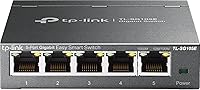
- 4. TP-Link TL-SG105E 5 Port Gigabit Easy Smart Managed Switch
- 5. UGREEN 5 Port Gigabit Ethernet Switch
- Buying guide: picking the right 5-port gigabit switch
- Final verdict
- FAQ
Your router has only a few Ethernet ports, and they are already taken. Maybe it is the TV stand at home, where the TV, console and streaming box all want a wired connection. Maybe it is a desk at the office, where a PC, an IP phone and a printer share one wall jack.
A 5-port gigabit switch solves both. You plug the one existing cable into the switch, and it gives you four more full-speed ports. There is nothing to install and nothing to set up. It is one of the cheapest network upgrades you can make.
We compared the most popular 5-port switches on Amazon.com, checked each spec and warranty on the maker's own site, and left out models with slower 10/100 ports or no track record. Here are the five worth buying.
Quick answer: Buy the TP-Link TL-SG105. It is small, silent, built in steel and backed by a 3-year warranty. Want the longest warranty? The D-Link DGS-105 carries a limited lifetime warranty once you register it. Need to power a camera or access point? Get the TP-Link TL-SG1005P with four PoE+ ports.
Already counting more than four devices? Jump to our 8-port gigabit switch picks, since the bigger box usually costs only a few dollars more.
How we chose these 5-port switches
Every pick here has exactly five gigabit ports. Beyond that, these were the deciding factors:
- Gigabit on all five ports. Each port runs at 1 Gbps, with enough switching capacity for all five to work flat out at once.
- A brand that stands behind it. TP-Link, D-Link and UGREEN all publish a clear US warranty for these models.
- No fan, no noise. Every switch here is fanless, so it can live in a bedroom or next to the TV.
- Long-term owner feedback. We read owner reviews for patterns, especially how each switch holds up after a year or two.
Best 5 Port Gigabit Switches Compared (2026)
| Product | Type | PoE | Case | Warranty | Score | |
|---|---|---|---|---|---|---|
 Best OverallTP-Link TL-SG105 5 Port Gigabit Unmanaged Ethernet SwitchHomes and office desks that need four more wired ports | Unmanaged, plug and play | None | Steel, fanless, wall-mountable | 3 years | 9.3 | Check Price |
 Best BuiltD-Link DGS-105 5-Port Gigabit Unmanaged Ethernet SwitchLong-term installs in homes and offices with unstable power | Unmanaged, plug and play | None | All-steel, fanless, wall-mountable | Limited lifetime | 9.1 | Check Price |
 Best PoETP-Link TL-SG1005P 5 Port Gigabit PoE Switch (4 PoE+ Ports)Powering security cameras, access points or VoIP phones | Unmanaged PoE+, plug and play | 65W on 4 ports | Metal, fanless, wall-mountable | 3 years | 9.0 | Check Price |
 Best ManagedTP-Link TL-SG105E 5 Port Gigabit Easy Smart Managed SwitchHome labs and anyone who wants VLANs | Easy Smart managed | None | Metal, fanless, shielded ports | 3 years | 8.9 | Check Price |
 | Unmanaged, plug and play | None | Compact, fanless, wall-mountable | 2 years | 8.5 | Check Price |
Our Top Picks Reviewed
Here is a closer look at all 5 of our picks for the best 5 port gigabit switches: what each one does well, where it falls short and who it suits best, based on the specs and real buyer feedback.

TP-Link TL-SG105 5 Port Gigabit Unmanaged Ethernet Switch
- Ports
- 5 x Gigabit RJ45
- Type
- Unmanaged, plug and play
- Extras
- 802.1p/DSCP QoS, IGMP snooping
- Case
- Steel, fanless, wall-mountable
- PoE
- None
- Warranty
- 3 years
More than 10,000 people bought a TL-SG105 last month alone. That kind of popularity sometimes just means a product is cheap, but here it also means the switch is genuinely good.
It is roughly the footprint of a drink coaster, wrapped in a steel case. Five gigabit ports sit on the front, and each one works out the right speed and cable type on its own. Plug in the power, connect one port to your router, and the other four are ready. There is no fan, so it makes no sound at all.

Owners keep coming back to the same praise. It is easy to set up, small enough to hide next to an outlet, and steady at full gigabit speed without slowing their internet. That kind of consistency across so many buyers is why it tops this list.
It also sneaks in a few extras. 802.1p and DSCP QoS help voice and video traffic when the network is busy. IGMP snooping keeps IPTV streams from flooding every port, and idle ports drop to low power by themselves.
As for weak spots, a small number of owners say their unit quit after a few months. At this sales volume that is expected, and TP-Link's 3-year warranty covers it. There are no VLANs or PoE, but the TL-SG105E and TL-SG1005P below handle those jobs.
What we like
- Compact, coaster-sized footprint
- Silent steel case
- QoS and IGMP snooping built in
- Zero setup
Good to know
- No VLANs (the TL-SG105E adds them)
- No PoE (the TL-SG1005P adds it)
- Rare early failures are covered for 3 years

D-Link DGS-105 5-Port Gigabit Unmanaged Ethernet Switch
- Ports
- 5 x Gigabit RJ45
- Type
- Unmanaged, plug and play
- Extras
- 802.1p QoS, IGMP snooping, 4 kV surge protection
- Case
- All-steel, fanless, wall-mountable
- PoE
- None
- Warranty
- Limited lifetime
Live somewhere with summer storms or flickering power? The D-Link DGS-105 was built with you in mind. It has surge and ESD protection rated to plus or minus 4 kV, so everyday power spikes are less likely to take it out.
It also carries the best coverage on this list. D-Link offers a limited lifetime warranty once you register the switch, while the TP-Link models get 3 years. That makes it our pick for a switch you plan to plug in and forget for a decade.

Inside the all-steel case, five gigabit ports share a 10 Gbps non-blocking engine, so every port can run at full speed in both directions. 802.1p QoS helps gaming and voice calls, IGMP snooping handles streaming to several screens, and 802.3az power saving cuts energy use on idle ports. Rubber feet and keyhole slots let it sit on a shelf or hang on a wall.
Owners are just as happy as TP-Link buyers. People say it simply works with no setup and feels solid. They also like the two LEDs on each port, which show link and activity at a glance.
Most durability stories are long ones, with plenty of owners running theirs for years. That is exactly where the lifetime warranty helps, so register it the day it arrives. Note that the DGS-105 shares its Amazon listing, and its owner feedback, with the 8-port DGS-108.
What we like
- Limited lifetime warranty
- Built-in surge and ESD protection
- All-steel case, two LEDs per port
- 802.3az power saving on idle ports
Good to know
- Register it to activate lifetime coverage
- No management features
- No PoE (the TL-SG1005P adds it)
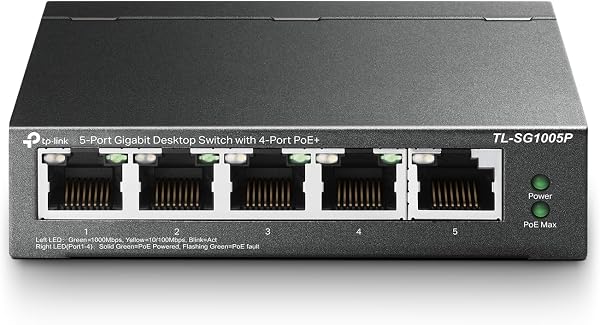
TP-Link TL-SG1005P 5 Port Gigabit PoE Switch (4 PoE+ Ports)
- Ports
- 5 x Gigabit RJ45 (4 PoE+)
- Type
- Unmanaged PoE+, plug and play
- Extras
- 30W per port, 65W total budget
- Case
- Metal, fanless, wall-mountable
- PoE
- 65W on 4 ports
- Warranty
- 3 years
Ceiling cameras and access points share one annoying problem: the outlet is never where you need it. The TP-Link TL-SG1005P fixes that by sending power and data down the same Ethernet cable.
Four of its five ports support PoE+ (802.3af and 802.3at), with up to 30 watts each and 65 watts shared between them. The fifth port is a regular gigabit port for your router. That budget comfortably runs four typical indoor cameras, or a couple of access points with room to spare.

Owners describe it as reliable and ready to go straight out of the box, and many use it for exactly this job: powering security cameras. One buyer slotted it into a TP-Link Omada setup without any trouble. Complaints are rare.
Under the hood, it matches the TL-SG105: a fanless metal case, 802.1p and DSCP QoS, IGMP snooping and flow control. If the total draw ever goes over 65 watts, it cuts power to lower-priority ports first instead of shutting everything down. It carries a 3-year warranty.
Just do the math before you buy. Four 30-watt devices at full load would need 120 watts, so this is not the switch for a row of PTZ cameras. Also check that your devices follow the 802.3af or 802.3at standard, since some cheap cameras use passive PoE instead.
What we like
- Four PoE+ ports, up to 30W each
- No power adapters needed at devices
- Fanless metal case
- Drops low-priority ports first if overloaded
Good to know
- 65W is shared, so total your devices first
- Needs 802.3af/at devices, not passive PoE
- Costs more than a plain switch

TP-Link TL-SG105E 5 Port Gigabit Easy Smart Managed Switch
- Ports
- 5 x Gigabit RJ45
- Type
- Easy Smart managed
- Extras
- 32 VLANs, QoS, port mirroring, cable test
- Case
- Metal, fanless, shielded ports
- PoE
- None
- Warranty
- 3 years
Ever wondered why that bargain smart plug sits on the same network as your work laptop? The TP-Link TL-SG105E is the easiest way to change that. It is a 5-port Easy Smart switch that can split one network into several.
Out of the box, it acts like any plug-and-play switch. Open its web page or TP-Link's Windows utility when you are ready, and you can run up to 32 VLANs (port-based, 802.1Q tag-based or MTU). You also get QoS, IGMP snooping, rate limiting, storm control and static link aggregation. Our walkthrough on creating your first VLAN gets you started.

The troubleshooting tools are the hidden gem. Port mirroring copies traffic for analysis, and loop prevention catches a cable accidentally plugged in twice. The cable test can even spot a damaged run without unplugging anything.
Owner feedback is strongly positive. Buyers say it works flawlessly, sets up easily and holds around 950 Mbps in real transfers, which is what a gigabit link actually delivers. Many call it great value for a switch with VLANs.
Expect a short learning curve, since VLANs can feel confusing the first time. Change one setting at a time and write down the switch's IP address before you start. If a unit ever acts up, TP-Link's 3-year warranty has your back. For a first home lab, it is our favorite.
What we like
- Up to 32 VLANs
- Port mirroring, loop prevention and cable test
- Plug and play until you need more
- Static link aggregation
Good to know
- VLANs take practice, so change one setting at a time
- Desktop utility is Windows-only (the web page works anywhere)
- No PoE

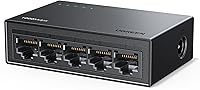
UGREEN 5 Port Gigabit Ethernet Switch
- Ports
- 5 x Gigabit RJ45
- Type
- Unmanaged, plug and play
- Extras
- Port LEDs, auto MDI/MDIX
- Case
- Compact, fanless, wall-mountable
- PoE
- None
- Warranty
- 2 years
Some desks have no room for anything, and the UGREEN 5-port switch is made for them. Owners say it is close to the size of a credit card, so it vanishes behind a monitor or under a laptop stand.
It is a plain unmanaged switch with five gigabit ports, auto MDI/MDIX and a status light on each port. There are no drivers, no settings and no fan. It works with Windows, macOS, Linux, consoles and anything else with an Ethernet port, and wall-mount holes on the back get it off the desk entirely.

For the price, the feedback is impressive. Buyers call it a nice basic device that holds gigabit speed reliably, and one says it was an affordable way to expand a network without a complicated install.
The tiny size has a cost, since the ports sit close together, so chunky cable boots can be a squeeze side by side, and slim patch cables solve that. A few owners also mention random disconnects, which is why it ranks below the metal TP-Link and D-Link picks. It has no PoE, and UGREEN covers it for 2 years.
For a quick desk upgrade on a tight budget, it is a smart buy. For a switch that runs 24/7 in a TV cabinet for years, we would spend a little more on the TL-SG105.
What we like
- Credit-card-sized footprint
- Very low price
- Status light on every port
- No drivers or setup
Good to know
- Tight port spacing, so slim cables fit best
- A few reports of random disconnects
- Shorter 2-year warranty than the metal picks
What we ruled out
Not everything that shows up in a search made our list. Here is what we left out and why, so you know what to avoid when you shop.
- 10/100 Fast Ethernet switches. They are a little cheaper, but they cap every device at 100 Mbps. That slows file transfers and wastes most modern internet plans.
- 2.5G and multi-gig models. They cost much more and only help when your router, PC or NAS already has 2.5G ports. They deserve a list of their own.
- No-name brands and shaky track records. We skipped sellers without a clear warranty or networking track record, and kept only models that are consistently well reviewed by owners.
- Larger 8-port switches. They are a different size class. If you need more than four free ports, our 8-port roundup covers them.
Buying guide: picking the right 5-port gigabit switch
On the shelf, these switches look almost identical. The differences hide in the details: the case, the warranty, and whether you need anything beyond plain plug and play. Here is how to sort them out in a few minutes.
Why five ports means four free ones
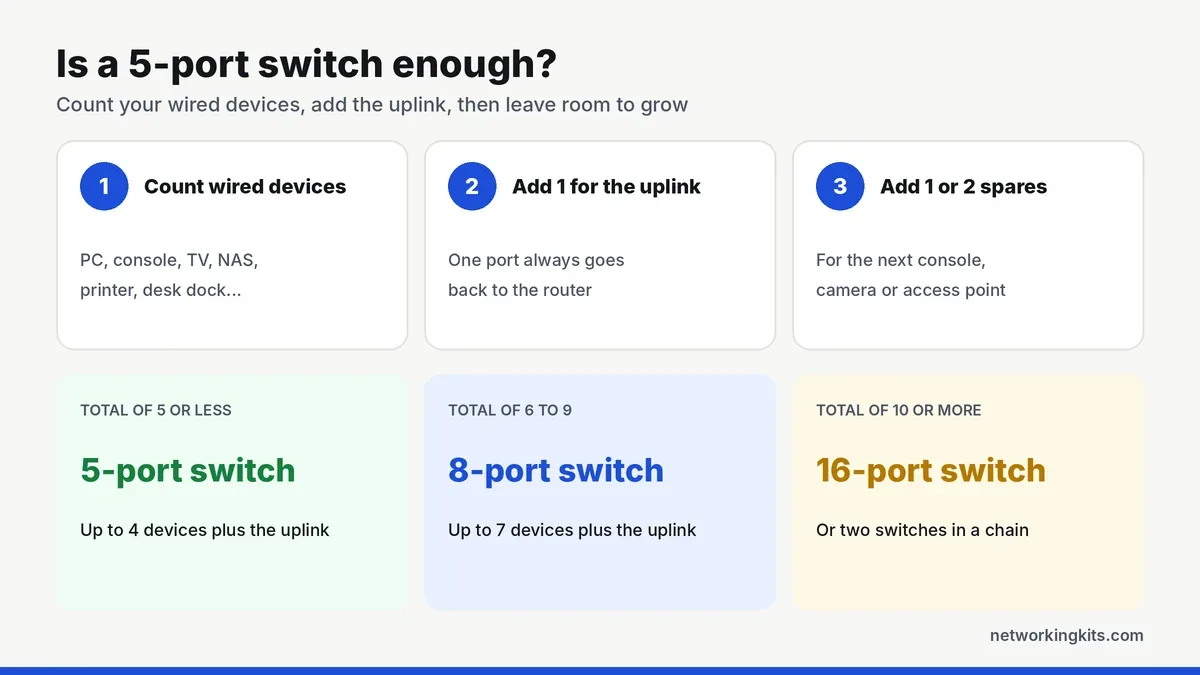
One port always goes back to your router. That link is called the uplink, and it is how every device on the switch reaches the internet. So a 5-port switch gives you four new ports, not five. It does not matter which port you pick for the uplink, since all five are identical.
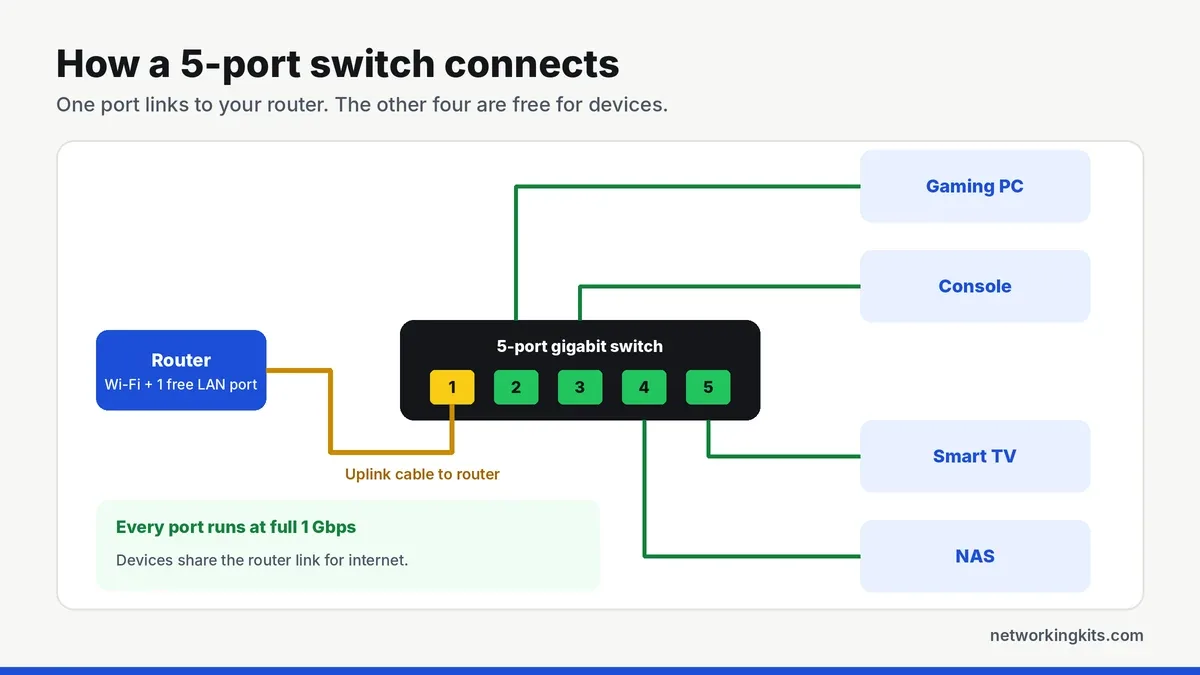
Devices on the same switch talk to each other directly, at full speed. Copying a big file from a PC to a NAS on the same switch never touches the router. For internet traffic, all four devices share the single uplink, which is plenty for nearly every home or small-office internet plan. Wondering how this differs from an old hub? Our explainer on switches versus hubs covers it in plain English.
Unmanaged, smart managed or PoE?
Think of these as three flavors of the same box. Unmanaged switches like the TL-SG105, DGS-105 and UGREEN do one job with zero setup, and that is what most homes and office desks need. The smart managed TL-SG105E adds VLANs, traffic rules and port statistics. The TL-SG1005P also sends power over the cable to cameras, access points and phones.
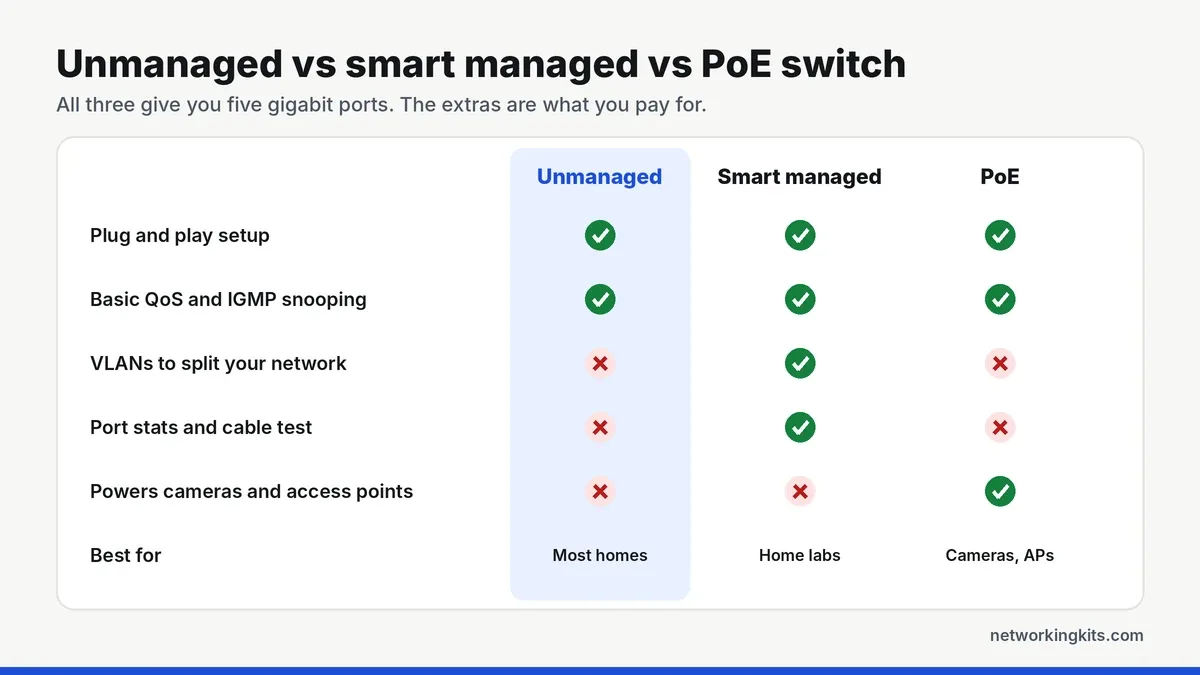
Not sure the extra features are worth paying for? Our guide to unmanaged and managed switches explains which settings matter at home and which are business extras.
Even basic unmanaged switches like the TL-SG105 and DGS-105 include 802.1p QoS and IGMP snooping. They quietly help games, video calls and IPTV streams, and you never have to touch a setting.
Five ports or eight?
Count the devices you want to wire, add one for the uplink, then add a spare. Five or fewer means a 5-port switch is enough. Six to nine means an 8-port model, which saves you from buying a second switch later. Our short guide on working out your switch port count walks through it step by step.
How much PoE power is enough?
The TL-SG1005P shares a 65W budget across its four PoE+ ports, with up to 30W on any single port. A typical indoor camera draws about 4 to 7 watts, and a Wi-Fi 6 access point usually needs 10 to 15. Add up your devices, leave some headroom, and you will know right away whether 65W covers you. Our Power over Ethernet guide walks through the math.
Metal case or tiny footprint?
All five picks are fanless, so the case does the cooling. The steel cases on the TP-Link and D-Link models spread heat well and shrug off knocks, which helps in a warm TV cabinet. The UGREEN is smaller and lighter, which is great on a crowded desk but leaves less room between the ports.
Check the warranty, not just the price
Coverage varies more than you might expect. TP-Link's current US policy gives its metal-case switches 3 years. D-Link offers a limited lifetime warranty on the DGS-105 when you register it, and UGREEN lists 2 years. For a box that may run for a decade, that difference is worth a few dollars.
Is 2.5G worth it yet?
For most homes, not yet. Consoles, smart TVs and most laptops still top out at 1 Gbps, and so do most internet plans. A 2.5G switch only pays off when your router, PC and NAS already have 2.5G ports. If you plan to upgrade your PC first, our roundup of PCIe network cards includes 2.5G options.
Where to put it
Put the switch next to the devices, not next to the router. One long cable from the router to a switch behind the TV is far tidier than four long cables across the floor. Give it a little breathing room, and do not stack it on top of a hot console or router.
No way to run a cable from the router? A switch can also hang off a mesh node or a range extender with an Ethernet port. Our list of gaming Wi-Fi extenders includes models with gigabit ports that pair nicely with a small switch. When you are ready to plug everything in, our switch setup walkthrough takes about five minutes to follow.
Do not skimp on cables
A gigabit switch is only as fast as the cables plugged into it. Any solid copper Cat5e or Cat6 cable handles a gigabit easily. Cheap copper-clad aluminum cables are a common cause of mystery dropouts. Our PS4 Ethernet cable picks work just as well for a switch, PC or smart TV.
Final verdict
For most home and office desks, the TP-Link TL-SG105 is the best 5 port gigabit switch you can buy. It has a metal case, runs silently, and starts working the second you plug it in. Owners keep it running for years without a second thought, and TP-Link backs it with a 3-year warranty. If you just need four more wired ports, this is the easy answer. It is small enough to tuck behind a monitor or TV, and the wall-mount slots underneath let you keep it off the desk entirely.
Your needs might be a little different, though. If you want to power a camera or an access point from the same box, the TP-Link TL-SG1005P adds four PoE+ ports. Home lab fans who want VLANs will be happier with the TL-SG105E. Both run as quietly as the TL-SG105 and come from the same family, so you are not trading reliability for features. Whichever you choose, you can finally stop unplugging one cable to make room for another.
Frequently Asked Questions
What does a 5-port gigabit switch do?
It turns one Ethernet connection from your router into several. One port links back to the router, which leaves four free ports for devices like a PC, console, TV or NAS. Every port runs at up to 1 Gbps.
Is a 5-port switch really only 4 ports?
In practice, yes. One of the five ports has to connect to your router or another switch, so four are left for your devices. If you need more than four, an 8-port switch is the better buy.
Will a switch slow down my internet?
No. A gigabit switch adds no delay you would notice. Devices share the link to the router, so you would only see a limit if several of them download at once on a plan faster than 1 Gbps.
Why do TP-Link and D-Link warranties differ so much?
TP-Link's current US policy covers its metal-case switches, including the TL-SG105, TL-SG105E and TL-SG1005P, for 3 years. D-Link gives the DGS-105 a limited lifetime warranty once you register it. UGREEN lists 2 years.
Can I connect a switch to another switch?
Yes. Run one Ethernet cable from any port on the first switch to any port on the second. Just never connect the same two switches with two cables, because that creates a loop that can slow or crash your network.
Tell us a little about your home or office network and we will point you in the right direction. We read every message.

We are network installers and home lab builders who have spent over a decade crimping, punching down and testing cable. Every guide is built from spec sheets, verified buyer feedback and real-world install experience.
How we research and score products →