On this page 11 sections
- How we picked these Wi-Fi extenders
- Comparison table
- Our Top Picks Reviewed
- 1. TP-Link RE815X AX5400 Wi-Fi 6 Tri-Band Range Extender
- 2. TP-Link RE813XE AXE5400 Wi-Fi 6E Tri-Band Range Extender
- 3. NETGEAR Nighthawk EAX80 Wi-Fi 6 Mesh Range Extender
- 4. TP-Link RE715X AX3000 Wi-Fi 6 Range Extender
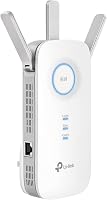
- 5. TP-Link RE550 AC1900 Wi-Fi Range Extender
- Buying guide: how to choose a Wi-Fi extender for gaming
- Final verdict
- FAQ
The router is downstairs, the console is upstairs, and every evening plays out the same way. One bar of Wi-Fi. A ping that jumps from 30 to 300. A teammate asking if you are still there.
An extender can fix that, but only the right one, set up the right way. Most cheap extenders are built for streaming and browsing, where a little extra delay goes unnoticed. Gaming is less forgiving. You want a strong, steady signal and, ideally, an Ethernet port so the console or PC can plug straight into the extender.
We looked at every Wi-Fi extender that sells well on Amazon.com, confirmed bands, ports and mesh support on each maker's spec sheet, and only kept extenders with at least one gigabit Ethernet port for your console. Then we read what owners say after living with them in real homes. These five made the cut.
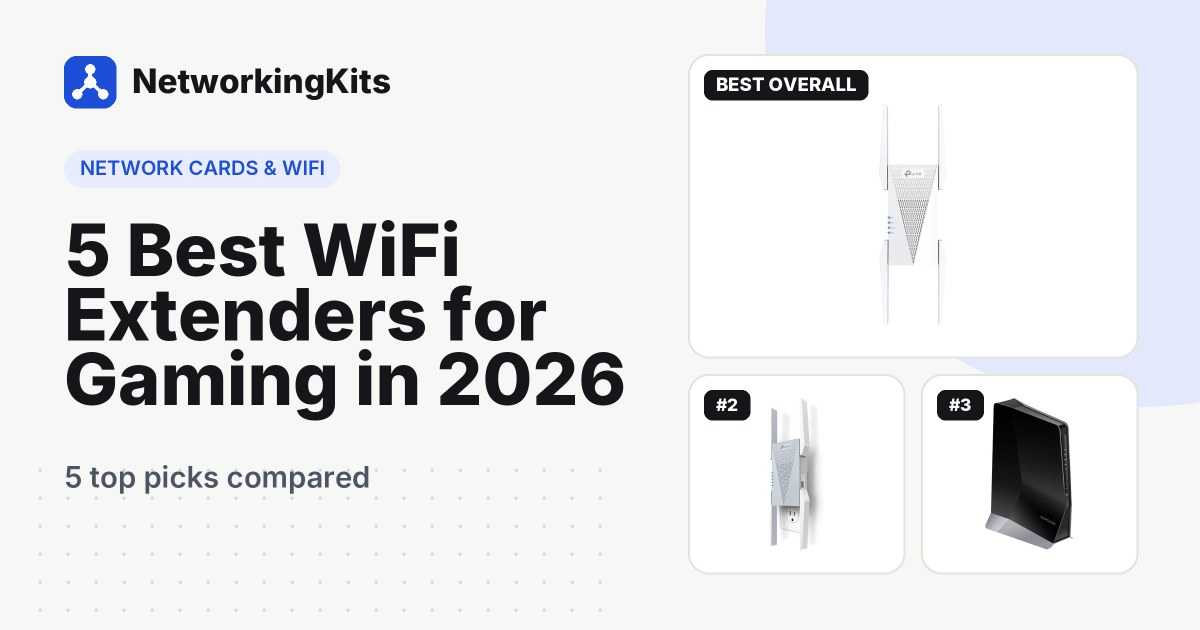
Quick answer: For most gamers, the TP-Link RE815X is the extender to get. It is tri-band Wi-Fi 6, with a spare 5 GHz band for talking to the router and a gigabit port for your console. If your router supports Wi-Fi 6E or 7, the TP-Link RE813XE adds the quieter 6 GHz band. Several consoles in one room? The NETGEAR Nighthawk EAX80 has four Ethernet ports.
All five are popular, widely used models, which gives us plenty of real-world experience to go on, including a few common complaints worth knowing before you buy.
How we picked these Wi-Fi extenders
For gaming, the biggest number on the box matters less than what keeps a match smooth. Here is what we looked for:
- An Ethernet port. A short cable from the extender to the console is the single best way to make an extender work for games. Every pick has at least one gigabit port.
- Wi-Fi 6 or newer where it counts. Newer standards cope better with busy homes, which means fewer lag spikes when everyone is online.
- Connection stability. Dropouts are the most common extender complaint, so we paid close attention to how often owners mention them.
- Easy placement and setup. A good extender should tell you when it is in the right spot and be running from an app in minutes.
Best WiFi Extenders for Gaming Compared (2026)
| Product | Wi-Fi | Bands | Ethernet ports | Mesh | Warranty | Score | |
|---|---|---|---|---|---|---|---|
 Best OverallTP-Link RE815X AX5400 Wi-Fi 6 Tri-Band Range ExtenderMost gamers who need a strong signal in a far room | Wi-Fi 6, tri-band AX5400 | 2.4 + 5 + 5 GHz | 1 x gigabit | TP-Link EasyMesh | 2 years | 9.1 | Check Price |
 Best Wi-Fi 6ETP-Link RE813XE AXE5400 Wi-Fi 6E Tri-Band Range ExtenderWi-Fi 6E or 7 routers in crowded buildings | Wi-Fi 6E, tri-band AXE5400 | 2.4 + 5 + 6 GHz | 1 x gigabit | TP-Link OneMesh | 2 years | 8.9 | Check Price |
 Best for Multiple ConsolesNETGEAR Nighthawk EAX80 Wi-Fi 6 Mesh Range ExtenderGaming rooms with several wired consoles or PCs | Wi-Fi 6, dual-band AX6000 | 2.4 + 5 GHz | 4 x gigabit | NETGEAR Smart Roaming | 1 year | 8.6 | Check Price |
 | Wi-Fi 6, dual-band AX3000 | 2.4 + 5 GHz | 1 x gigabit | TP-Link EasyMesh | 2 years | 8.4 | Check Price |
 | Wi-Fi 5, dual-band AC1900 | 2.4 + 5 GHz | 1 x gigabit | TP-Link OneMesh / EasyMesh | 2 years | 8.2 | Check Price |
Our Top Picks Reviewed
Here is a closer look at all 5 of our picks for the best WiFi extenders for gaming: what each one does well, where it falls short and who it suits best, based on the specs and real buyer feedback.

TP-Link RE815X AX5400 Wi-Fi 6 Tri-Band Range Extender
- Wi-Fi
- Wi-Fi 6, tri-band AX5400
- Bands
- 2.4 + 5 + 5 GHz
- Ethernet ports
- 1 x gigabit
- Mesh
- TP-Link EasyMesh
- Warranty
- 2 years
Every extender has to juggle two conversations at once: one with your router and one with your devices. On a single 5 GHz band, those two compete for the same airtime. The TP-Link RE815X sidesteps that with a second 5 GHz band, and that one design choice is why it tops our list.
It is a tri-band AX5400 Wi-Fi 6 extender with one 2.4 GHz band and two 5 GHz bands. TP-Link sets one of the 5 GHz bands aside as a dedicated link back to the router. Four external antennas handle range. TP-Link rates it for up to 96 devices, and Access Point mode is there if you can run a cable.

For gaming, the gigabit Ethernet port is the feature to use. Plug the console or gaming PC into it, and the device gets a wired link to the extender with no extra wireless hop. Need more than one wired device in the room? A small switch on that port does the trick. See our picks for the best gigabit 5-port switches.
More than a thousand are bought every month, and most owners are happy with it. Signal strength and quick setup draw the most praise, and many owners mention faster downloads and uploads plus whole-house coverage.
The complaints match most extenders. Some owners report disconnects, and a few say it needs a quick unplug to reset now and then. It works with any router, joins TP-Link's EasyMesh routers for seamless roaming, and carries a 2-year warranty.
What we like
- Spare 5 GHz band for the router link
- Gigabit port for a wired console or PC
- Up to 96 devices
- Access Point mode
Good to know
- Some disconnects, a quick restart usually helps
- Wi-Fi 6, so no 6 GHz band
- Expect lower speeds than beside the router

TP-Link RE813XE AXE5400 Wi-Fi 6E Tri-Band Range Extender
- Wi-Fi
- Wi-Fi 6E, tri-band AXE5400
- Bands
- 2.4 + 5 + 6 GHz
- Ethernet ports
- 1 x gigabit
- Mesh
- TP-Link OneMesh
- Warranty
- 2 years
Live in an apartment building? Open the Wi-Fi list on your phone and count the networks. Every one of them is fighting for the same 2.4 and 5 GHz airspace as your console. The TP-Link RE813XE gives you a way out of the crowd.
It is a tri-band AXE5400 Wi-Fi 6E extender with 2.4, 5 and 6 GHz bands, four external antennas and one gigabit Ethernet port. TP-Link rates it for up to 96 devices. It works with any router and pairs with TP-Link OneMesh routers for seamless roaming.

The 6 GHz band is the reason to buy it. Only Wi-Fi 6E and 7 gear can use it, so it has far more room and much less traffic. In a dense building, a clean 6 GHz link between router and extender can make a real difference to lag spikes. Then a short cable from the gigabit port gets the console the rest of the way.
Owners are largely positive. One covers a 3,200 square foot house with it, another finished setup in about 10 minutes, and many call it well worth the price. As with every extender here, connection stability gets mixed comments.
There is a catch, and it is a big one. To use 6 GHz between the router and the extender, your router must support Wi-Fi 6E or 7. With an older router it still works well on 5 GHz, but you would be paying for a band you cannot use yet. TP-Link covers it for 2 years.
What we like
- Quiet 6 GHz band for fewer lag spikes
- Gigabit port for your console
- Owners cover 3,200 sq ft homes
- Setup in about 10 minutes
Good to know
- 6 GHz needs a Wi-Fi 6E or 7 router
- Stability varies, so place it carefully
- Pricier than Wi-Fi 6 models

NETGEAR Nighthawk EAX80 Wi-Fi 6 Mesh Range Extender
- Wi-Fi
- Wi-Fi 6, dual-band AX6000
- Bands
- 2.4 + 5 GHz
- Ethernet ports
- 4 x gigabit
- Mesh
- NETGEAR Smart Roaming
- Warranty
- 1 year
A PlayStation, an Xbox, a gaming PC and a streaming box, all in one room, all wanting a wire. Most extenders give you one Ethernet port. The NETGEAR Nighthawk EAX80 gives you four gigabit ports, and that makes it the obvious pick for a crowded entertainment center.
It is a dual-band AX6000 Wi-Fi 6 mesh extender with eight streams. NETGEAR rates it for up to 2,500 square feet and 30 or more devices. Smart Roaming keeps your existing network name, so phones and laptops move between router and extender without dropping. It works with any router, and the Nighthawk app helps you find a good spot.

It has been on sale for years and has a long track record. Owners describe excellent coverage and an immediate jump in signal strength, with downloads reaching around 200 Mbps. One says it reaches three times further than their provider's router. Easy setup is the point owners praise most often.
It is not flawless. Setup can take an extra try with some internet providers' routers, so keep the quick-start guide handy. If you use a provider combo unit, update the EAX80's firmware first and set it up through the Nighthawk app.
This is also a desktop tower, not a plug-in. It sits on a shelf with its own power adapter and costs more than the TP-Link models. NETGEAR's warranty is 1 year, the shortest here. For a room where four devices all need a cable, we think that is a fair trade.
What we like
- Four gigabit Ethernet ports
- 8-stream Wi-Fi 6, up to 2,500 sq ft
- Smart Roaming keeps one network name
- Easy setup in the Nighthawk app
Good to know
- Update firmware first if pairing with a provider router
- Desktop tower, needs shelf space
- 1-year warranty, the shortest here

TP-Link RE715X AX3000 Wi-Fi 6 Range Extender
- Wi-Fi
- Wi-Fi 6, dual-band AX3000
- Bands
- 2.4 + 5 GHz
- Ethernet ports
- 1 x gigabit
- Mesh
- TP-Link EasyMesh
- Warranty
- 2 years
Straight verdict: the TP-Link RE715X delivers most of what the tri-band models do for a single gaming room, at a noticeably lower price. It is the best value Wi-Fi 6 extender on our list.
It is a dual-band AX3000 extender with two external antennas and one gigabit Ethernet port. It joins EasyMesh routers for seamless roaming, and Access Point mode turns it into a wired access point if you can run a cable to it. The Tether app also lets you dial the signal strength down to a single room or up to a whole floor.

What do you give up? The spare 5 GHz band. Being dual-band, it splits its 5 GHz airtime between the router and your devices. In practice, that matters less than you might expect once the console is plugged into the Ethernet port, because the console's hop to the extender is now a cable. That leaves the 5 GHz band free to handle the link back to the router.
Owner praise centers on easy setup and a strong signal, especially on second floors. One owner went from 25 Mbps to 550 Mbps after adding it, and another says the signal now reaches out into the yard.
Owner feedback is a little more mixed than for our top picks. Connectivity draws mixed comments, including some owners who had trouble pairing it with their router. If that happens, try setting it up through the Tether app instead of the WPS button. TP-Link covers it for 2 years.
What we like
- Wi-Fi 6 for less than tri-band models
- Gigabit Ethernet port
- Strong signal on upper floors
- Adjustable signal strength in the app
Good to know
- No spare backhaul band, so wire the console
- Pair through the Tether app if WPS fails
- Owner feedback a little more mixed than our top picks

TP-Link RE550 AC1900 Wi-Fi Range Extender
- Wi-Fi
- Wi-Fi 5, dual-band AC1900
- Bands
- 2.4 + 5 GHz
- Ethernet ports
- 1 x gigabit
- Mesh
- TP-Link OneMesh / EasyMesh
- Warranty
- 2 years
Few extenders on Amazon have been bought and used as widely as this one. That long track record is the main reason the TP-Link RE550 earns its spot as our budget pick.
It is an older AC1900 dual-band Wi-Fi 5 model with three adjustable external antennas. For gaming, the important part is the gigabit Ethernet port. Wire the console to it and Wi-Fi 5 is enough for many setups. It also supports TP-Link's mesh roaming and works as an access point when a wired connection is available.

Most owners are happy with it. Build quality and easy setup come up again and again, along with strong signal and range. One buyer reports consistent speeds of around 200 Mbps.
Two trade-offs come with the low price. Some owners report random disconnections, the same mixed point as every extender here. And as a Wi-Fi 5 model, it copes less well with a house full of busy devices than the Wi-Fi 6 picks. If your home is quiet and you mainly need one console online, neither will bother you much. TP-Link covers it for 2 years.
What we like
- Mesh roaming and Access Point mode
- Gigabit port for wired gaming
- Three adjustable antennas
- Affordable and easy to set up
Good to know
- Older Wi-Fi 5, fine for a wired console
- Occasional disconnects reported
- Busy homes suit a Wi-Fi 6 pick better
What we ruled out
Not everything that shows up in a search made our list. Here is what we left out and why, so you know what to avoid when you shop.
- Extenders with no Ethernet port. Many compact plug-in models skip the port. Without it, the console is stuck on a second wireless hop, which is exactly what gamers want to avoid.
- Mesh Wi-Fi kits. They are a different product that replaces or works alongside your router. They suit whole-home problems, while this list covers fixing one room.
- Older Wi-Fi 4 (N300) extenders. They are cheap but slow and often limited to 2.4 GHz, so they struggle in busy homes and add more lag than they remove.
- Unknown brands and models without a proven track record. Extenders depend on firmware updates and good setup apps, so we kept to established makers with a long trail of owner feedback.
Buying guide: how to choose a Wi-Fi extender for gaming
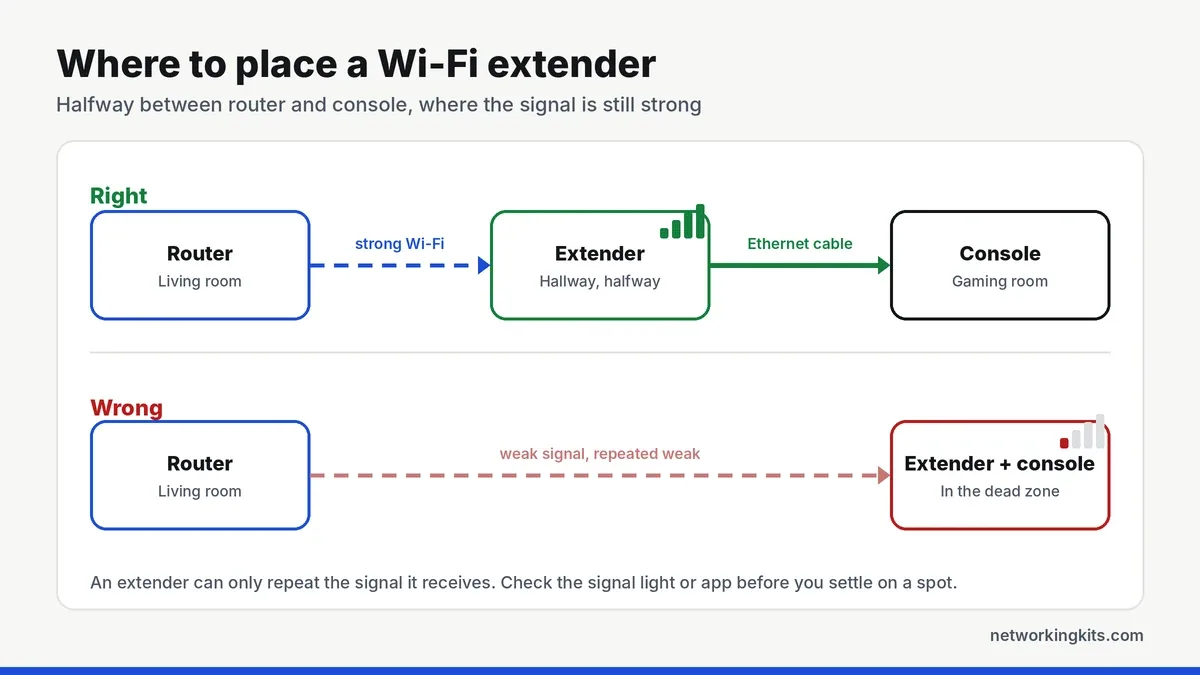
An extender can only pass along the signal it receives. Where you put it, and how the console connects to it, matter as much as the model you buy.
Put it halfway, not in the dead zone
The most common mistake is plugging the extender into the room with no signal. If the extender itself hears the router weakly, all it can repeat is a weak signal. Place it roughly halfway between the router and your gaming room, somewhere it still gets a strong connection. Most models have a signal light or an app that confirms a good spot.
Use the Ethernet port whenever you can
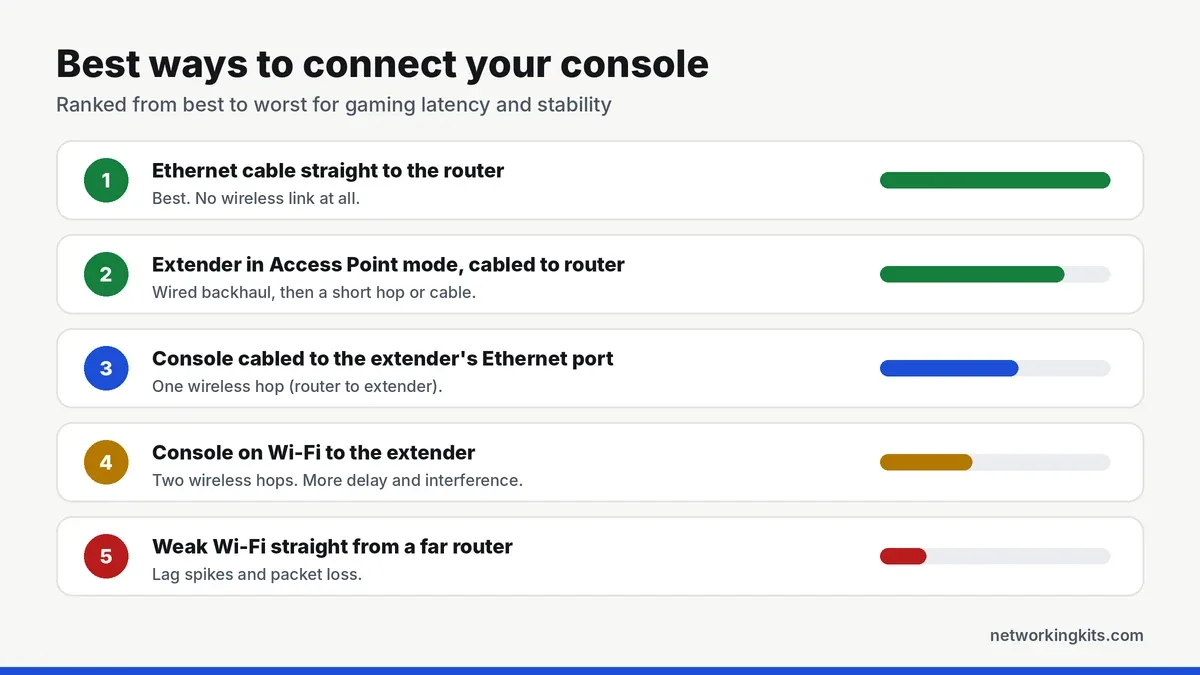
Every extender on our list has a gigabit Ethernet port, and it is the best feature a gamer can use. With the console or PC plugged into the extender, you skip a second wireless hop, which removes a lot of extra delay and interference. Any decent patch cable works, and our list of the best Ethernet cables for consoles has short, cheap options.
Can you run one long cable from the router to the extender? Then switch it to Access Point mode. That turns it into a wired access point and removes the wireless link to the router entirely. For gaming, it is the best setup of all.
Only give the extender its own network name if roaming causes trouble. Otherwise, keep the router's name, or use a mesh feature like OneMesh, EasyMesh or Smart Roaming, so phones and laptops switch between the two smoothly. A console that never moves can simply stay connected by cable.
Wi-Fi 5, 6 or 6E?
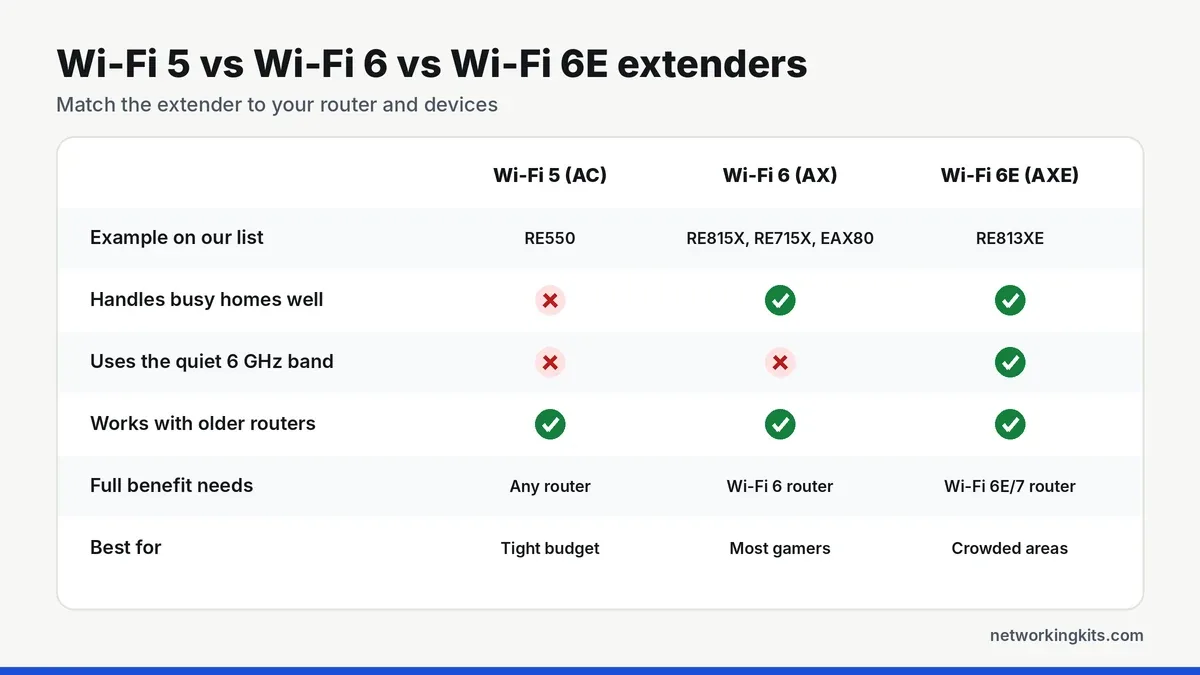
Wi-Fi 6 extenders handle homes full of phones, TVs and smart gadgets much better than older Wi-Fi 5 models. That means fewer lag spikes when the whole family is online. Wi-Fi 6E adds the 6 GHz band, which is far less crowded, but it only helps if your router supports 6E or 7. Tri-band extenders have a spare band, so they can talk to the router and your devices at the same time without the two competing.
A five-minute setup for consoles
Once the extender is in place, a few small steps make a big difference. Update its firmware from the app first, since many stability fixes arrive that way. Then plug the console into the Ethernet port and set the console's network to a wired connection.
On a PlayStation or Xbox, run the built-in connection test afterward and note the result. If it looks weak, move the extender one outlet closer to the router and test again. Remember that the console is wired, so its distance from the extender barely matters. What counts is a strong link between the extender and the router. Keep moving it until the signal light or app shows a good connection, not just a fair one.
Be realistic about speed
An extender improves coverage, not your internet plan. TP-Link itself warns that speeds through an extender can be half or less of what you get beside the router. For gaming that is usually fine, because games need very little bandwidth. What they need is a stable, low-latency link. A well-placed extender with a wired console delivers exactly that. For the settings that matter beyond hardware, read our guide on how to get your ping down.
When an extender is not the answer
One dead room is an extender job. A large home with weak spots on every floor usually calls for a mesh system instead, and our breakdown of extenders vs mesh Wi-Fi walks through the trade-offs. Gaming on a PC? Pair the extender with a good internal card from our guide to the best network cards for gaming. And if you can run a cable all the way, nothing beats a direct wired connection.
Final verdict
For most gamers, the TP-Link RE815X is the best WiFi extender for gaming. Its spare 5 GHz band talks to the router, so your game traffic does not have to share it, and its gigabit port lets you wire the console straight in. That combination gives you a steadier connection and fewer lag spikes in a far room. It also works with most routers, so you do not have to replace the gear you already own to get a better signal.
If you own a Wi-Fi 6E or Wi-Fi 7 router, the TP-Link RE813XE adds the cleaner 6 GHz band. Got several consoles in one room? The NETGEAR Nighthawk EAX80 has four Ethernet ports. The TP-Link RE715X is a solid middle option if you want Wi-Fi 6 for less. Place whichever extender you choose about halfway between the router and the gaming room, not inside it, and you will notice the difference.
Frequently Asked Questions
Are Wi-Fi extenders good for gaming?
They can be, as long as you place them well and connect the console or PC to the extender with an Ethernet cable. A wireless-only connection through an extender adds a second hop, which can raise latency. A wired link to the extender, or Access Point mode with a cable to the router, works best.
Does a Wi-Fi extender increase ping?
A wireless extender can add a little latency because data travels over an extra wireless link. In return, it can greatly reduce the lag spikes and packet loss caused by a weak signal. Plugging the console into the extender's Ethernet port keeps the extra delay to a minimum.
Should I get a Wi-Fi extender or a mesh system for gaming?
An extender is the cheaper fix for one dead zone, such as a single gaming room. A large home with several weak areas usually gets a more even signal from a mesh system. Either way, a wired connection to the console gives the best results.
Where should I put a Wi-Fi extender?
Roughly halfway between the router and your gaming room, in a spot where the extender still gets a strong signal from the router. Avoid the dead zone itself, because the extender can only repeat the signal it receives.
Will a Wi-Fi 6E extender work with my Wi-Fi 6 router?
Yes, but it will connect to the router on 2.4 or 5 GHz, not 6 GHz. The 6 GHz band only works between devices that support Wi-Fi 6E or Wi-Fi 7, so you need a 6E or 7 router for the full benefit.
Tell us a little about your home or office network and we will point you in the right direction. We read every message.

We are network installers and home lab builders who have spent over a decade crimping, punching down and testing cable. Every guide is built from spec sheets, verified buyer feedback and real-world install experience.
How we research and score products →