On this page 8 sections
Buy a switch that is too small and you will be shopping again within a year. Buy one that is far too big and you have paid for ports that never light up. The good news: picking the right size takes about 30 seconds.
This guide shows a simple way to count the ports you need, gives typical sizes for apartments, family homes and home offices, and covers the small details people forget, like the port that goes back to the router.
The quick answer
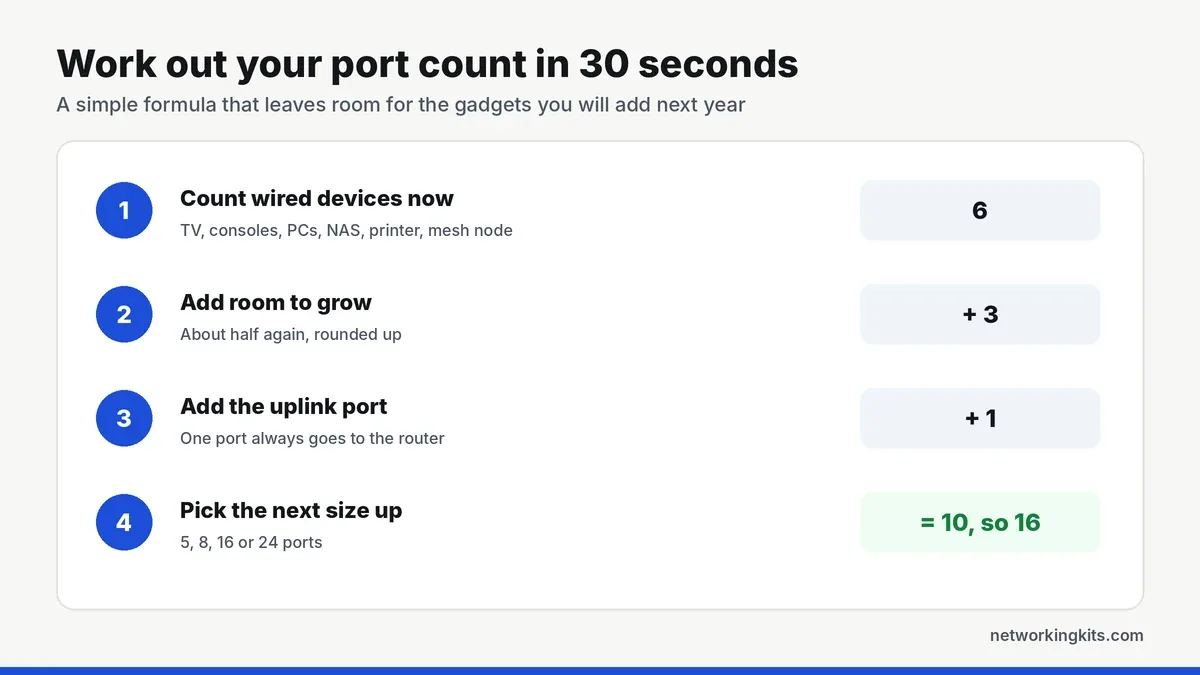
Count your wired devices, add about half again for growth, then add one port for the router. Round up to the next switch size. Most apartments need 5 ports, most homes need 8, and houses wired room to room need 16.
How to count the ports you need
Grab a piece of paper and walk through the house once. It is quicker than it sounds.
Step 1: list every wired device
Include anything that should have a cable: TVs, streaming boxes, consoles, desktop PCs, laptop docks, a NAS, printers, smart home hubs and any mesh node with a wired backhaul. Skip phones and tablets, which stay on Wi-Fi.
Step 2: add room to grow
Homes add devices every year. A new console, a second monitor dock, a camera. Adding about half again to your count keeps you from outgrowing the switch.
Step 3: add one port for the uplink
One port always connects the switch back to your router. An 8-port switch therefore has seven ports for devices, and a 16-port switch has fifteen. This is the step most people forget.
Step 4: round up
Switches come in 5, 8, 16 and 24 ports. If your total lands between sizes, take the larger one. The price difference is small, and a spare port is always handy.
Typical sizes by home
Here is what the count usually looks like in real homes.
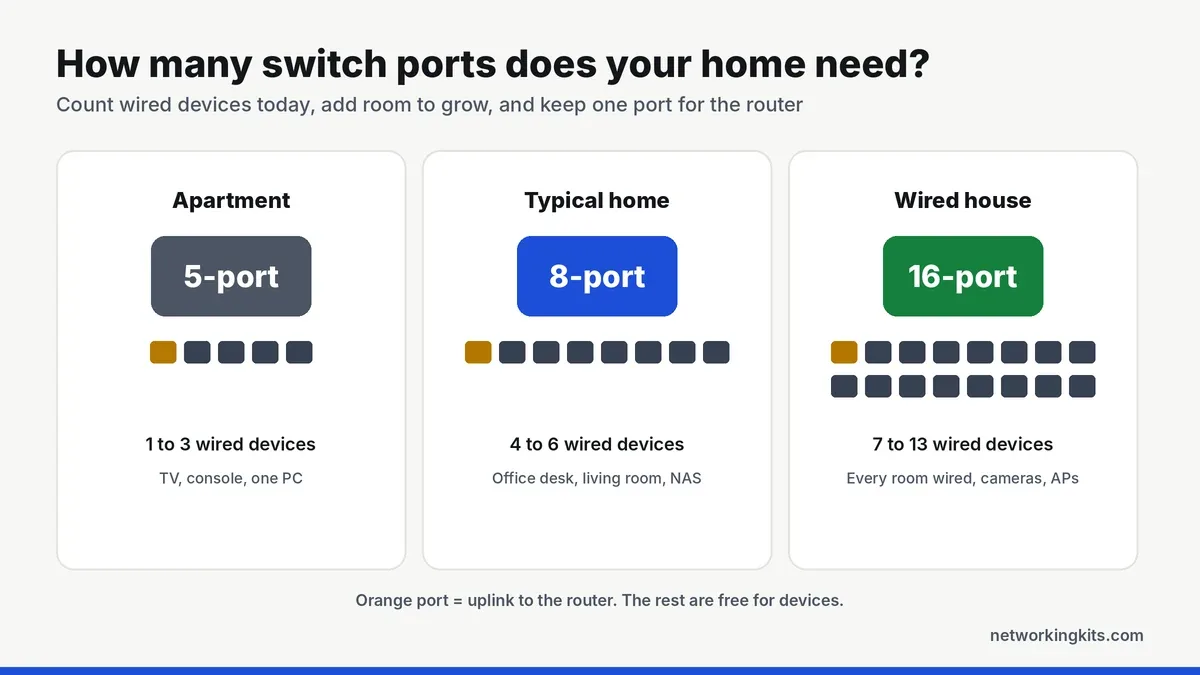
- Apartment or single room: a TV, a console and maybe a PC. A 5-port switch is plenty. See our picks for the best 5-port gigabit switches.
- Family home or home office: four to six wired devices in one area. An 8-port switch fits nicely. Our 8-port switch roundup has the details.
- House wired room to room: cable runs from every room ending in one closet. Go for 16 ports, like the picks in our 16-port switch guide.
- Small office: ten or more desks plus printers and phones. Look at 24 ports and consider a rack.
One big switch or two small ones?
If your wired devices sit in two different rooms, two small switches are often better than one big one. Run one cable to each room and put a 5 or 8-port switch at the end. You save on long cable runs and keep things tidy.
If all your cables already end in one spot, buy a single bigger switch. It is simpler, uses one power outlet and leaves fewer things to go wrong. Never connect two switches with two cables, which creates a loop, unless you have set up link aggregation.
Ports people forget to count
A few devices are easy to miss when you walk around the house.
- Mesh nodes with wired backhaul. Each wired node uses a port, and it is worth it for the speed boost.
- Smart home hubs and bridges. A Philips Hue bridge and many security system base stations connect with a cable.
- A second switch. If you daisy chain to another room, that link uses one port on each switch.
- Work gear. A laptop dock, a desk phone and a printer in a home office can need three ports on their own.
Do PoE and smart features change the count?
No, but they change which switch you buy. A PoE switch sends power to cameras and access points, so count how many of those you have and check the switch's power budget too. A smart managed switch counts ports the same way and adds VLANs. Our list of the best gigabit switches for a home network covers both.
Conclusion
To work out how many ports you need on a network switch, count your wired devices, add about half again, add one for the router and round up. That usually means 5 ports for an apartment, 8 for a typical home and 16 for a fully wired house. When in doubt, go one size up, because unused ports cost very little and running out costs a second switch.
Frequently Asked Questions
Is an 8-port switch enough for a home?
For most homes, yes. An 8-port switch gives you seven ports for devices, which covers a TV, consoles, a PC, a NAS and a printer with room to spare.
Does the uplink port count as one of the switch ports?
Yes. One port connects to your router, so a 5-port switch has four free ports and an 8-port switch has seven.
Can I connect two switches together?
Yes. Plug one cable from any port on the first switch into any port on the second. Just never connect them with two cables unless you have set up link aggregation.

We are network installers and home lab builders who have spent over a decade crimping, punching down and testing cable. Every guide is built from spec sheets, verified buyer feedback and real-world install experience.
How we research and score products →