On this page 8 sections
Search Amazon for an "Ethernet hub" and you will find hundreds of results. Look closely and almost every one is actually a switch. The word hub survived long after the hardware disappeared, which is why so many people still wonder what the difference is.
The difference is not small. A hub and a switch both give you more ports, but they treat your data in completely different ways. Here is how each one works, and why you should only ever buy a switch.
How a hub works
A hub is a simple repeater. Whatever signal comes in on one port, it copies straight out of every other port. It has no idea which device the data is for, because it never reads the addresses inside the packet. Every device on the hub receives every packet, and each one has to check whether the data was meant for it.
That creates three problems. First, all ports share the same bandwidth, so the more devices talk, the slower everyone gets. Second, hubs work in half duplex, which means a device can send or receive, but not both at once. Third, when two devices transmit at the same moment, their signals collide, and both have to wait and try again. Hubs sit in one shared "collision domain", so collisions get worse as the network grows.
How a switch works
A switch reads the destination MAC address of every frame and sends it only to the port where that device lives. It builds a MAC address table automatically by noting which address arrives on which port. If it has not learned a destination yet, it floods that one frame to all ports, then remembers the answer for next time.
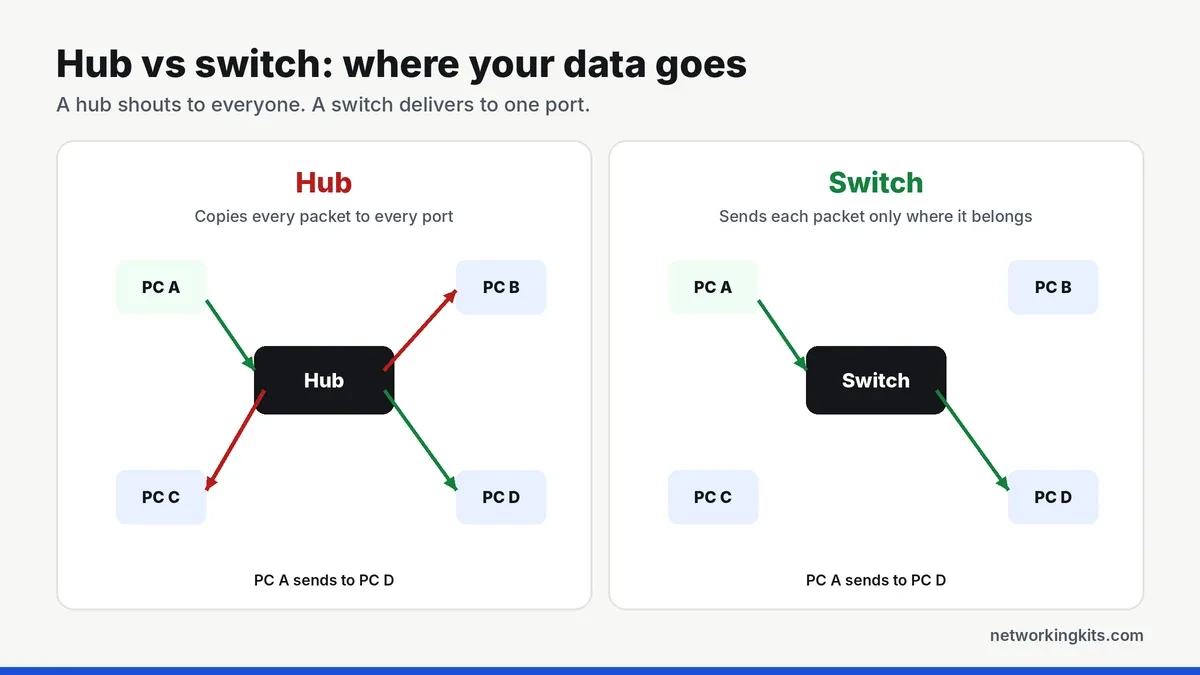
Because every switch port is its own collision domain and runs in full duplex, devices can send and receive at the same time without colliding. Two pairs of devices can even talk simultaneously at full speed. That is why a cheap gigabit switch easily outperforms any hub ever made.
Hub vs switch: the key differences
- OSI layer: a hub works at Layer 1, the physical layer. A switch works at Layer 2, the data link layer.
- Traffic: a hub broadcasts everything. A switch delivers each frame to one port.
- Duplex: hubs are half duplex. Switches are full duplex.
- Speed: hubs topped out at 10 or 100 Mbps. Switches run 1 Gbps, 2.5 Gbps, 10 Gbps and beyond.
- Privacy: on a hub, any device can see traffic meant for others. A switch keeps traffic between the devices involved.
Why this matters for your network today
You might wonder why any of this matters if hubs are gone. The answer is that the same ideas explain how your network behaves. Broadcasts, such as a device asking "who has this IP address?", still go to every port on a switch, and on a very large flat network they can add up. That is one reason businesses split networks with VLANs and routers.
It also explains why a switch is the right way to add ports. Each device gets its own dedicated full duplex link, so a big download on one PC does not slow down the console on the next port, as long as the router link is not saturated.
Are hubs still sold?
Not really. Mainstream manufacturers stopped making true Ethernet hubs years ago, and there are no gigabit hubs at all. Listings that say "Ethernet hub" or "network hub" today are switches using an old, familiar name. You can confirm it by checking the specs for words like "switching capacity", "full duplex" or "MAC address table".
The one place hubs still appear is in labs, where engineers sometimes use them to capture packets, since every port sees all traffic. A managed switch with port mirroring does the same job better, which we cover in managed vs unmanaged switch.
What to buy instead
For a home or small office, a simple unmanaged gigabit switch is the modern replacement for a hub. It costs very little, needs no setup and runs silently. Connect one port to your router, and every other port becomes a full-speed connection for your devices. Our 5-port switch picks start at around the price of a long Ethernet cable.
If you are not sure whether you need a switch or a new router, read switch vs router first, since they solve different problems.
Avoid old 10/100 "Fast Ethernet" switches and hubs from a drawer. They cap every device at 100 Mbps, which is slower than many internet plans. Look for "Gigabit" or "10/100/1000" on the label.
Bottom line
Hubs are obsolete. They share one slow connection between every port and send all traffic everywhere. A basic gigabit switch costs very little, needs no setup and gives every device its own full-speed link, so it is the only sensible choice today.
Frequently Asked Questions
Is a hub the same as a switch?
No. A hub copies all data to every port and runs in half duplex. A switch sends data only to the right port and runs in full duplex, so it is faster, more efficient and more private.
Why do people still call switches hubs?
Habit. "Hub" was the common name for these boxes in the 1990s, and many product listings still use it as a keyword. Almost every "Ethernet hub" sold today is actually a switch.
Is a USB hub related to a network hub?
Only by name. A USB hub adds USB ports to a computer. A network hub or switch adds Ethernet ports to a network. They are completely different devices.
Can I use a switch instead of a hub for packet capture?
Yes. A managed or smart switch with port mirroring copies the traffic of chosen ports to a monitoring port, which does the job of a hub without slowing down the rest of the network.

We are network installers and home lab builders who have spent over a decade crimping, punching down and testing cable. Every guide is built from spec sheets, verified buyer feedback and real-world install experience.
How we research and score products →