On this page 8 sections
Your router has run out of Ethernet ports, so you search for "more ports" and get two answers: buy a switch, or buy a better router. They look similar, both have rows of RJ45 ports and blinking lights, and they even cost about the same at the low end.
But they do very different jobs. Picking the wrong one either wastes money or does not fix the problem. Here is what a router does, what a switch does, and which one you actually need.
What a router does
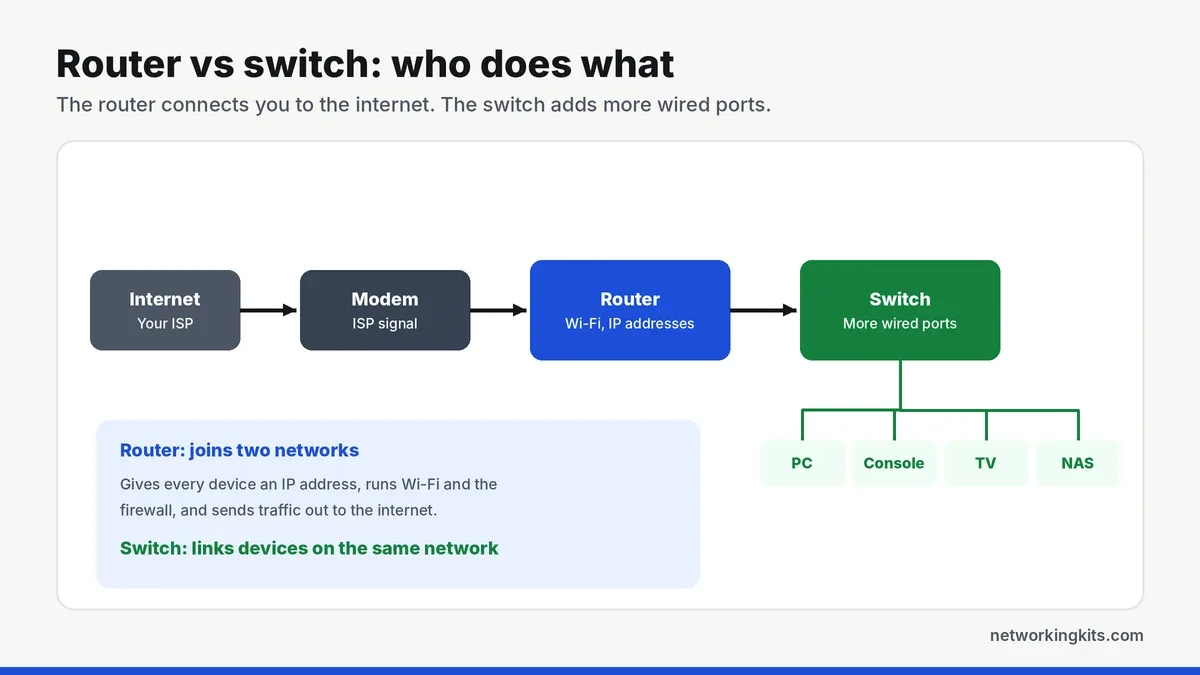
A router connects your home network to the internet. It sits between your modem and every device in the house, and it handles the jobs that make the internet work at home:
- Routing: it moves traffic between two different networks, your private home network and the internet.
- IP addresses: its DHCP server gives every device a local address so they can talk to each other.
- NAT and firewall: it lets all your devices share one public IP address and blocks unwanted traffic from outside.
- Wi-Fi: most home routers also include a wireless access point.
Most home routers include a small built-in switch too, usually with four LAN ports. That is why people often confuse the two.
What a switch does
A network switch connects devices on the same network. It does not talk to the internet, hand out IP addresses or run a firewall. Its only job is to move data between its ports, quickly and only to the right device. It learns the MAC address of every device plugged into it and sends each packet to the correct port. Unlike an old hub, it never floods traffic to everyone, which we explain in network switch vs hub.
The key differences
In networking terms, a router works at Layer 3 of the OSI model, using IP addresses to move traffic between networks. A switch works at Layer 2, using MAC addresses to move traffic within one network. Every home network needs one router. A switch is optional, and you only need one when you run out of wired ports or want ports in another room.
Speed is the other common question. A gigabit switch adds no noticeable delay, and devices on it share the router link for internet access. File transfers between two devices on the same switch never even touch the router, so they run at full speed.
What about access points and modems?
Two other boxes often join the confusion. A modem converts the signal from your internet provider, over cable, fiber or DSL, into Ethernet. Many providers supply a combined modem and router, sometimes called a gateway, which is why some homes only have one box. An access point adds Wi-Fi to a wired network, and it usually connects to a switch port. Mesh systems and extenders are variations on the access point idea.
A typical wired home network therefore looks like this: modem, then router, then one or more switches, with access points, PCs, consoles and TVs connected to those switches. Each box does one job well.
When you need a switch
- Your router's LAN ports are full.
- You have one Ethernet cable reaching a room, but several devices there, such as a TV, console and streaming box.
- You want to wire a desk with a PC, NAS and printer from one wall jack.
- You need to power cameras or access points, in which case a PoE switch helps (see PoE basics).
A small 5-port switch fixes most of these for very little money. Our roundup of small gigabit switches covers the most reliable options.
When you need a new router
- Your Wi-Fi is slow or patchy around the house.
- Your internet plan is faster than your router can handle.
- You want newer features, such as Wi-Fi 6 or 7, better parental controls or SQM to stop lag spikes.
If the problem is coverage in one area, you may not need a new router at all. A WiFi extender or mesh system can fill the gap, and our guide to WiFi extenders and mesh systems explains which suits your home.
Never plug a second router into your network as a "switch" without turning off its DHCP server, or set it to access point mode. Two routers handing out addresses causes double NAT and devices that randomly lose connection. A cheap unmanaged switch avoids the problem entirely.
The short answer
A router connects your home to the internet and runs your network, while a switch simply adds more wired ports. If you are out of Ethernet ports, add a switch. If your Wi-Fi or internet speed is the problem, look at the router first.
Frequently Asked Questions
Can a switch replace a router?
No. A switch cannot connect you to the internet, assign IP addresses or provide a firewall. You still need a router, and the switch connects behind it to add more ports.
Does a network switch slow down internet speed?
No. A gigabit switch adds a tiny, unnoticeable delay. All devices on the switch share the router connection, but that link runs at a full gigabit.
Do I plug a switch into the modem or the router?
Into the router. Connect any LAN port on your router to any port on the switch. Plugging a switch directly into the modem only works for one device on most internet plans.
Is a router just a switch with extra features?
Partly. Most home routers include a small built-in switch for their LAN ports, plus routing, a firewall, DHCP and Wi-Fi. A standalone switch only does the switching part, but with many more ports.

We are network installers and home lab builders who have spent over a decade crimping, punching down and testing cable. Every guide is built from spec sheets, verified buyer feedback and real-world install experience.
How we research and score products →