On this page 7 sections
Store-bought Ethernet cables come in fixed lengths, so you always end up with ten feet coiled behind the desk or a cable that stops one foot short. Making your own fixes that, and once you have the tools, each cable costs very little.
It takes a few tries to get right, but it is a skill anyone can learn. This guide covers the tools you need, the exact wire order and a step-by-step method that produces reliable cables the first time.
What you need
- Bulk Ethernet cable: Cat5e or Cat6, pure copper. Use stranded cable for patch cables that get moved, and solid cable for runs inside walls.
- RJ45 connectors: rated for your cable category and type. Solid and stranded cable often need different plugs, so check the packaging.
- Crimping tool: presses the plug's contacts into the wires. A pass-through crimper with a built-in cutter makes the job much easier.
- Cable stripper: removes the outer jacket without nicking the wires inside.
- Cable tester: confirms all eight wires are connected in the right order.
Buying these together in a kit is usually cheaper and guarantees the crimper matches the plugs. Our list of Ethernet tool sets compares the most trusted options on Amazon.
Step-by-step: how to make an Ethernet cable
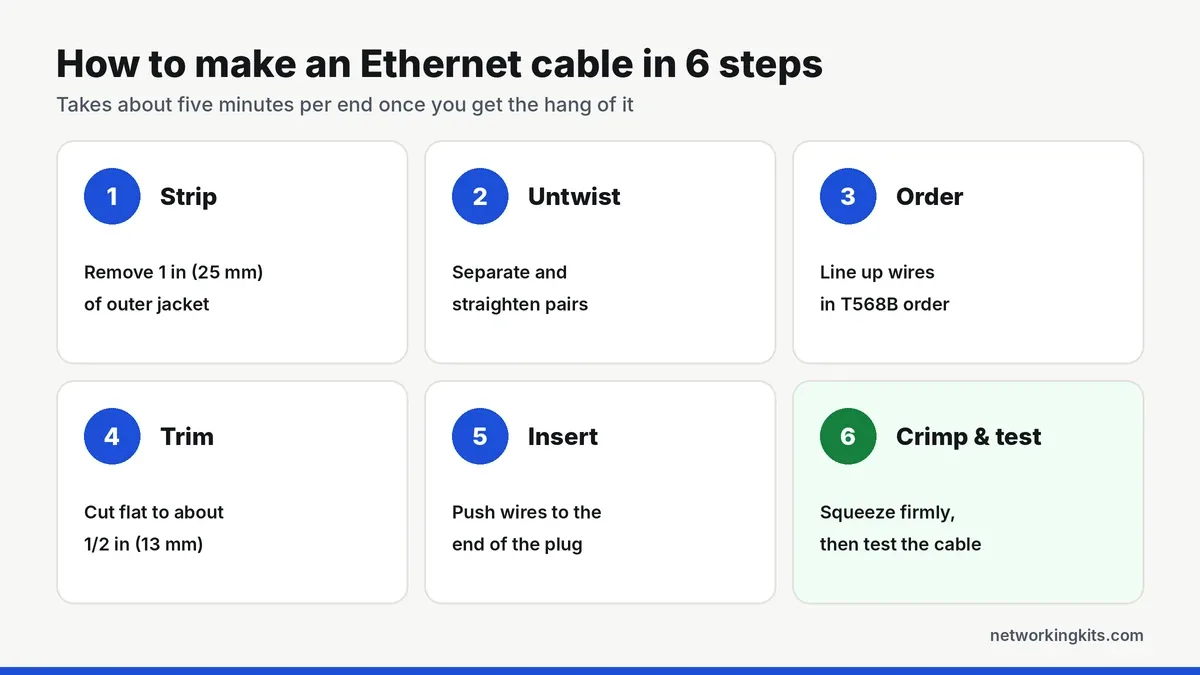
1. Cut and strip the jacket. Cut the cable to length, adding a little extra for mistakes. Strip about 1 inch (25 mm) of the outer jacket. Be gentle: a nicked wire can cause a connection that fails weeks later. If your cable has a pull string or plastic spline, cut them off flush.
2. Untwist and straighten the pairs. Separate the four twisted pairs and untwist them, then straighten each wire by running it between your fingers. Straight wires slide into the plug far more easily.
3. Arrange the wires in order. Line them up flat, side by side, in the T568B order: white/orange, orange, white/green, blue, white/blue, green, white/brown, brown.
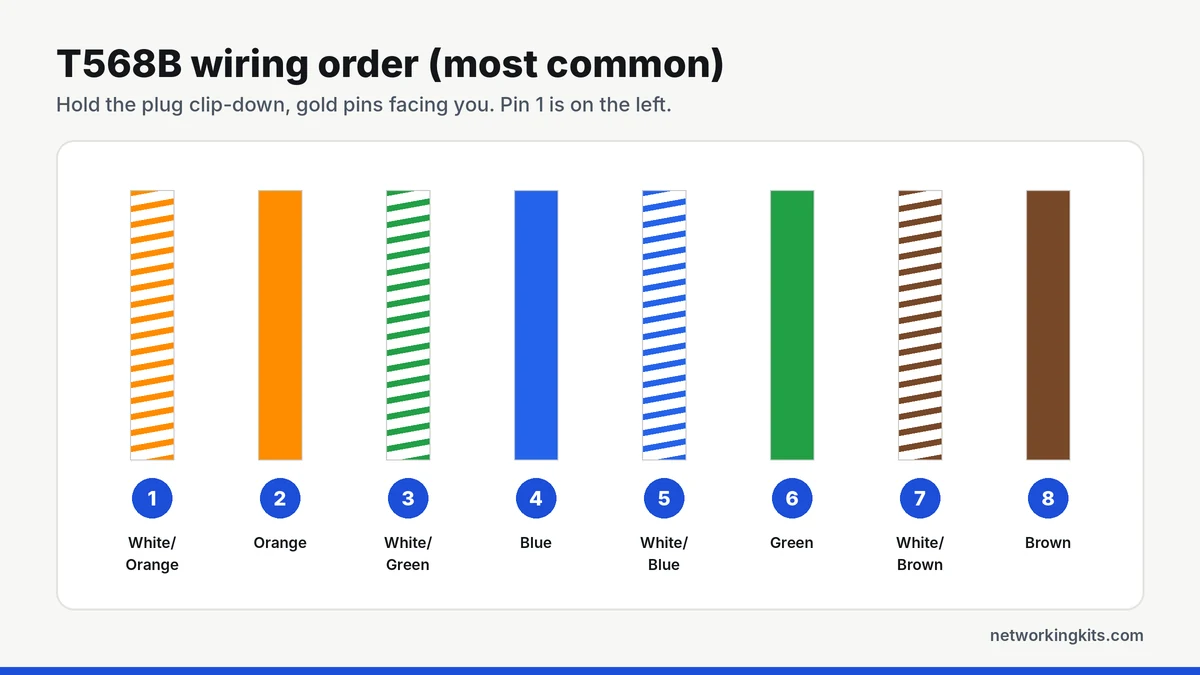
If you are matching an existing network wired to T568A, use that order instead. Our wiring color code guide explains the difference.
4. Trim the wires. With a standard plug, cut all eight wires straight across, leaving about 1/2 inch (13 mm) beyond the jacket. With pass-through plugs you can leave them longer, because the ends will be cut after crimping.
5. Insert the wires into the plug. Hold the plug with the clip facing down and push the wires in firmly until every one touches the front of the plug. The outer jacket should sit inside the back of the plug, under the strain relief tab. Check the color order one more time through the clear plastic.
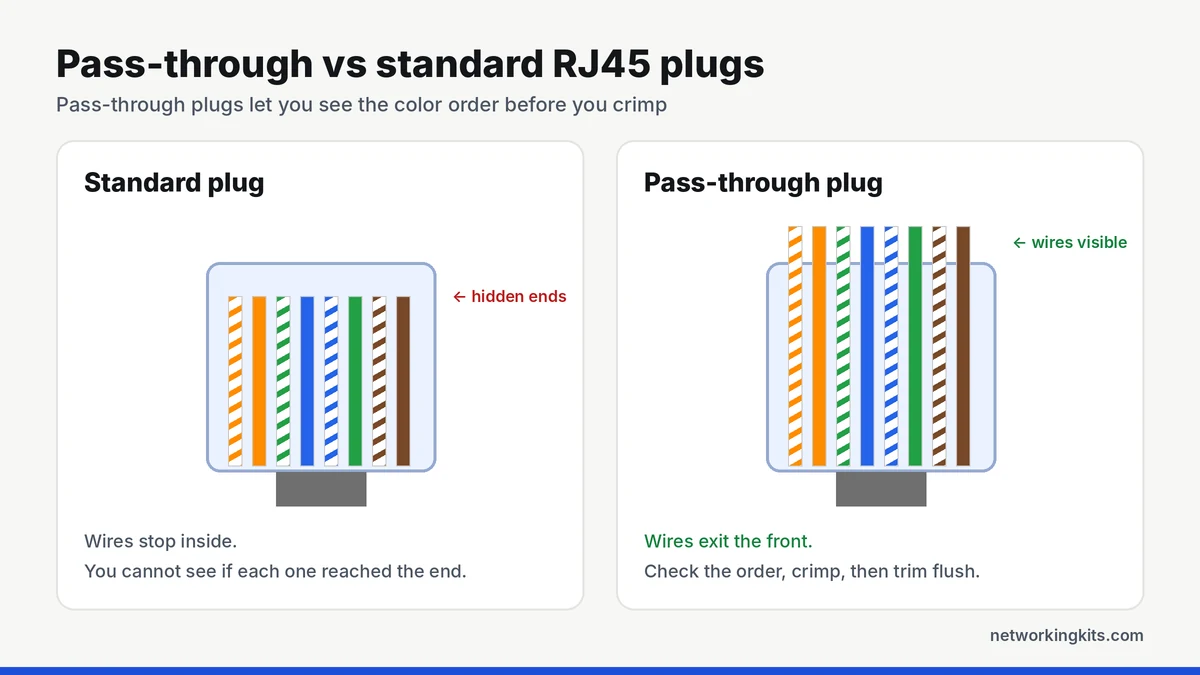
6. Crimp and test. Place the plug in the crimper and squeeze firmly until the handle closes fully. For pass-through plugs, the tool trims the extra wire at the same time. Repeat on the other end, then plug both ends into a tester. All eight lights should flash in order from 1 to 8 on both units.
Patch cable or wall jack?
The steps above are for patch cables with a plug on each end. For cable inside walls, the professional approach is different: you terminate each end into a keystone jack or patch panel with a punch down tool, then use short patch cables to connect devices. Jacks hold solid cable better than plugs, and they make it easy to replace a damaged patch cable later without touching the wall run.
Common mistakes and how to fix them
- Jacket not inside the plug: the strain relief cannot grip the cable, so wires pull loose over time. Strip less and trim shorter.
- Wires not fully inserted: one or two lights stay dark on the tester. Cut the plug off and redo it.
- Wrong order or split pair: the lights flash out of sequence. A split pair can even pass a basic tester but cause slow speeds, so double-check the colors.
- Cat6 wires will not fit: Cat6 conductors are thicker. Use plugs rated for Cat6, ideally pass-through, and straighten the wires carefully.
Slide strain relief boots onto the cable before you crimp. It is easy to forget, and once both plugs are on you cannot add them without cutting the cable again.
Test every cable you make
A cable that looks perfect can still have one weak contact. Always test before you install a cable inside a wall or behind furniture. For long runs or business installs, a professional tester like the Fluke MicroScanner or LinkIQ measures length and finds faults precisely, which we compare in the best Fluke network cable testers.
Not sure which cable to buy for your project? Our Cat5e vs Cat6 comparison will help you choose.
The short answer
Making your own cable takes a crimper, RJ45 plugs, a stripper and a few minutes of practice. Keep the wire order the same on both ends, push the wires all the way to the tip, and test every cable before it goes behind a wall. After the first two or three, it gets quick and easy.
Frequently Asked Questions
Is it cheaper to make your own Ethernet cables?
Yes, if you need several cables or custom lengths. Once you own the tools, bulk cable and connectors cost far less per cable than pre-made ones. For one or two short cables, buying pre-made is easier.
Should I use T568A or T568B?
Use T568B for most patch cables in the US. Use T568A only if your existing wiring or a project spec requires it. Always use the same standard on both ends.
How long can a homemade Ethernet cable be?
Up to 100 meters (328 feet) for the full channel, the same as any Ethernet cable. For patch cables, stranded cable is best under about 10 meters, and solid cable is better for long runs.
Why does my homemade cable only run at 100 Mbps?
Usually one wire is not making contact or a pair is split. 100 Mbps only uses two pairs, while gigabit needs all four. Re-crimp the ends and test again.

We are network installers and home lab builders who have spent over a decade crimping, punching down and testing cable. Every guide is built from spec sheets, verified buyer feedback and real-world install experience.
How we research and score products →