On this page 7 sections
Your Wi-Fi is fine most of the time, the router has a few Ethernet ports, and everything mostly works. So do you actually need a network switch, or is it one more box on the shelf?
The honest answer: many homes do not need one at all. But if you are running out of ports, want wired speed in another room or are adding cameras, a switch is the cheapest and simplest fix there is. Here are the clear signs, plus the cases where something else will serve you better.
The short answer
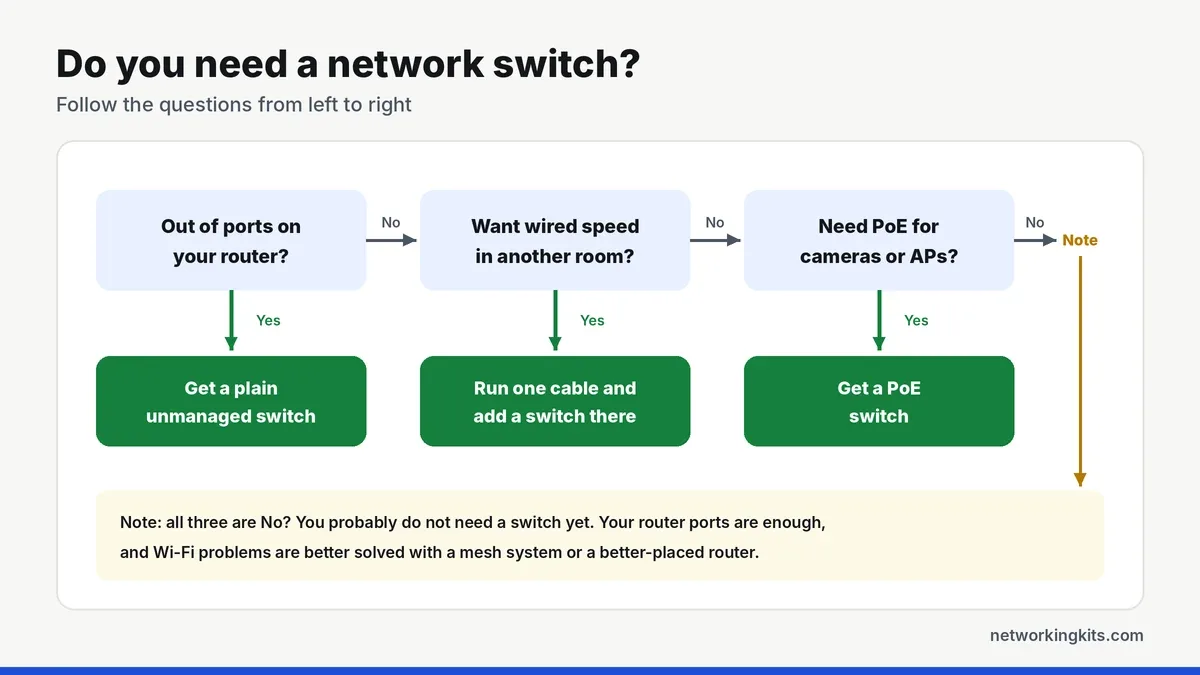
You need a network switch when you have more wired devices than free ports on your router. That is it. A switch takes one router port and turns it into five, eight or sixteen, and every device on it gets a fast, stable wired connection.
5 signs you need a network switch
If any of these sound familiar, a switch will make your network easier to live with.
1. You keep unplugging one device to plug in another
Most routers have three or four free Ethernet ports. A TV, a console, a desktop and a printer use them up fast. If you swap cables around every week, an 8-port switch ends that for good.
2. You want wired speed in a room far from the router
Say the router lives in the hallway and your desk, TV and console are in the living room. Run one Ethernet cable to that room and put a small switch at the end. Now every device there has a wired connection, from a single cable.
3. Your game console or TV keeps buffering on Wi-Fi
Wi-Fi shares airtime between every phone, tablet and smart plug in the house. A cable does not. Moving a console or streaming box onto a switch is one of the easiest ways to lower ping and stop lag spikes.
4. You are adding cameras or ceiling access points
IP cameras, video doorbells and Wi-Fi access points often run on Power over Ethernet. A PoE switch sends power and data down one cable, so you do not need an outlet next to each device. Our guide to Power over Ethernet explains the basics.
5. You work from home on a wired setup
A laptop dock, a desktop, a printer and a desk phone can need four ports on their own. A small switch under the desk keeps video calls steady and gives you room for one more gadget later.
When you do not need a switch
A switch only adds ports. It does not improve your Wi-Fi or your internet plan. If the router still has free ports for every wired device, you are fine without one.
If your real problem is weak Wi-Fi in far rooms, a mesh system or a better-placed router is the right fix. Our comparison of Wi-Fi extenders and mesh systems helps you choose. And if you are wondering how a switch differs from the box you already have, see switch vs router.
Which kind of switch should you get?
For most homes, a plain unmanaged gigabit switch is the right buy. It has no settings, runs silently and costs little. Pick a smart managed switch if you want VLANs to keep smart home gadgets apart, a PoE switch for cameras, or a 2.5G switch if your internet plan or NAS is faster than 1 Gbps.
Our shortlist of the best gigabit switches for home networks has a clear pick for each of those. Not sure about size? Read how many switch ports you need first.
Adding a switch takes about two minutes
There is nothing to install and no app to download. The whole job looks like this.
- Place it near your devices. Behind the TV, under the desk or on a shelf with a little airflow.
- Connect one port to the router. Any port works. Switches detect the cable type on their own.
- Plug in your devices. Use Cat5e or Cat6 patch cables. The port lights tell you each link is up.
- Power it on. Devices get their address from the router as usual, so nothing else changes.
Our full guide to installing a network switch covers what the lights mean and how to fix the rare hiccup.
Conclusion
You need a network switch when you run out of router ports, want wired speed in another room, or add PoE devices like cameras. If none of that applies, save your money, and fix Wi-Fi problems with a mesh system instead. When you do buy one, a simple 8-port gigabit switch covers most homes, and setting it up takes about two minutes.
Frequently Asked Questions
Do I need a network switch if I have a router?
Only if you need more Ethernet ports than your router has. A router usually has three or four free ports. A switch adds more, so every wired device can connect.
Does a network switch improve Wi-Fi?
No. A switch only adds wired ports. It can help Wi-Fi indirectly when you move busy devices like consoles and TVs onto cables, which frees up airtime for phones and laptops.
Can I plug a switch into a mesh node?
Yes. Most mesh nodes have at least one Ethernet port. Plug a switch into it to give several wired devices a connection in that room.
Will a switch slow down my internet?
No. A gigabit switch adds no noticeable delay. Devices on it share the link to the router, which is far faster than most internet plans.

We are network installers and home lab builders who have spent over a decade crimping, punching down and testing cable. Every guide is built from spec sheets, verified buyer feedback and real-world install experience.
How we research and score products →