On this page 11 sections
You line up the perfect shot, pull the trigger and nothing happens for half a second. By the time the game catches up, you are back at the respawn screen. High ping is the most frustrating problem in online gaming, because it feels like the game is cheating you.
The good news is that most of the lag you feel at home comes from things you can fix, usually for free. This guide explains what ping is, where it comes from and the fixes that actually make a difference, in the order you should try them.
What ping actually measures
Ping, or latency, is the time it takes for data to travel from your device to the game server and back, measured in milliseconds (ms). As a rough guide, under 20 ms feels instant, 20 to 50 ms is great for any game, 50 to 100 ms is playable but noticeable in fast shooters, and above 100 ms starts to feel sluggish.
Just as important is jitter, how much your ping jumps around. A steady 60 ms often feels better than a ping that swings between 20 and 150 ms. Many "lag spikes" are jitter, not high average ping.
Where lag comes from
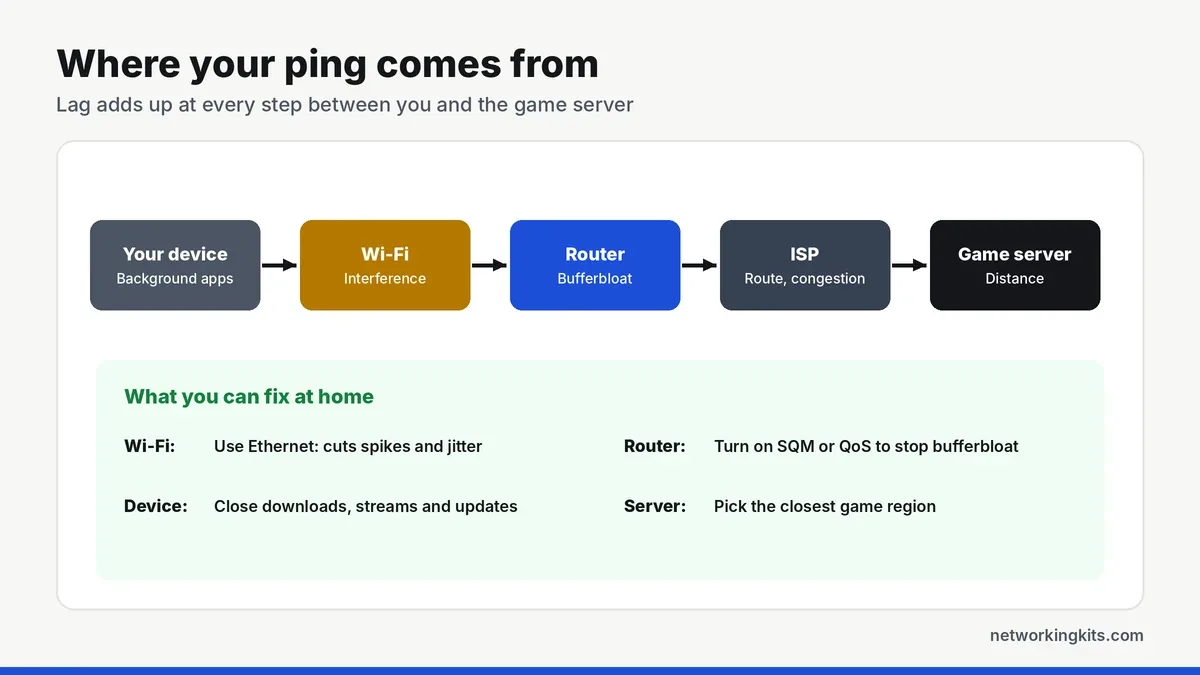
Your ping is the sum of every step between you and the server: your device, your Wi-Fi, your router, your internet provider's network and the physical distance to the server. You cannot change the speed of light, but the first three steps are under your control, and they cause most of the spikes.
1. Use a wired Ethernet connection
This is the biggest single fix. Wi-Fi shares the air with your neighbors' networks, phones and smart devices, and it has to retry when signals collide, which shows up as jitter and packet loss. A cable removes all of that.
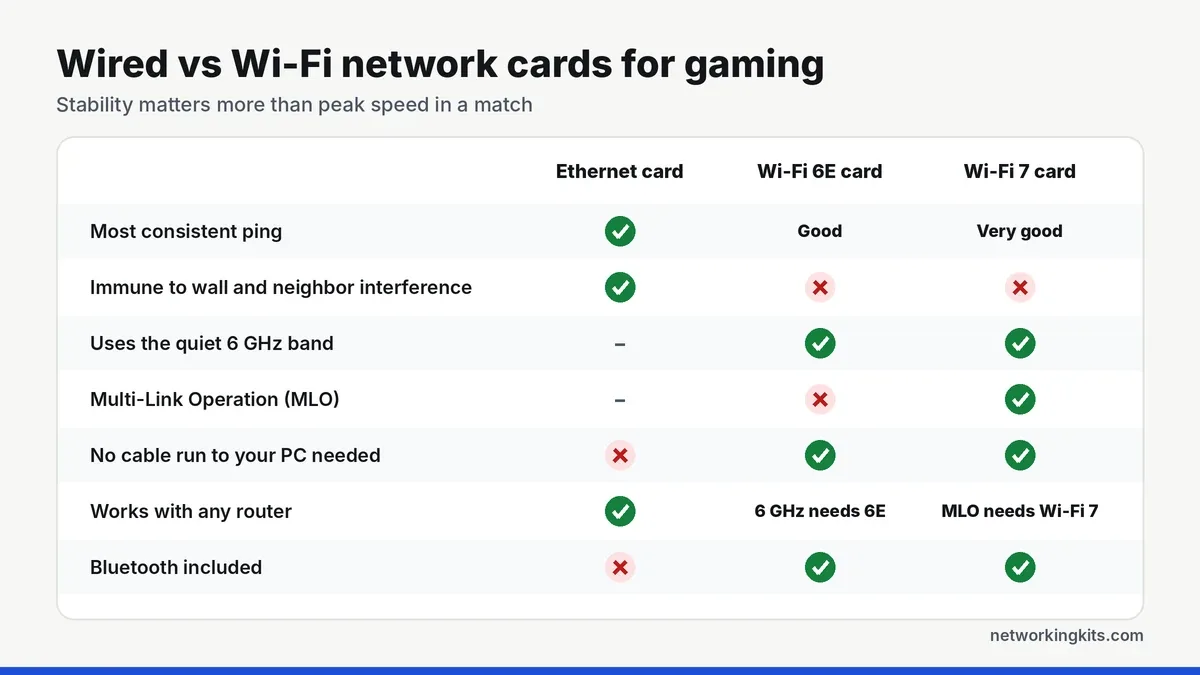
Any good Cat5e or Cat6 cable is enough. Our console Ethernet cable reviews work for any console or PC. If your router is out of ports, a small switch adds more, as explained in our roundup of small gigabit switches.
2. Fix bufferbloat with SQM or QoS
Bufferbloat happens when your connection is busy, such as someone uploading photos or streaming in 4K, and your router queues up so much data that your game packets wait in line. Ping can jump from 20 ms to 200 ms the moment someone else starts a download.
Run a bufferbloat test online to check. If your grade is poor, turn on Smart Queue Management (SQM) or adaptive QoS in your router settings, and set the limits to roughly 90 to 95 percent of your measured speeds. On many routers this one setting removes most lag spikes.
3. Stop background traffic
Game updates, cloud backups, streaming on other devices and even Windows updates all compete for your connection. Pause downloads on your console and PC while you play, and schedule big updates for overnight.
4. Choose the closest server
Distance adds ping that no setting can remove. Most games let you choose a region or show your ping per server, so pick the closest one. Playing with friends overseas will always cost you some latency.
5. If you must use Wi-Fi, improve it
- Use the 5 GHz or 6 GHz band rather than 2.4 GHz, which is slower and more crowded.
- Move closer to the router, or remove walls and furniture from the path.
- Add a WiFi extender or mesh node with an Ethernet port near your setup, then plug in. Our extender vs mesh comparison helps you choose, and the best WiFi extenders for gaming lists the top options.
- On a PC, a modern Wi-Fi 6E or Wi-Fi 7 card helps, as covered in our network card reviews.
How to test your ping properly
Many games show your ping in a settings menu or performance overlay, which is the most accurate number for that server. For a general check, run a speed test that shows latency and jitter, then run it again while someone streams video to see how much your connection degrades under load. Compare wired and wireless results to see exactly how much Wi-Fi is costing you.
6. Restart and update your router
Routers that run for months can slow down, and firmware updates often fix bugs and improve performance. Restart it once in a while, and check for updates in its app or web page.
Gaming VPNs and "ping booster" apps rarely help. They can only improve ping if your internet provider uses a poor route to the game server, and they often add latency instead. Fix your home network first.
Final thoughts
The biggest wins come first: plug in with Ethernet, turn on SQM or QoS, and stop downloads while you play. Those three steps fix most lag at home. If your ping is still high after that, the problem is usually the route your internet provider takes to the game server, and a call to them or a closer server is the next step.
Frequently Asked Questions
What is a good ping for gaming?
Under 20 ms is excellent, 20 to 50 ms is great for any game, 50 to 100 ms is playable, and above 100 ms starts to feel slow in fast-paced games. Steady ping matters as much as a low number.
Does faster internet lower ping?
Not directly. A faster plan gives you more bandwidth, which helps when several people use the connection at once, but ping depends mostly on your connection type, your home network and the distance to the server.
Does Ethernet really lower ping?
Yes. A wired connection removes Wi-Fi interference and retries, which usually lowers ping a little and reduces jitter and lag spikes a lot. It is the most effective single fix.
Why is my ping high only at certain times?
That is usually congestion, either in your home when others are streaming or downloading, or on your provider's network at peak hours. SQM or QoS on your router fixes the home side.

We are network installers and home lab builders who have spent over a decade crimping, punching down and testing cable. Every guide is built from spec sheets, verified buyer feedback and real-world install experience.
How we research and score products →